


Look up vessels, port state control inspections, ownership history, and company fleets in Equasis from the command line, an interactive shell, or Python.
Investigating many vessels or companies through the Equasis website is slow and manual. equasis-cli turns it into scriptable commands that produce tables, JSON, JSON Lines, or CSV, handle batches of hundreds of vessels, and summarize the signals researchers look for.
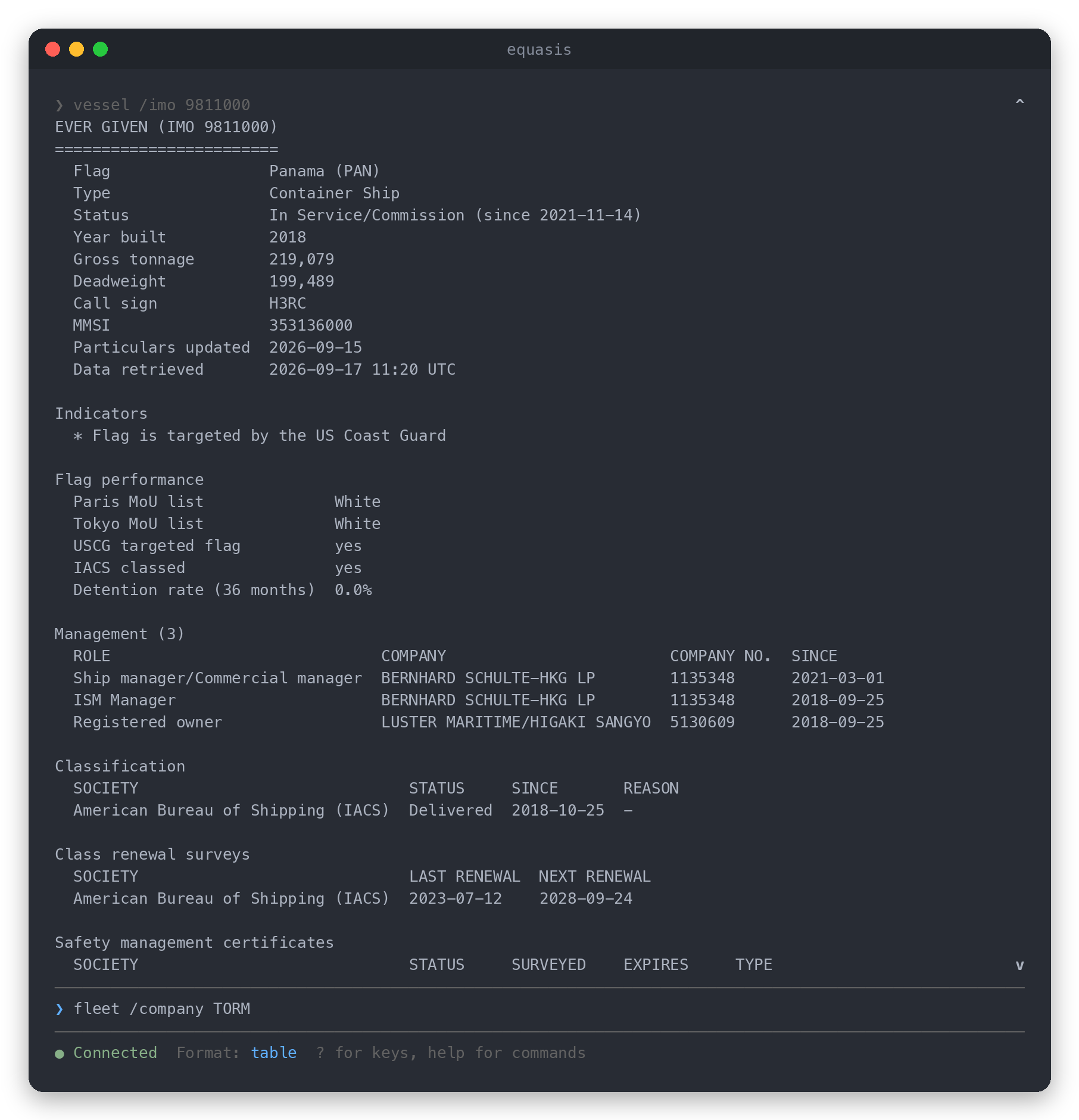
- Complete vessel profiles: particulars, flag performance, management companies, classification and surveys, safety management certificates, P&I insurance, recent sightings, PSC inspections with detentions and deficiencies, and name, flag, class, and company history
- Indicators: renames, reflagging, and management changes; recent detentions; grey or black listed flags; class withdrawals; missing P&I cover; MMSI and flag mismatches. All are facts from Equasis data, with no opaque scores.
- Search: ships and companies by name, or ships by exact IMO number, MMSI, or call sign
- Fleets: every vessel linked to a company, with roles, class, and detention counts
- Batches: hundreds of vessels or companies from a file, continuing past failures and streaming results as they complete
- Output for people and programs: readable tables, or versioned JSON, JSON Lines, and CSV. Results go to stdout, messages to stderr, and exit codes are documented.
- Interactive shell with command menus, history, and scrolling
- Considerate by default: request pacing, retries with backoff, and a 24-hour page cache
equasis-cli requires Python 3.10 or later. Installing with pipx keeps it isolated from other Python packages:
pipx install equasis-cliAlternatives: uv tool install equasis-cli, or pip install equasis-cli inside a
virtual environment.
-
Register for a free account at equasis.org.
-
Store your credentials. This checks that the login works and saves the credentials to a file only you can read:
equasis configure --setup
You can also set
EQUASIS_USERNAMEandEQUASIS_PASSWORDin the environment. -
Look up a vessel:
equasis vessel 9811000
equasis vessel 9811000                        # full profile as a table
equasis vessel 9811000 -f json                # JSON document
equasis vessel 9811000 -o ever-given.json     # format follows the file extension
equasis vessel 9811000 9074729 -o vessels.csv # several vessels: one CSV row each
equasis vessel --imo-file fleet.txt -o results.jsonl
List files contain one IMO number per line. Blank lines and # comments are ignored, and
- reads from standard input:
# Vessels of interest
9811000   # EVER GIVEN
9074729
Batches keep going when a lookup fails and report every item. Add --fail-fast to stop at
the first failure.
equasis search "EVER GIVEN"             # ships and companies by name
equasis search TORM --type companies    # companies only
equasis search --mmsi 353136000         # exact identifier (also --imo, --call-sign)
equasis search MAERSK --all-pages # every page of results (default: 3 pages)equasis fleet "TORM A/S" # company name
equasis fleet --company-id 0310062 # 7-digit Equasis company number
equasis fleet --company-file companies.txt -o fleets.csvWhen a name matches several companies, equasis-cli asks you to choose (in a terminal) or
lists the matches and exits. Use --company-id or --first-match in scripts.
Run equasis with no arguments:
> vessel /imo 9811000
> search /name "EVER GIVEN"
> fleet /company "TORM A/S" /output torm.csv
> batch /file fleet.txt /format json /output results.json
> help batch
Type / for a menu of commands or parameters and press ? for keyboard shortcuts.
| Format | Use |
|---|---|
table |
Reading in a terminal (default) |
json |
A single document with schema_version, retrieved_at, results, and indicators |
jsonl |
One JSON object per line; batches stream results as they complete |
csv |
Spreadsheets; one row per vessel with key facts and indicator columns |
equasis vessel 9811000 -f json | jq '.indicators.observations'Exit codes: 0 success, 1 error, 2 invalid usage, 3 authentication failed,
4 not found, 5 some batch items failed, 6 Equasis page layout changed,
130 interrupted.
See docs/usage.md for every command and option and docs/output-schema.md for the output fields.
from equasis_cli import EquasisClient
from equasis_cli.enrichment import compute_indicators

with EquasisClient("you@example.com", "password") as client:
    vessel = client.get_vessel("9811000")
    print(vessel.name, vessel.flag, len(vessel.inspections))
print(compute_indicators(vessel).observations)equasis-cli reads the same pages you would open in a browser, using your own Equasis account. Equasis is a free public service, so please:
- Follow the Equasis terms and conditions.
- Keep request volumes modest. Requests are paced at one per second by default (
--delay), each vessel takes three requests, and pages are cached for 24 hours (--refreshbypasses the cache). Split very large batches across days. - Verify important findings on equasis.org before relying on them.
| Problem | What to do |
|---|---|
authentication failed (exit 3) |
Run equasis configure --test, and check that you can log in on equasis.org |
could not read the Equasis page (exit 6) |
Equasis may have changed its website. Re-run with --save-html DIR and open an issue. Remove your name from saved pages before attaching them. |
rate limiting requests (HTTP 429) |
Wait a while, then retry with a larger --delay |
| Unexpected or stale results | Add --refresh, or run equasis cache clear |
| Anything else | Re-run with --debug to log HTTP activity |
Bug reports and pull requests are welcome. See CONTRIBUTING.md and docs/development.md. Report security issues privately as described in SECURITY.md.
equasis-cli is source-available software licensed under the PolyForm Noncommercial License 1.0.0. It is free for personal, research, educational, nonprofit, and government use, and journalists and nonprofit researchers have an additional permission. Commercial use requires a separate license. See LICENSING.md for details and contact information.
equasis-cli is not affiliated with or endorsed by Equasis.