Make disclaimer dialog scroll within a safe max height#353
Make disclaimer dialog scroll within a safe max height#353thedavidmeister wants to merge 2 commits into
Conversation


DialogContent caps its height at the safe inside height and scrolls its
own overflow, so tall disclaimer content stays within the dialog.

Closes #18

Co-Authored-By: Claude Opus 4.8 <noreply@anthropic.com>


|
The latest updates on your projects. Learn more about Vercel for GitHub.
|



|
Warning Review limit reached
More reviews will be available in 53 minutes and 45 seconds. Learn how PR review limits work. Your organization has used up its prepaid credits, and credit purchases are no longer available. Enable the review add-on in the billing tab to keep reviews running — you're only billed for reviews past your plan's rate limits ($0.25/file). ⌛ How to resolve this issue?After more reviews become available, a review can be triggered using the To avoid repeated limits, reduce automatic review volume by pausing incremental auto-reviews earlier, using label-based review opt-in, excluding WIP or generated PR titles, or requesting reviews manually when the PR is ready. If your team needs uninterrupted high-volume reviews, an organization admin can enable usage-based credits. 🚦 How do rate limits work?CodeRabbit enforces per-developer PR review limits for each organization. Most developers receive the normal plan refill rate. For paid Pro and Pro+ PR reviews, CodeRabbit uses adaptive limits for sustained high-volume activity. When a developer's recent PR review activity reaches the 95th percentile or higher among CodeRabbit users, the refill rate gradually slows as usage increases. The highest same-day bursts are limited more strictly. Please see our Fair Usage Limits Policy for further information. ℹ️ Review info⚙️ Run configurationConfiguration used: Organization UI Review profile: ASSERTIVE Plan: Pro Run ID: 📒 Files selected for processing (1)
✨ Finishing Touches🧪 Generate unit tests (beta)
Thanks for using CodeRabbit! It's free for OSS, and your support helps us grow. If you like it, consider giving us a shout-out. Comment |

|
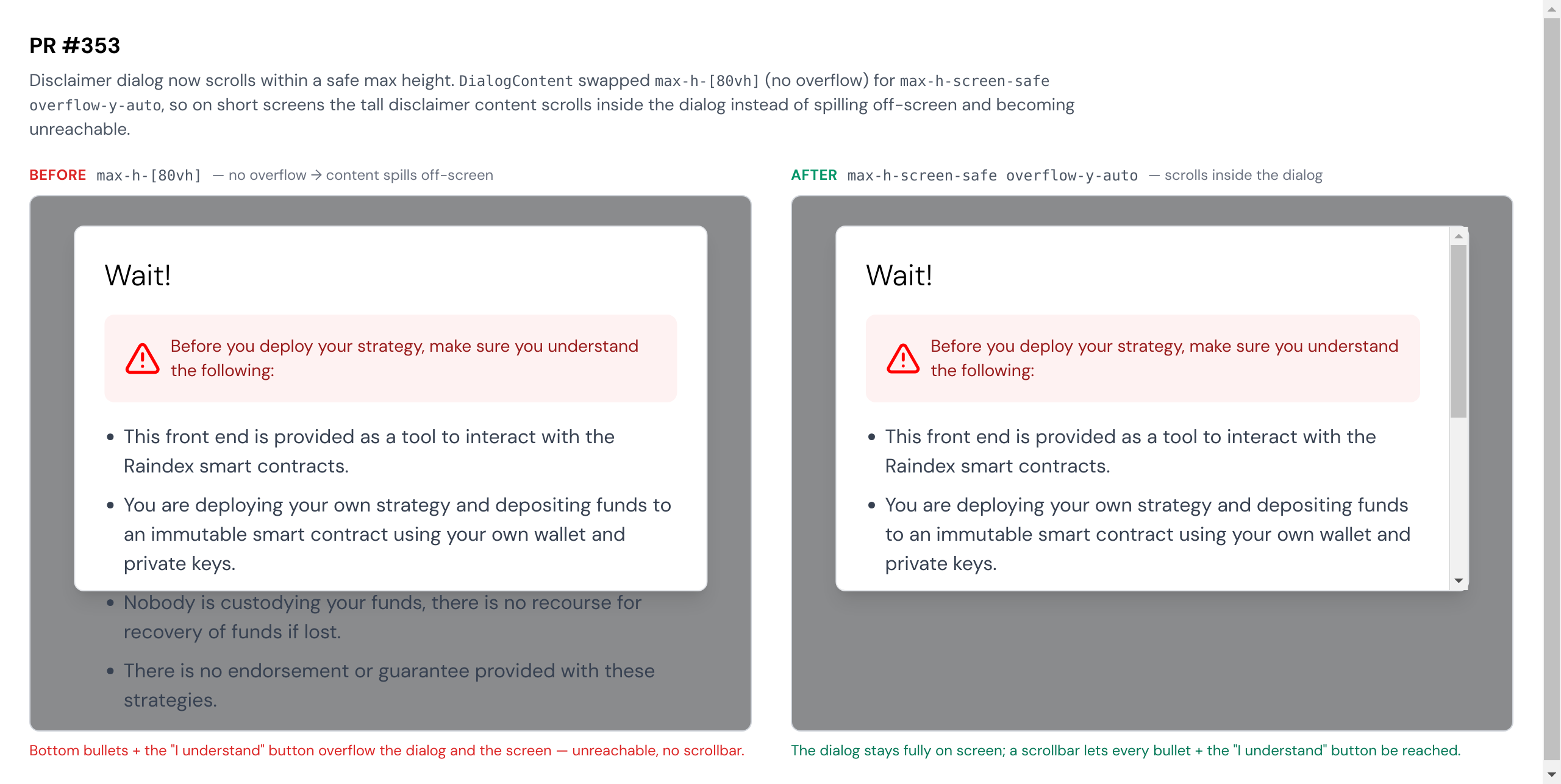
Screenshot after the fix: the disclaimer dialog is capped at the safe inside height and scrolls its own overflow, so tall content stays within the dialog instead of overflowing the screen. (Rendered from the dialog markup with the changed
|

|
UI screenshot: disclaimer dialog now scrolls within a safe max height. |
1 participant

What
On some screen sizes the disclaimer modal filled the whole screen and its content overflowed without any way to scroll (issue #18).
DialogContenthadmax-h-[80vh]but nooverflow-y, so when the content was taller than the cap it spilled out instead of scrolling.This swaps the height cap to
max-h-screen-safe(the safe inside height from thetailwindcss-safe-areaplugin the issue author added for exactly this) and addsoverflow-y-auto, so tall disclaimer content scrolls within the dialog. CSS-only, no behavioral change to the dialog otherwise.The
max-h-screen-safeutility compiles to:max-height: calc(100vh - (env(safe-area-inset-top) + env(safe-area-inset-bottom)))Verification
npm run buildgreennpm run lint-checkgreen (only pre-existing unused-eslint-disable warnings, none in the changed file)Closes #18