


Treat your AI as a coworker — ask questions about its changes in the same session that wrote the code.
/askdiff from inside any Claude Code session opens a GitHub-style diff
viewer in your browser. Hover a line, click +, type a question. The
answer streams back inline — and because each ask resumes the same
Claude Code session that wrote the code, the model already remembers
the file, the conversation, and why it made the change.
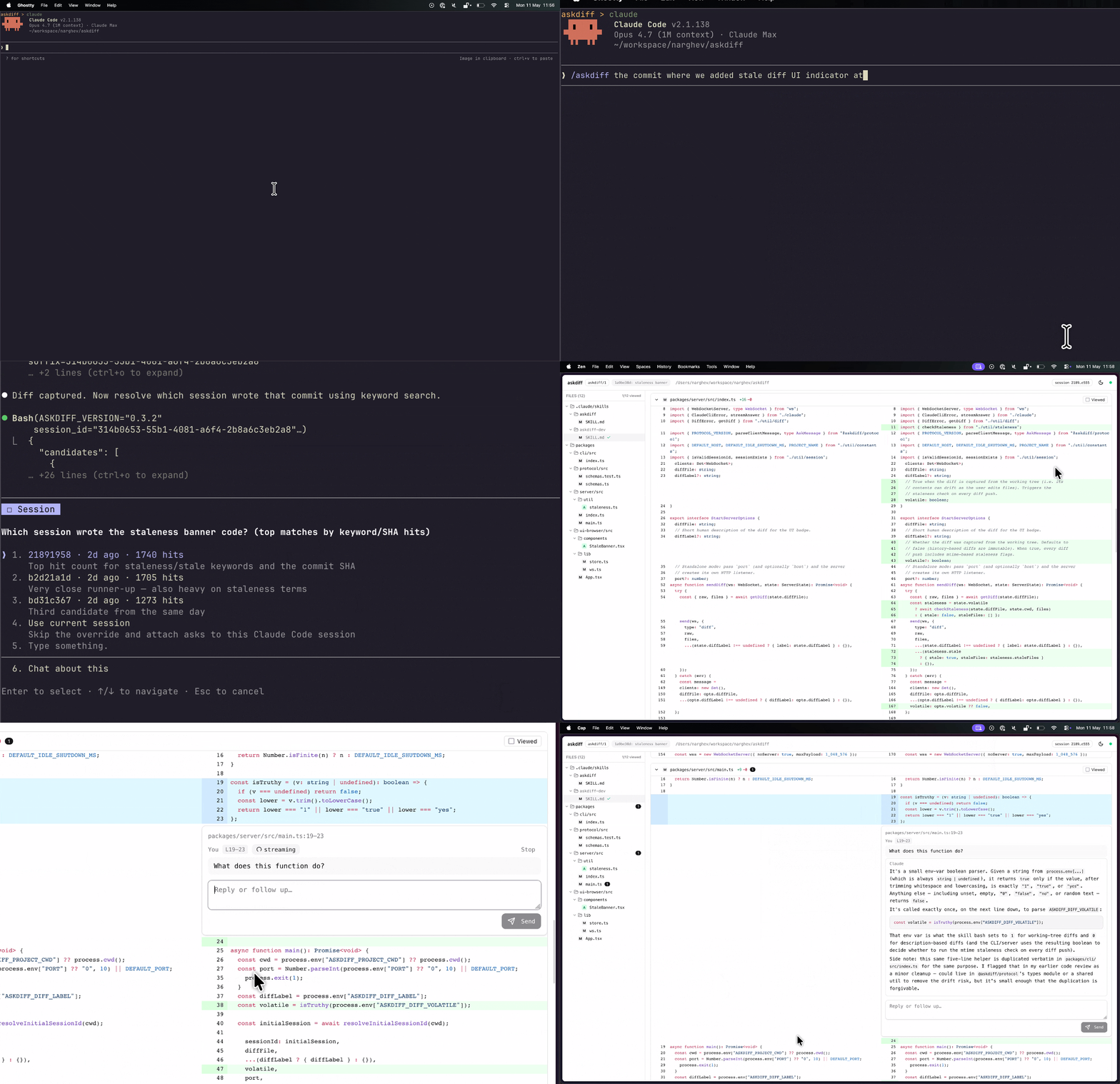
Asking about a past commit's diff in the session that wrote it.
Developers often prompt AIs to write the code, then, if the diff becomes large enough, open draft GitHub PRs in order to review it better. Then, if there are any questions, take the diff back to the terminal, ask questions about it, and repeat.
Askdiff simplifies this process by combining the diff viewer and the Q&A interface into one seamless experience, directly integrated with the very same Claude Code session that wrote the code. It makes you treat the model truly as a coworker who already knows the entire context and the reasoning behind every single line of the diff.
1. One-time skill install (project-scoped — installs into <git-root>/.claude/):
cd /path/to/your/project
npx -y askdiff install-skill

# Or, install user-level (available from any project):
npx -y askdiff install-skill --global
2. From a Claude Code session in that project:
/askdiff                                                                # working-tree changes
/askdiff David's latest commit where he removed the xmpp integration    # author + content search
/askdiff last commit attached to the session where we discussed auth    # send asks to a different past session
That's it. No API key, no config. The browser opens to a syntax-highlighted diff; comments stream back as the model thinks.
The hero demo above shows this case: /askdiff with a natural-language description of the diff and session finds the right git invocation, captures the output, and points the server at it. Asks flow into that past session, so the model already wrote (or investigated) the code you're asking about — even if you're currently in a different session.
/askdiff with no description shows the working tree diff — all uncommitted changes. Best used in the same session that made the changes, so it holds the full context of the edits.
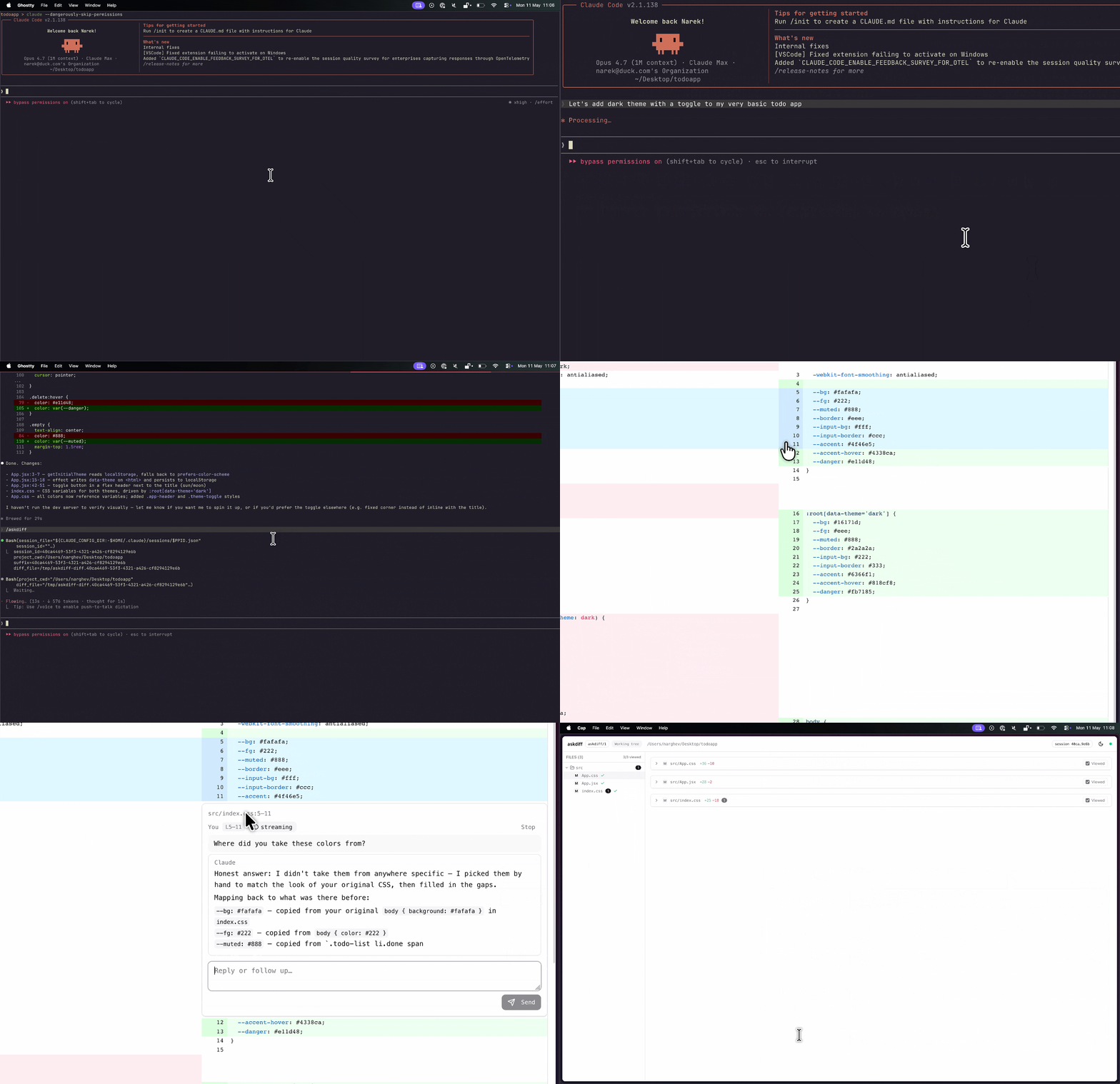
Each ask spawns the claude CLI with --resume <your-session-id>.
So your question becomes a real turn in the running session's transcript:
- No diff sent to the model. The resumed session already has the full context that wrote the code; the prompt is just your question.
- No Anthropic API key needed. askdiff doesn't talk to the API —
it shells out to the
claudeCLI you've already auth'd via subscription or API key. - Auto-cleanup. The server self-exits after 5 minutes of inactivity — close the browser tab and forget about it.
Anything after /askdiff is a description — Claude figures out the
right git diff invocation, writes the result to a temp file, and
points the server at it. Some examples:
| You type | What you'll review |
|---|---|
/askdiff |
working-tree changes (uncommitted + untracked) |
/askdiff last commit |
HEAD~1..HEAD |
/askdiff last 3 commits |
HEAD~3..HEAD |
/askdiff the 5th latest commit |
the single commit at HEAD~4 |
/askdiff main vs feature/x |
main…HEAD (three-dot, PR-style) |
/askdiff abc123 vs def456 |
abc123..def456 |
/askdiff staged |
git diff --cached |
/askdiff the commit where I added the favicon |
Claude searches commit messages, diff content, or file history to find it |
Defaults when ambiguous:
- "branch X against branch Y" between named refs ⇒ three-dot (PR semantics).
- Two arbitrary commits ⇒ two-dot (literal tree diff).
- "Nth latest commit" ⇒ that single commit's changes.
The TopBar shows what diff you're reviewing as a small label
(e.g. Working tree, HEAD~1..HEAD, main…feature/x).
Re-invoking refreshes. Run /askdiff again from the same session
and the previous server is killed, the diff is recomputed, and the
existing browser tab auto-reconnects on the same port. For working-tree
diffs, an amber banner appears if any reviewed file has been edited
since the diff was captured, prompting you to re-run /askdiff.
By default /askdiff attaches to the invoking session — the one running
the skill. Asks become real turns in that session's transcript.
If the diff you're reviewing was written (or investigated) in a different past session, describe that session in natural language and asks will flow there instead. The original "ask in the same session that wrote the code" promise still holds — it's just that the session that wrote the code might not be the session you're currently in:
| You type | What attaches |
|---|---|
/askdiff last commit |
invoking session (default — same as today) |
/askdiff last commit in our session about pricing rules |
searches sessions in this project for "pricing rules" mentions; the dominant match attaches |
/askdiff abc123 vs def456 attached to the session that authored it |
Claude builds keyword needles from the diff; matches that to a past session |
/askdiff session 322bc90a |
exact UUID prefix; resolves to a specific session |
/askdiff in session 322bc90a-714f-41b7-914e-109404e46072 |
full UUID |
Search is bounded: only sessions touched in the last 30 days, top 5 candidates
by hit count, and command grep -Ff over the JSONL transcripts so it stays
fast and uses zero LLM tokens. If multiple sessions match comparably, askdiff
asks you which to use rather than guessing. If nothing matches, it falls back
to the invoking session.
Hover any line in the diff. A + button appears in the gutter.
Click it for a single-line question, or click and drag to range over
multiple lines. The comment widget renders below the selected lines;
type a question and hit Cmd/Ctrl+Enter (or click Send).
Tokens stream in as the model generates them — usually starting within
~1 second, typing speed-of-thought. Click Stop mid-stream to abort.
Markdown is rendered live, including syntax-highlighted code blocks
in any of 30+ languages.
Each line can have multiple ask/answer pairs. They render as a threaded conversation inline with the diff, so you can ask a follow-up without losing context.
After launching, the skill asynchronously checks npm for a newer version and prints a passive upgrade notice if one exists. Run the printed command at the same scope you originally installed:
npx -y askdiff@latest install-skill --force            # project-local
npx -y askdiff@latest install-skill --global --force   # user-level
Set ASKDIFF_SKIP_UPDATE_CHECK=1 to suppress the network call.
Uninstall is a single rm — there's intentionally no uninstall-skill
command. Delete whichever scope you installed:
rm -rf <git-root>/.claude/skills/askdiff   # project-local (the default)
rm -rf ~/.claude/skills/askdiff            # user-level (--global)
askdiff keeps no other state under ~/.claude or your project.
Anything left in /tmp/askdiff* is session-scoped scratch and clears
itself out within the WS server's idle-shutdown window.
- Hitting a bug? See SUPPORT.md for common issues and how to file a useful report.
- Hacking on askdiff? See CONTRIBUTING.md for the
dev loop, architecture, and the in-repo
/askdiff-devskill.