




A code editor extension that provides common I/O tools directly in code editor
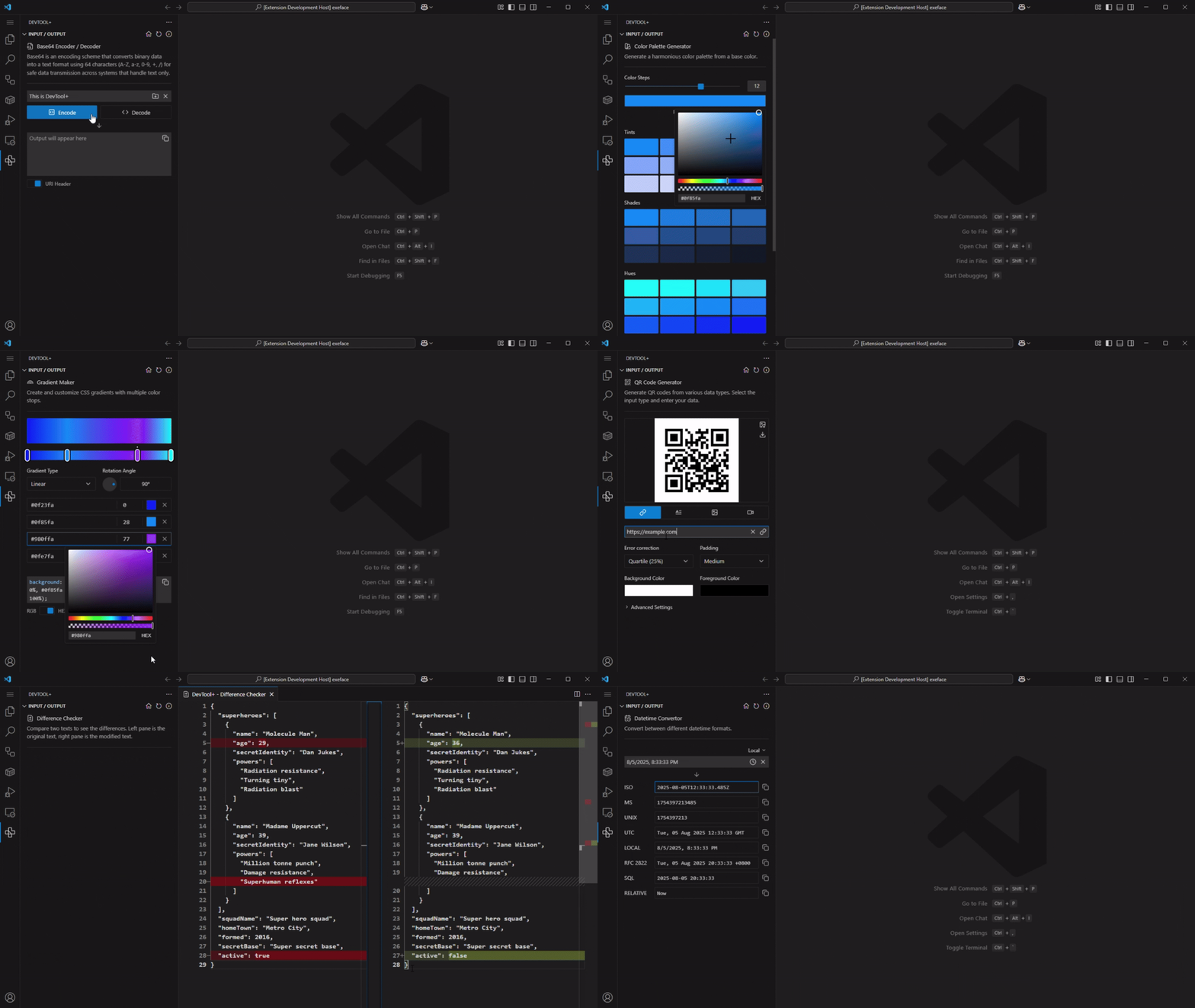
DevTool+, (DevTool Plus) is a code editor extension that provides common developer I/O tools directly into your editor — It's free, no ads, and no tracking.
The extension keeping everything inside code editor and running entirely on your local machine. There are no network requests involved, making it safe to use even with private or production data. By integrating these tools directly into the development workflow, DevTool+ helps developers work faster, stay focused, and avoid relying on external websites for everyday tasks.
- [🔒 Security] - All tools run locally in code editor — no data is sent to external servers, ensuring privacy and offline usability.
- [🧰 Integration with Editor] - Directly embedded into code editor workflow; Use tools in the side panel without leaving your coding environment.
- [🛠️ Diverse Toolset] - Over 35 tools across categories like Data, Encoding, Design, Text, and Cryptography. (Will keep expanding)
- [📔 Native UI Language] - Have native-like UI components (e.g., code editors, diff viewers) powered by Lit for a polished, theme-aware interface.
- [⚡ Real-Time Update] - Tools I/O update instantly as you type, providing immediate feedback and results.
- [💻 Performance] - Built with Lit for fast, efficient rendering and minimal resource usage.
- [📌 Pinned Tools] - Pin your favorite tools for quick access and better organization.
- [🔍 Searchable Tools] - Quickly find tools by name, category, or tags.
Directly search for "DevTool+" in your code editor's extension marketplace. Or install through
Visual Studio Code | Cursor | Windsurf
code --install-extension Fuzionix.devtool-plus| Tool | Version | Editor | Progress |
|---|---|---|---|
| [Encode / Decode] | |||
| Base64 Encoder / Decoder | 1.0.2 | ✅ | |
| URL Encoder | 1.0.1 | ✅ | |
| URL Parser | 1.1.0 | ✅ | |
| ASCII Binary / Hex | 1.0.0 | ✅ | |
| Unicode Inspector | 1.0.0 | ✅ | |
| Escape HTML Entities | 1.0.0 | 🆕 | |
| [UI / UX Design] | |||
| Color Convertor | 1.2.0 | ✅ | |
| Color Palette Generator | 1.0.0 | ✅ | |
| Gradient Maker | 1.0.0 | ✅ | |
| Cubic Bezier | 1.0.0 | ✅ | |
| Contrast Checker | 1.0.0 | ✅ | |
| Color Mixer | 1.0.0 | ✅ | |
| [Data Manipulation] | |||
| UUID Generator | 1.1.0 | ✅ | |
| Data Format Convertor | 1.2.0 | ✅ | ✅ |
| JSON Editor | 1.1.0 | ✅ | ✅ |
| YAML Editor | 1.1.0 | ✅ | ✅ |
| HTML / XML Editor | 1.1.0 | ✅ | ✅ |
| Datetime Convertor | 1.0.0 | ✅ | |
| File Compressor / Decompressor | 🚧 | ||
| Random Data Generator | 📝 | ||
| [Text] | |||
| Difference Checker | 1.1.0 | ✅ | ✅ |
| Markdown Table Builder | 1.0.0 | ✅ | |
| Lorem Ipsum | 1.0.0 | 🆕 | |
| Slug Generator | 1.0.0 | ✅ | |
| [Utility] | |||
| QR Code Generator | 1.0.0 | ✅ | |
| HTTP Status Code | 1.0.0 | ✅ | |
| Data Unit Converter | 1.0.0 | ✅ | |
| UNIX / Windows Path Convertor | 1.0.0 | ✅ | |
| Number Base Convertor | 1.0.0 | 🆕 | |
| Crontab Generator | 🚧 | ||
| Chmod Calculator | 🚧 | ||
| Docker Compose Generator | 🚧 | ||
| [Cryptography] | |||
| Token Generator | 1.0.0 | ✅ | |
| Password Generator | 1.0.0 | ✅ | |
| JWT Inspector | 1.0.0 | ✅ | |
| AES Encryption / Decryption | 1.0.0 | ✅ | |
| SHA Hashing | 1.0.0 | ✅ | |
| RSA Key Generator | 1.0.0 | ✅ | |
| RSA Encryption / Decryption | 1.0.0 | ✅ | |
| Signature Signer / Verifier | 1.0.0 | ✅ | |
| ✅ = Released | 🚧 = In Progress | 📝 = Planning | |||
Does this extension collect any telemetry or usage data?
No. DevTool+ is built on the principle of absolute privacy. There are no tracking scripts, no telemetry, and no external API calls.
Will installing this extension slow down code editor?
DevTool+ is built using Lit, a lightweight web component library. The extension and its views are only loaded into memory when you actually open the side panel or a tool, ensuring your editor remains fast and responsive.
Does it match my code editor's theme?
Yes. DevTool+ uses native UI CSS variables. It will automatically adapt its colors, borders, and typography to match whatever theme you are currently using.
This project is licensed under the MIT License. See the LICENSE file for details.