
gflow-cli is an open-source MCP server and command-line tool that automates Google Flow. It generates Veo 3.1 and Omni video and Nano Banana and Imagen images from Claude Code, Claude Desktop, Cursor, Codex, VS Code or your terminal, billed to your own Google account's Flow credits. Install it from PyPI with
uv tool install gflow-cli(MIT, macOS, Windows and Linux).





An independent project, not affiliated with Google. It drives your own signed-in Flow session in a real Chrome window, so Google's terms apply to your account: read the DISCLAIMER and ACCOUNT_SAFETY.
| What it is | One Python package that is both a CLI (gflow) and an MCP server (gflow mcp run, gflow serve) for Google Flow |
| Agent surface | 27 MCP tools plus resources and prompts, over stdio and Streamable HTTP; listed in the official MCP Registry as io.github.ffroliva/gflow-cli |
| Terminal surface | 70+ commands with typed exit codes, most with --json output; gflow --help --json prints the whole tree for agents |
| Video models | Veo 3.1 Lite, Fast and Quality; Omni Flash and Omni 1.2 Flash (up to 15 s, up to 7 reference images) |
| Image models | Nano Banana 2.1, Nano Banana Pro, Nano Banana 2 Lite, Imagen 4 |
| Works with | Claude Code (plugin), Claude Desktop, Cursor, VS Code, Codex, any MCP client, shell scripts and CI |
| Cost | Free and MIT-licensed. Video bills your own Flow credits; images spend no credits (they count against a daily image quota) |
| Maturity | 130+ releases since May 2026; every release since v0.54.0 is live-verified against real Google Flow before it ships |
- Generate video: text-to-video, image-to-video with a start and an end frame, and reference-to-video, on Veo 3.1 and Omni (
gflow video t2v | i2v | r2v, orgflow video generateto pick the mode for you). - Make long videos:
gflow video extend --segments Ncontinues a clip past Flow's 8 s limit with a continuous join,gflow video chainlinks shots frame to frame, andgflow scene createstitches clips server-side for free. - Generate images: text-to-image and image-to-image, 1–4 per call, five aspect ratios (
gflow image t2i | i2i). - Keep characters consistent:
gflow character createmakes a reusable Flow Character (face, body, voice), and prompts can mention it as@Name. - Upscale: video to 1080p (or a GIF), images to 2K, or 4K on an Ultra plan.
- Run batches and pipelines: JSON batch runs where a row can build on an earlier row (
gflow run), multi-scene films from a manifest (gflow movie run), and persistent Agent-Mode briefs (gflow instructions). - Rewrite prompts:
--tool creative-directorand two other built-in prompt tools (reverse-engineer,storyboard), or your own (TOOLS). - Track spend and media: the Veo credit balance (
gflow credits), a local media catalog (gflow data), a health check (gflow doctor), and output to S3, MinIO or Google Cloud Storage.
Features on the way are tracked in #1367.
Install gflow-cli and sign in once, then register the MCP server with your client.
uv tool install gflow-cli
gflow auth login --browser chrome| Client | One step |
|---|---|
| Claude Code | /plugin marketplace add ffroliva/gflow-cli then /plugin install gflow@gflow-cli (adds the MCP server plus the gflow-cli and video-production skills) |
| Claude Desktop | gflow mcp setup |
| Cursor | gflow mcp setup --target cursor |
| VS Code | gflow mcp setup --target vscode |
| Codex | Skills: from a clone, codex plugin marketplace add . then codex plugin add gflow@gflow-cli; MCP: register gflow mcp run as a stdio server |
| Any MCP client | command uvx, arguments gflow-cli mcp run; or gflow serve for Streamable HTTP at /mcp |
The Claude Code plugin ships disabled, because enabling it starts a server that can spend your Veo credits. For a hard guarantee, register gflow mcp run --no-spend, which never registers the credit-spending tools. Full setup: docs/MCP.md.
Compatible with macOS (Apple Silicon & Intel), Windows, and Linux (x86_64 / Xvfb).
# 1 · Install (uv recommended; also: pip install gflow-cli)
uv tool install gflow-cli
uv tool run --from gflow-cli playwright install chromium     # one-time, ~150 MB
# optional extras: 'gflow-cli[tts]' for `audio narrate` (Edge), 'gflow-cli[chain]' for `video chain`/`assemble`/`captions`
# later: `gflow update` upgrades in place (other commands show a banner when a newer release is out)
# Windows pip install at 0.99.0 or older? Upgrade once by hand first (#1298):
#   close every gflow process, then <venv>\Scripts\python.exe -m pip install --upgrade gflow-cli
#   (keep your extras in the spec, e.g. "gflow-cli[patchright]", or their pins stay behind)
#   (a --user install: py -3.X -m pip install --user --upgrade gflow-cli; see https://github.com/ffroliva/gflow-cli/blob/main/docs/USAGE.md#gflow-update)

# 2 · Authenticate (one-time, opens a real Chrome window)
# Behind a proxy (e.g. Clash)? Set GFLOW_CLI_BROWSER_PROXY=http://127.0.0.1:7897 first (docs/CONFIGURATION.md)
gflow auth login --browser chrome

# Check the session (spends nothing)
gflow auth status
gflow credits user          # Veo credit balance (no browser when the direct read is on and the saved session is accepted; spends nothing)
gflow capabilities          # what gflow can drive here: yes/no/partial per capability (no call to Flow)
gflow models list           # image and video models, aliases, durations (no call to Flow)
# Every error says whether Flow may have charged you and what to do next: docs/ERRORS.md

# 3 · Generate
gflow image t2i "a hot air balloon over Tokyo at sunrise"
# or:
gflow video t2v "Slow cinematic push-in on a sunlit forest clearing" --aspect 16:9
# or mint a reusable Character (face + body reference):
gflow character create --project <id> --name "Aria" --face-prompt "..." --body-prompt "..."
Outputs land under $GFLOW_CLI_OUTPUT_DIR, or you can route them to S3, MinIO, or Google Cloud Storage with GFLOW_CLI_STORAGE_URI. The first call takes 30 to 90 seconds while Chromium warms up; later calls reuse the warm session.
To save one result at an exact path, pass --out-file PATH (for example gflow image t2i "..." --out-file hero.png). Use -o/--output to select the output format (json|table|id). Non-format arguments to -o fail fast with exit 2 reminding you to use --out-file. See USAGE.
Scripts that branch on exit codes can opt in to the stable core now (0 ok, 1 error, 2 usage, 3 auth, 130 interrupted) by setting GFLOW_CLI_EXIT_CODES=2. It becomes the default in a later release. See ERRORS: the stable core.
Why
--browser chrome? It is the only strategy that marks the profile as a real-Chrome profile, which is what later generation runs open it with. The defaultautopicks it whenever Chrome is installed — see docs/AUTHENTICATION.md.
Installing from a local checkout?
uv tool install <path>ignoresuv.lockand resolves dependencies from thepyproject.tomlranges, so it can hand you a Playwright build this project has never tested. Playwright ships the browser driver, and an untested minor can wedge a generation silently. Carry the locked version explicitly:uv tool install --force --with playwright==1.59.0 .Installing from PyPI (
uv tool install gflow-cli) is unaffected — the published range is upper-bounded. Check what you actually have withuv tool run --from gflow-cli python -c "import importlib.metadata as m; print(m.version('playwright'))".
For the full 10-minute walkthrough with troubleshooting and multi-account setup, see USER_GUIDE: Journey 1.
gflow models list prints the full list from the installed version (including veo-lite-lp, a lower-priority Veo 3.1 Lite), with no call to Flow. Its retires on column shows the models Flow has said it will retire.
| Kind | Model | Alias | Max length / refs |
|---|---|---|---|
| Video | Omni 1.2 Flash | omni-1.2 |
15 s, 7 reference images |
| Video | Omni Flash (1.1) | omni-flash |
10 s, 7 reference images; Flow retires it on 2026-12-05 |
| Video | Veo 3.1 Quality | veo-quality |
8 s; Flow retires it on 2026-12-05 |
| Video | Veo 3.1 Fast | veo-fast |
8 s, 3 reference images; Flow retires it on 2026-12-05 |
| Video | Veo 3.1 Lite | veo-lite |
8 s, 3 reference images |
| Image | Nano Banana 2.1 | nano2 |
10 reference images |
| Image | Nano Banana Pro | nano-pro |
10 reference images |
| Image | Nano Banana 2 Lite | nano2-lite |
3 reference images |
| Image | Imagen 4 (not in Flow's own menu) | imagen4 |
3 reference images |
For the three models Flow retires on 2026-12-05, use veo-lite or omni-1.2 instead (known issue).
Video comes in 16:9 and 9:16; images in 16:9, 4:3, 1:1, 3:4 and 9:16. Which models and durations your account sees depends on your Flow plan; gflow capabilities reports what this install can drive.
- Only video spends credits. Image generation spends no credits (it counts against a daily image quota), and Scene stitching is free.
- A server that cannot spend.
gflow mcp run --no-spendnever registers the credit-spending tools, so an agent cannot call them at all. - Cost before commitment on multi-clip runs.
video chain,video extendandmovie runtake--dry-runto show the plan without submitting anything, andchainandextendask before they spend. - Never billed twice. A billed request is sent once and never retried automatically, and
gflow run --resumeregenerates only the rows the local catalog does not already hold. - Every error says whether you were charged. Errors carry
charged: yes | no | maybeand anext_action(retry,reauth,reconcile) in both the CLI's--jsonoutput and MCP replies (ERRORS). - Paced like a person. gflow uses a real Chrome window with randomised interaction timing and paced submissions. It does no IP rotation, uses no proxy unless you set one, and does no fingerprint spoofing by default (ACCOUNT_SAFETY).
- Fails loudly. When Flow's interface changes, the run stops with a distinct exit code (selector drift is exit 23) instead of guessing.
Compared from each project's own README on 2026-11-19 (the kodelyx/flow-agent column on 2026-11-20). "—" means that README does not state it.
| gflow-cli | GTAI-1/flow-mcp | ByteLandTechnology/flow-mcp | kodelyx/flow-agent | swissmarley/gflow-cli | crisng95/flowkit | |
|---|---|---|---|---|---|---|
| Surfaces | CLI and MCP server (27 tools), parity enforced in CI | MCP server, local web panel | MCP server | CLI, MCP server (5 tools), OpenAI-compatible REST API | CLI | Chrome extension, local REST API, dashboards |
| Install | uv tool install gflow-cli (PyPI) |
git clone, npm build | npm, binaries | clone, pip install -e, unpacked Chrome extension, bridge process |
npm | git clone, load unpacked extension |
| Official MCP Registry | Yes | — | — | — | no MCP | no MCP |
| MCP over HTTP | Yes (gflow serve) |
— | — | SSE (per its docs/MCP_GUIDE.md) |
no MCP | no MCP |
| macOS / Windows / Linux | All three | macOS, Windows | All three | — | — | All three |
| Licence | MIT | — | MIT | MIT (README; no licence file in the repository) | MIT | MIT |
| Video, image, start/end frames, references | Yes | Yes | Yes | Text- and image-to-video, text-to-image | Yes | Yes |
| Extend past 8 s | Yes | Yes | Yes | — | Yes (to 148 s) | — |
| Characters | Yes | Yes, with edit | Yes, with edit | — | Yes | Yes |
| Upscale | Video 1080p, image 2K/4K | 1080p, 2K | — | — | 2K, 4K | 4K |
| OpenAI-compatible API | No | — | — | Yes | — | — |
| Pool credits across Google accounts | No (one profile per call; switch with gflow auth use) |
— | — | Yes | — | — |
Spend lockout for agents (--no-spend) |
Yes | — | — | — | — | — |
charged field on every error |
Yes | — | — | — | — | — |
| Per-call credit cap | Yes (--max-credits, read from Flow's own quote) |
Yes (max_credits) |
— | — | — | — |
| Video-to-video edit | Planned (#1356) | Yes | Yes | — | — | — |
| Narration audio | Yes (audio narrate: edge-tts or Gemini voices) | Yes | — | — | — | Yes |
| Captions | Yes (video captions, .srt export) |
Yes | — | — | — | — |
| Join clips | Yes, server-side (scene create) or local with music and voiceover (video assemble) |
Yes, with music and voiceover | — | — | Yes (scene) | Yes, with music and narration |
| Bulk agent-mode image batch | Planned (#1361) | Yes | Yes | — | — | — |
| Web control panel | Planned (#1364) | Yes | — | — | — | Yes |
| Machine-readable self-description | capabilities, --help --json, models, llms.txt, agent skills |
— | — | — | — | Agent skills |
| Live-verified against real Flow every release | Yes (since v0.54.0) | — | — | — | — | — |
The full list of planned items is in #1367. A correction to a cell is welcome as an issue or a pull request.
Is gflow-cli an official Google tool? No. It is an independent, MIT-licensed project that drives your own signed-in Google Flow session.
Is this the gflow-cli package on npm or JSR? No. Other projects use the name, including Node.js packages on npm and JSR. This gflow-cli is the Python package on PyPI, maintained at github.com/ffroliva/gflow-cli and listed in the MCP Registry as io.github.ffroliva/gflow-cli.
Do I need a Gemini or Vertex AI API key? No. gflow-cli uses your Google account's Flow access and Flow credits, not the pay-per-use API.
Does it cost anything? The tool is free. Video generation spends your Flow credits; image generation spends none but counts against a daily image quota.
Can an AI agent spend my credits without asking? Not when you register gflow mcp run --no-spend: the credit-spending tools are never registered. The Claude Code plugin also ships disabled.
Does it run headless or on a server? Sign-in needs a display once. Generation drives a real Chrome window, so on Linux servers it runs under Xvfb. A pure-HTTP transport for video is blocked by Google's reCAPTCHA (see Architecture).
Does it work with flow.google.com as well as labs.google? Yes. It drives both Flow frontends and routes by the host Flow serves your account. On flow.google.com it covers text-, image- and reference-to-video from local files, Nano Banana image generation, a single-segment extend, image and video upscale, and characters by @Name; the rest keeps the labs driver until ported (Architecture).
Which Python version? Python 3.11 or newer. uv tool install gflow-cli handles it for you.
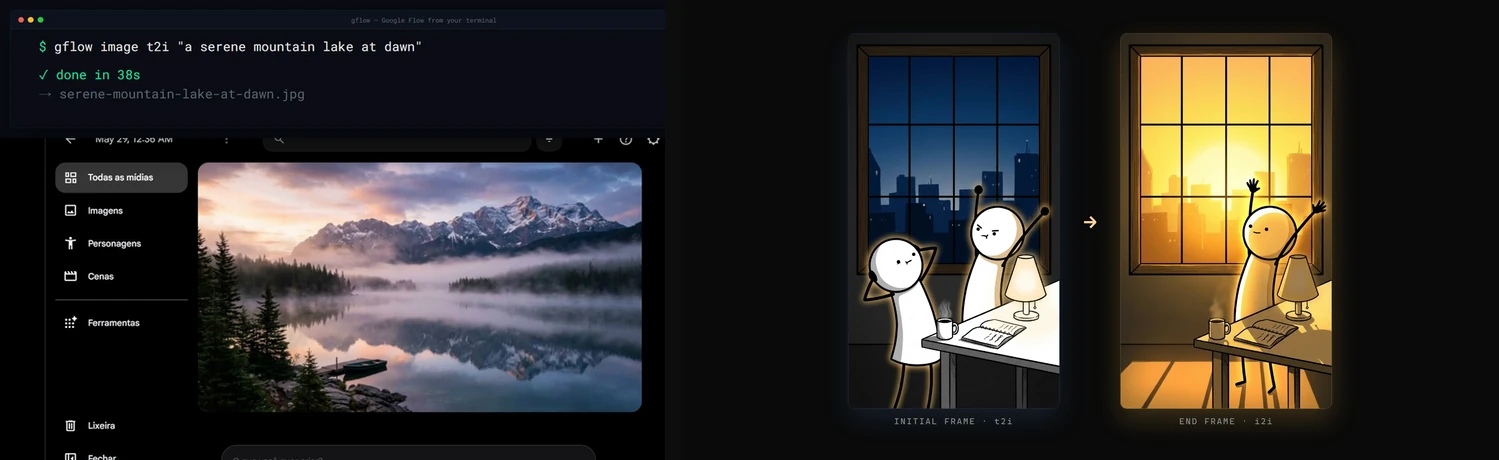
One command in, real Flow output back. Left: gflow image t2i generating a photorealistic scene in your library. Right: a frame-to-frame transform.
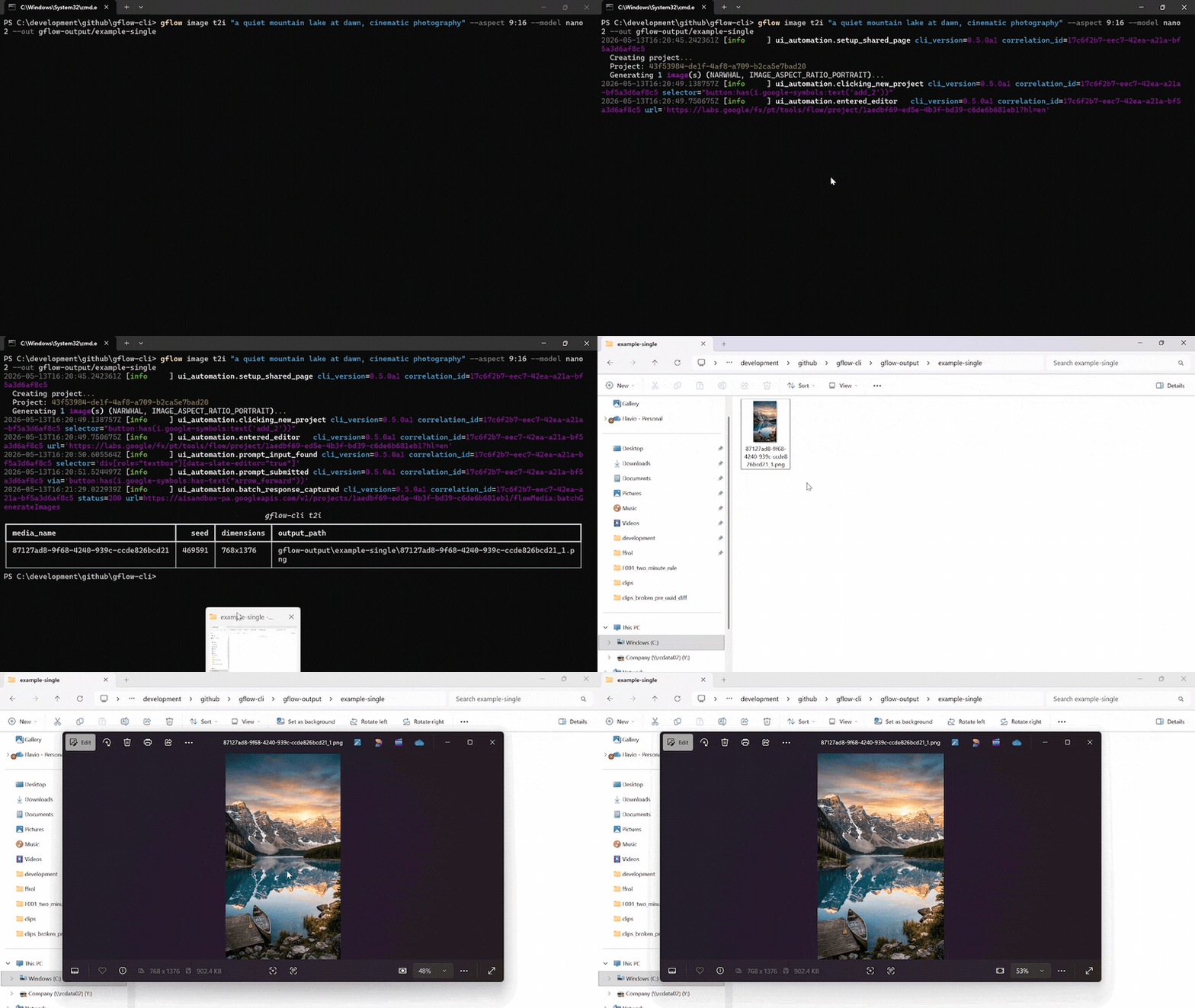
A single gflow image t2i "..." --aspect 9:16 --model nano2 call against a logged-in Flow profile. The terminal streams the run's structlog JSON, then lists the written PNG. Chromium drives the Flow editor silently in the background.
Reproduce the recording with scripts/record_demo.ps1 (Windows, OBS, ffmpeg, gifski). More formats, including the side-by-side split-screen: docs/DEMOS.md.
docs/INDEX.md is the master routing layer. Quick links:
Usage data: gflow stores local usage counters and, after an interactive notice (and explicit consent in the EU/EEA), uploads weekly totals without an identifier. See the privacy notice and how to turn it off.
| Topic | Read |
|---|---|
| 🎯 Getting started | User Guide · Usage · Configuration |
| Storage & catalog | External Storage · Data Layer |
| 🎭 Characters | Characters, reusable subjects (gflow character) |
| 🤖 Agentic & automation | Instructions (gflow instructions, persistent brief cards) · Movie (gflow movie, multi-scene manifests) · Tools (--tool, prompt rewriting) · MCP server (gflow mcp run / gflow serve) |
| 🔐 Auth & sessions | Authentication · Known issues |
| 📣 Where to install from | Marketplaces (every channel and what each actually delivers) · Container (why the image introspects but cannot generate) |
| 🏗️ Internals | Architecture · Security · Usage data notice · Debugging |
| 📦 Releases | Changelog · Roadmap · Release protocol · Project status |
| 🤝 Contributing | Contributing · Development · GitHub workflow |
gflow-cli ships four agent entry points. Pick the one your tool reads first.
| File | Audience | Tools |
|---|---|---|
| AGENTS.md | Universal coding-agent spec | Cursor · Codex · Aider · Antigravity · Jules · Devin · Windsurf · Zed · Warp · opencode · Copilot |
| CLAUDE.md | Claude Code's auto-loaded memory | Claude Code |
| llms.txt | LLM-readable summary (llmstxt.org format) | Paste into ChatGPT, Claude, or Gemini to onboard the model |
skills/gflow-cli/SKILL.md |
Claude Code Skill | Symlink into ~/.claude/skills/ |
An agent can also read the whole command tree from the CLI itself: gflow --help --json.
To connect an MCP client, see How do I connect Claude Code, Cursor or Codex to Google Flow?
Onboard any agent in one line. Paste this into your agent of choice:
"Read AGENTS.md and docs/INDEX.md, then help me with my Flow batch."
gflow CLI  →  Provider (interchangeable)  →  Flow (ui_automation) / Mock (tests)
                                              ↓
                                      Playwright Chromium (headed — login AND generation, by default)
                                              ↓
                              aisandbox-pa.googleapis.com  (Google's private Flow API)
Current transport: ui_automation drives Flow through a persistent Playwright Chromium profile. It is production-stable and verified end-to-end every release (see the per-release LIVE_VERIFICATION_* evidence files).
Two Flow frontends: Google is moving accounts from labs.google onto flow.google.com (#639) — same product, different widget toolkit and wire protocol (batchexecute instead of aisandbox-pa). The migrated driver covers text-to-video, image-to-video from a local start frame, reference-to-video from local files, text-to-image, image-to-image from local files, and a single-segment video extend. Image generation supports Nano Banana 2.1 (nano2, #958) / 2 Lite / Pro, the five aspect ratios measured on that host (16:9, 4:3, 1:1, 3:4, 9:16), and counts 1–4; an existing project is required at the transport boundary. Images can tag a character by @Name, and reference-to-video takes a named character with --reference-entity + --reference-entity-name (#723). An account served the agent-only composer (#799) gets text-to-image and text-to-video only. An image --ref <uuid> is referenced in place when the catalog records it in the same --project (#995). Other UUID media references, an entity id without a name, instructions, Imagen 4, and the rest of the matrix keep the labs driver until ported (GFLOW_CLI_FLOW_HOST, see CONFIGURATION).
What's blocked: a pure HTTP transport for video generation. The video upload endpoint returns HTTP 401 under non-Chrome browsers plus a reCAPTCHA mint we cannot reproduce headlessly. Three earlier HTTP strategies (evaluate_fetch, bearer, sapisidhash) live under src/gflow_cli/api/transports/experimental/ for research, off the production path.
How you can help: if you have driven aisandbox-pa.googleapis.com from outside a real Chrome session, or you understand Google's anti-bot stack here, please open an issue. A working REST transport would unlock serverless deployments, true horizontal concurrency, and roughly 10x the project's reach. Details: docs/ARCHITECTURE.md § Headed-browser dependency.
Beta. Image (t2i, i2i, upload, upscale, batch) and video (t2v, i2v, r2v, chain, extend, upscale), plus image generate / video generate, which pick the mode from the inputs, run end-to-end on ui_automation, with a six-model video picker (Veo 3.1 and Omni) plus --duration and --count. Beyond single generations: gflow movie renders multi-scene manifests, gflow instructions manages persistent Agent-Mode brief cards (credits-free), gflow character handles reusable subjects, gflow scene does credit-free server-side stitching, --tool applies prompt-rewriting tools, and an MCP server (gflow mcp run stdio / gflow serve Streamable HTTP) exposes the core surface to AI agents with a CI-enforced CLI↔MCP parity contract.
Full milestone history lives in CHANGELOG.md. Where the project is heading: ROADMAP.md.
gflow-cli is built and maintained by one person. Every release is verified against real Google Flow, which spends real AI credits, and breakages get fixed fast because people run it in their pipelines. Sponsorship pays for both.


Relying on gflow-cli at work? The monthly company tiers put your logo here, and Silver and above also get priority issues. All tiers and what each one gets: docs/SPONSORS.md.
Patched gflow-cli in your fork? Please open an issue or a pull request — a fix that lands upstream helps everyone.
No sponsors yet. Be the first — every public sponsor is listed here.
MIT License © 2026 Flavio Oliva (ffroliva). The MIT license covers gflow-cli's code only. It grants no rights to Flow, Veo model output, or any Google service. Google's own terms (Labs Additional Terms and any plan-specific subscription terms) govern your generations. See the DISCLAIMER.
edge-tts, design inspiration for community SDKs over private cloud APIs.googleapis/python-genai, the official Veo SDK that a future provider release may alias.- Keysight, Google Labs – Flow AI with Veo3: A Network Traffic Analysis, an independent capture that helped validate the route patterns.









If gflow-cli saves you time, please ⭐ the repo. It is the cheapest way to support the project.