
Ultra-lightweight, OBS-invisible floating sticky notes for Windows 10 & 11.
Keep private stream notes, meeting prompts, checklists, and scratchpads on your screen during live broadcasts, video calls, or screen recordings, without your audience ever seeing them.



⬇️ Download GhostNotes (v1.0.0)
No installation or .NET runtime needed. Just download and run.
GhostNotes puts sticky notes on your screen that only you can see. They float above your windows like normal notes, but screen capture tools simply don't pick them up. Your talking points, scripts, and reminders stay in view while your stream, recording, or screen share stays clean.
Works with: OBS Studio · Streamlabs · Discord · Zoom · Google Meet · Microsoft Teams · screenshot tools
- 🛡️ 100% Screen-Capture Invisible (OBS Stealth)
Uses Windows DWM Hardware Capture Exclusion (
WDA_EXCLUDEFROMCAPTURE). Notes remain crystal-clear on your physical monitor, but are completely hidden from OBS Studio, Streamlabs, Discord screen share, Zoom, Google Meet, Microsoft Teams, and screenshot tools. - 📌 Collapsible Edge Pill Click the — button on any note to collapse it into a discreet edge pill docked against your monitor border. Hovering expands a preview; clicking restores the note to its exact previous position.
- ✍️ In-Place Rich Text Editing
Click anywhere and type. Hover near the bottom edge of any note to reveal the formatting capsule: Bold, Italic, Underline, Strikethrough, Bullet lists, Numbered lists, and Checkboxes (
- [ ]). - 🎨 Pastel Colors & Glass Opacity Click the gear ⚙ button to choose from 6 soft pastel tints, high-contrast font colors, and smooth transparency control (20% to 100%).
- 💾 Automatic Instant Autosave
Every keystroke and position change is safely autosaved to
%APPDATA%\GhostNotes\notesin the background. - 🔔 System Tray & Windows Startup Manage active/closed notes, monitor capture status, and toggle "Start with Windows" directly from the system tray icon.
| Shortcut | Context | Action |
|---|---|---|
Ctrl + Alt + N |
Global | Create a new sticky note from anywhere |
Ctrl + Alt + S |
Global | Hide / reveal all notes instantly |
Ctrl + B / I / U |
Editor | Bold / Italic / Underline |
Ctrl + N |
Editor | Create a new note |
| Drag Header | Window | Reposition note anywhere (including across multi-monitor setups) |
| Drag Borders | Window | Resize smoothly in any direction |
- Go to Releases.
- Download
GhostNotes.exe(Portable single file) orGhostNotes-Setup.exe(Installer). - Double-click to launch!
Note: Zero dependencies required. The portable app is completely self-contained and does not require .NET, Visual Studio, or administrative privileges to run.
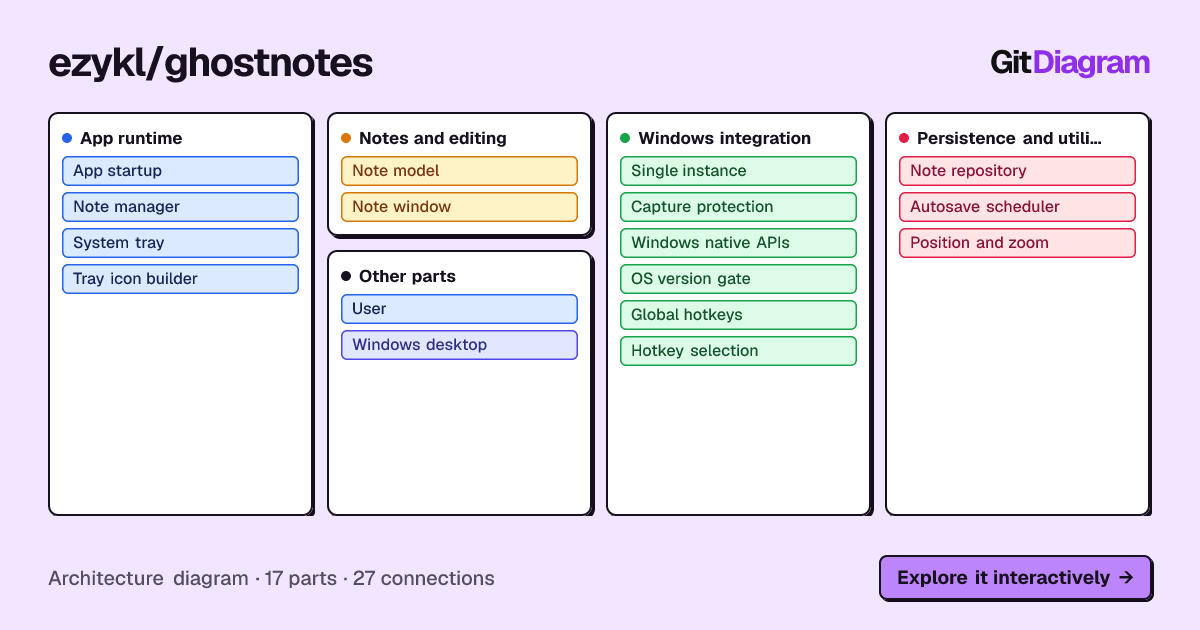
- Launch: a single-instance guard makes sure only one GhostNotes runs at a time.
- Protect:
CaptureGuardchecks that your Windows build supports capture exclusion, then applies theWDA_EXCLUDEFROMCAPTUREdisplay affinity to every note window. - Manage:
NoteManagerloads saved notes, opens their windows, keeps them on-screen, and schedules autosaves. - Control: global hotkeys and the system tray talk to the note manager, so you can create or hide notes without leaving your game, slides, or call.
💡 The capture-exclusion API requires Windows 10 version 2004 (build 19041) or later. On older builds GhostNotes can't hide notes from capture, and the tray shows the capture status so you always know.

flowchart TD

subgraph group_runtime["App runtime"]
  node_app["App startup<br/>[App.xaml.cs]"]
  node_manager["Note manager<br/>[NoteManager.cs]"]
  node_tray["System tray<br/>[TrayController.cs]"]
  node_icon["Tray icon builder<br/>[IconBuilder.cs]"]
end

subgraph group_notes["Notes and editing"]
  node_model["Note model<br/>[Note.cs]"]
  node_window["Note window<br/>[NoteWindow.xaml.cs]"]
end

subgraph group_platform["Windows integration"]
  node_single_instance["Single instance"]
  node_capture["Capture protection<br/>[CaptureGuard.cs]"]
  node_native["Windows native APIs<br/>[NativeMethods.cs]"]
  node_version["OS version gate<br/>[VersionGate.cs]"]
  node_hotkeys["Global hotkeys<br/>[HotkeyService.cs]"]
  node_selection["Hotkey selection<br/>[HotkeySelection.cs]"]
end

subgraph group_services["Persistence and utilities"]
  node_repository[("Note repository<br/>[NoteRepository.cs]")]
  node_autosave["Autosave scheduler"]
  node_clamp["Position and zoom<br/>[Clamp.cs]"]
end

node_user(("User"))
node_windows(("Windows desktop"))

node_user -->|"launches"| node_app
node_app -->|"checks instance"| node_single_instance
node_app -->|"initializes"| node_capture
node_app -->|"creates"| node_manager
node_app -->|"registers"| node_hotkeys
node_app -->|"creates"| node_tray
node_manager -->|"loads and saves"| node_repository
node_manager -->|"manages"| node_model
node_manager -->|"attaches"| node_window
node_manager -->|"schedules saves"| node_autosave
node_manager -->|"passes guard"| node_capture
node_manager -->|"clamps geometry"| node_clamp
node_repository -->|"serializes"| node_model
node_window -->|"edits and displays"| node_model
node_window -->|"applies protection"| node_capture
node_window -->|"uses window APIs"| node_native
node_hotkeys -->|"selects fallback"| node_selection
node_hotkeys -->|"registers keys"| node_native
node_hotkeys -.->|"requests note actions"| node_manager
node_tray -->|"controls notes"| node_manager
node_tray -->|"shows notices"| node_hotkeys
node_tray -->|"shows status"| node_capture
node_tray -->|"renders fallback icon"| node_icon
node_capture -->|"sets affinity"| node_native
node_capture -->|"checks capability"| node_version
node_version -->|"gates by build"| node_windows
node_native -->|"calls Win32"| node_windows

classDef ghostRuntime fill:#2a2540,stroke:#a78bfa,stroke-width:1.5px,color:#ede9fe
classDef ghostNotes fill:#fde68a,stroke:#f59e0b,stroke-width:1.5px,color:#422006
classDef ghostPlatform fill:#12323a,stroke:#22d3ee,stroke-width:1.5px,color:#cffafe
classDef ghostData fill:#173326,stroke:#4ade80,stroke-width:1.5px,color:#dcfce7
classDef ghostEdge fill:#1e2327,stroke:#94a3b8,stroke-width:1.5px,color:#e2e8f0
class node_app,node_manager,node_tray,node_icon ghostRuntime
class node_model,node_window ghostNotes
class node_single_instance,node_capture,node_native,node_version,node_hotkeys,node_selection ghostPlatform
class node_repository,node_autosave,node_clamp ghostData
class node_user,node_windows ghostEdge
GhostNotes/
├── src/GhostNotes/        # WPF application
│   ├── Interop/           # CaptureGuard, NativeMethods, VersionGate
│   ├── Models/            # Note model
│   └── Services/          # Hotkeys, repository, autosave, single instance
├── tests/GhostNotes.Tests # Unit tests
├── installer/             # Setup installer
└── .github/workflows/     # CI
# Clone the repository
git clone https://github.com/ezykl/GhostNotes.git
cd GhostNotes

# Run directly
dotnet run --project src/GhostNotes

# Publish single-file portable executable
dotnet publish src/GhostNotes/GhostNotes.csproj -c Release -r win-x64 --self-contained -p:PublishSingleFile=true -o publishDistributed under the MIT License.