Home
This project uses gestures to control a robotic gripper. The gestures may be captured by an webcam. Other image sources, like an android phone, may be used as well. Captured gestures are classified into basic commands and then transmitted via USB to an Arduino board, that translates them into action. The gestures are trainned by a deep learning neural network. The resulting model is used to predict the meaning of a gesture.
To be able to run the full project, users will definitely need some materials (or equivalent stuff):
- Arduino prototyping board (i.e. Uno, Leonardo, etc)
- USB cable for the Arduino board.
- protoboard
- bunch of jumpers. (at least 16)
- Robotic gripper with 4 servos (movements: left, right, foward, back, up, down, grip, loose).
- External power source with 5 volts and 2.5A output.
- Desktop computer (at least i3 5th generation or equivalent)
- External webcam (a decent one)
| material | image |
|---|---|
| Arduino Uno |  |
| Arduino USB cable |  |
| protoboard |  |
| jumpers |  |
| robotic gripper |  |
| power source |  |
| desktop computer |  |
| webcam |  |
Users are invited to install anaconda. The python 3.x version is recomended, as the python code used is for version 3, and there are sure some differences from python 2.x code. I belive that the code may be adapted to python 2.x, but this may demand a lot of work.
With anaconda installed, they can create an environment (if you are new to python/anaconda, you can learn about it here ). The environment may be created using the file duo_ml.yml, that can be obtainned on the root of this project. Once again, if you are new to anaconda you can learn how to create an environment from a file here. Note that by creating and then using the environment will install all nescessary code packages needed in the correct (original used) versions. So, any attempt to directly install code packages may broke the code here. this should be enough to run the project python code.
Users should install also an Arduino IDE.
Finally, users should clone this repository (if someone is reading this here, at least must know github. There are instructions on github site how to clone a project).
There is a very rudimentary video of the project working on youtube (portuguese spoken, but even if you do not speak portuguese, the visual is there). Click in the image below to watch it.
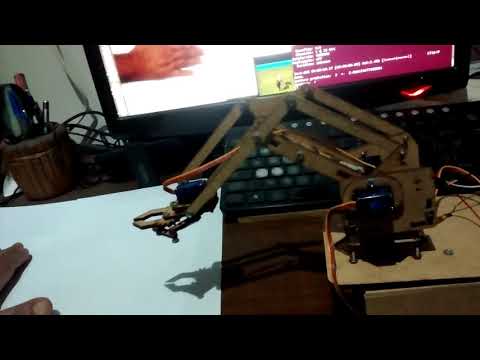
As an early version, the jupyter notebook roboticGripper.ipynb, that can be obtainned on the root directory of this repository, (it may be soon transfered to an inner backup folder) has a complete code implementing the full project.
It is all at an early stage, so, there sure is a lot of room for improvements.
Now we use 3 notebooks, each one executes one phase of the project, and they can be found at the root directory of this repository:
- 01_captureAndSaveGestures_roboticGripper.ipynb
- 02_trainModel_roboticGripper.ipynb
- 03_operation_roboticGripper.ipynb
After all, the project demands at least 3 phases:
- Capture the gestures (with values) to future use in supervised learning.
- Train a model using deep learning neural network buid with Keras/TensorFlow.
- Use the model predicted commands to operate the robotic gripper.
Have fun!
©Duodécimo, December, 2017.