


A cross-platform desktop viewer and GUI custom-view builder for SysML v2 models, built on the SysML2Tools rendering engine.
SysML2Workbench opens a folder of .sysml files as a live workspace, renders
the same predefined diagrams (General, Interconnection, State Transition,
Action Flow, Sequence, and Grid) produced by the SysML2Tools CLI in an
interactive pan/zoom viewer, and lets you build ad-hoc custom views through a
GUI - picking a view kind, multi-selecting target elements, and optionally
filtering - without hand-writing SysML view syntax. Custom views can be
exported as copy-pasteable SysML view ... expose ... text to promote them
into a permanent model file, and any workspace .sysml file's raw source
text can be opened read-only, with syntax highlighting, by double-clicking
it in the workspace tree. A live-updating diagnostics panel surfaces parser
and reference-resolution problems across the whole workspace, a status bar
along the bottom of the window summarizes whichever document tab is active,
and a local rolling log file is written for bug-report attachments.
The diagram below shows how you use SysML2Workbench end to end: open a workspace, browse the model, render diagrams, then check diagnostics and export view text, query results, or the log file.
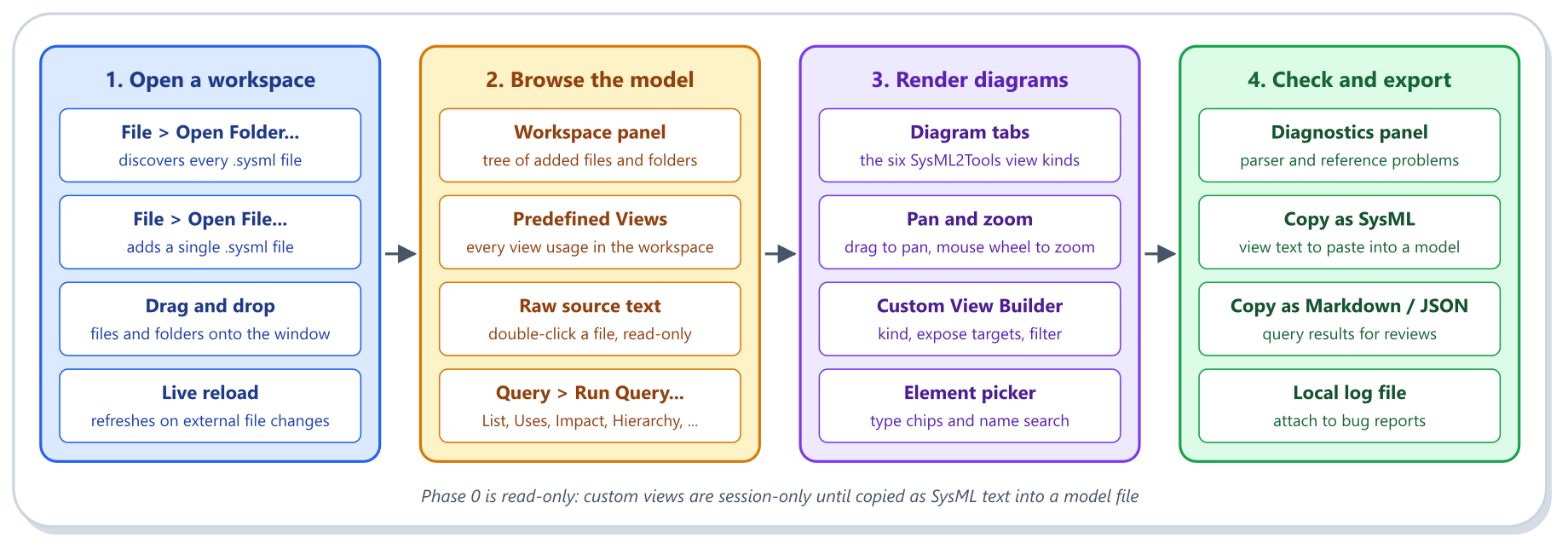
This is a Phase 0, read-only release: there is no git integration, no text/structural editing, no telemetry, and custom views are session-only until exported as text. See docs/design/introduction.md for the full scope and docs/user_guide/ for usage instructions.
Requires the .NET 10 SDK.
dotnet run --project src/DemaConsulting.SysML2Workbench.DesktopSee docs/user_guide/getting_started.md for a walkthrough of opening a workspace, browsing predefined views, and building a custom view.
src/DemaConsulting.SysML2Workbench/- shared application project (all subsystems: workspace, view catalog, view builder, layout/rendering, diagnostics panel, logging, element picker, app shell).src/DemaConsulting.SysML2Workbench.Desktop/- desktop platform head (Windows/Linux/macOS entry point).test/DemaConsulting.SysML2Workbench.Tests/- unit and subsystem-level tests mirroringsrc/.test/DemaConsulting.SysML2Workbench.UiTests/- headless, in-process Avalonia UI tests (view/view-model interaction, no real window).test/DemaConsulting.SysML2Workbench.IntegrationTests/- Appium/AT-SPI-driven end-to-end tests against the compiled Desktop application (Windows, macOS, and Linux; CI runs the Windows job today; requires a running automation server - see "Building and Testing" below).test/OtsSoftwareTests/- integration tests for the off-the-shelf (OTS) dependencies (SysML2Tools, Rendering, Avalonia, xUnit).docs/- requirements (docs/reqstream/), design (docs/design/), verification (docs/verification/), the SysML2 architecture model (docs/sysml2/), and the user guide.
pwsh ./build.ps1 -Build -Test   # restore, build, and run the unit/headless test suite
pwsh ./build.ps1                # no switches: prints usage and exits non-zero
pwsh ./fix.ps1                  # auto-fix formatting
pwsh ./lint.ps1                 # lint and compliance checks
build.ps1 accepts combinable switches: -Build (restore + build),
-Test (build if needed, then run the unit/headless suite), -IntegrationTest
(build if needed, then run the Appium/AT-SPI suite), and -All
(equivalent to all three). build.ps1 -Test and CI's cross-platform build
job both run dotnet test --filter "Category!=Integration", so
test/DemaConsulting.SysML2Workbench.IntegrationTests' Appium-driven tests
are excluded from that default test run. That tier runs for real in CI's
dedicated appium-windows-integration-tests job (windows-latest), and can
now also be run locally on Windows, macOS, or Linux via
pwsh ./build.ps1 -IntegrationTest, which delegates to run-under-appium.ps1:
on Windows/macOS it installs Appium and the NovaWindows/Mac2 driver, publishes
the Desktop application, starts and polls a local Appium server, runs the
tests, and always stops the server afterward; on Linux it publishes the
Desktop application and delegates the whole test run to the pre-installed
selenium-webdriver-at-spi-run wrapper (see docs/design/ots/appium.md).