Analytic Cloud (OAC)
Features under Preview
- To enable them, go to
Console--System settings--Previewsection
As of 2022.11
- Generic Rest Connector
- Excel Export
- Semantic Modeler
- Rest API
-
JDBC to local data source
- You can't use generic JDBC connections for local data sources. It means internet JDBC is not allowed without Remote Data Gateway(RDG). Disable of RDG will automatically hide existing JDBC connection
- OCI query service: A new option to connect flat files in Object Storage from OAC
- reuse ADB adapter with username
project
- reuse ADB adapter with username
- If you want data modelers to be able to use these connection details, check System connection
- Data source cache control
- In Dataset view -> Choose the table -> Click button at top-right "Edit Definition" -> "Data Access"数据访问 to "Live" 实时 | "Automatic Caching"
- Setup
- Mandate to create new API key and import the copied public key back to identity. You cannot reuse existing API key
Data Set
- Exclude a column
- Option: exclude before loading (useful when a column will crash OAC profiling process)
- Option: Delete/Hide Column after loading
- Data quality insights
Share in OAC instance level
- Menu item
Console->Users and Roles-> Find the target user -> Grant roleDV ConsumerandDV Content AuthorShare the workbook
Share the workbook folder
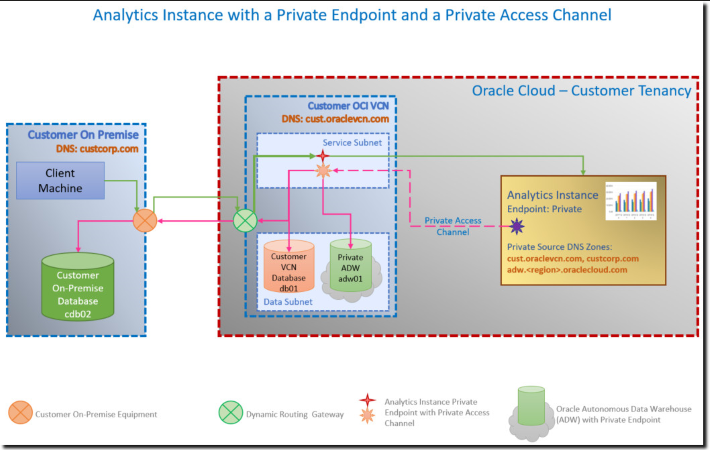
Private Access Channel is recommended by Oracle for new connections to private data sources.
DV Export
- In DV console, Click to top-right button Export -> "File" -> Powerpoint, PDF or Image format suupported

Workbook Export
- You can export/import a Workbook as a .dva file

You can export analyses results to various formats, including data and formatting in
- Microsoft Office Excel
- Adobe PDF
- CSV formats,
- various data-only formats (that is, with no formatting).
- Uploaded files to internal Object Storage will charge fee
Named User Plus (NUP) option
- NUP cannot be configured as BYOL
- Minimum NUP is 10
- The actual OCPU assigned for NUP option is limited to 4 OCPU
OCPU option
- Not scalable shapes
- 1 OCPU for non-production
- 16/24/36/52 OCPUs
- Scalable shapes:
- 2 - 8 OCPUs scale to 8 OCPUs
- 10 - 12 OCPUs scale to 12 OCPUs
- Row limit per provisioned OCPU
- File-based dataset
- File size up to 250MB
- Up to 250 Data columns
- Explain
- 请在唯一值数量少于 100 个的数据上重试
- Data source schema change cannot be refresh
- Sometime, try to clear cache of your browser
Unsupported features
- guest access
- In OAS, report (Analytics Publisher) can be access by user without login in guest folder.
- Guest access is not supported with SSO. So it exlude Analytic Cloud