





A blueprint for real-time voice agents on Databricks. You open a browser, click call, and talk to an AI support agent. Apart from the audio pipe, every layer runs on Databricks: the agent is a custom agent hosted on Databricks Apps, every chat and embedding call goes through Unity Gateway, its answers come from Lakebase, and with tracing on every call lands in MLflow as a trace.
| On Databricks | What it does here | |
|---|---|---|
| ✅ | Custom agent on Agent Bricks | The voice agent is your own code, a LiveKit Agents worker. Agent Bricks supports custom agents built with any framework and hosts them on Databricks Apps. |
| ✅ | Databricks Apps | The web tier and the agent run as one app in one container, with one deploy. |
| ✅ | Lakebase + Lakebase Search | Postgres holds each generated world (a fictional company's documents, customers and records), and Lakebase Search ANN finds the passages the agent answers from. |
| ✅ | Unity Gateway | Serves every chat and embedding call, so it powers all the LLMs. The app routes each loyalty tier to a model, the gateway serves it, and token usage and an indicative cost show up live. |
| ✅ | MLflow traces | When tracing is on, each call's spans go over OpenTelemetry into a Unity Catalog table and show up as an MLflow trace. |
| ✅ | AI Decide (ai_decide) |
Makes a fast decision on every turn, beside the LLM, through the ai_decide REST API, about whether to change the experience mid-call. Say "switch to the spooky voice" and the whole studio follows. |
The reference implementation is the Unity Gateway Voice Studio, a customer-support agent where each fictional company gets its own generated dataset. On a call the studio shows Unity Gateway's four pillars live: Choice (which model this caller got), Control (the governance guarantees and the voice mode), Context (what Lakebase retrieved) and Costs (token usage and an indicative cost). LiveKit carries the audio, Deepgram does speech-to-text and the default voice, and ElevenLabs is the optional Halloween voice. Fork it, point it at your workspace, and swap in your own data, prompts and tools.
The repo also ships an Agent Skill, building-voice-agents-on-databricks, so your coding
agent already knows the patterns and the traps. See Agent skill.
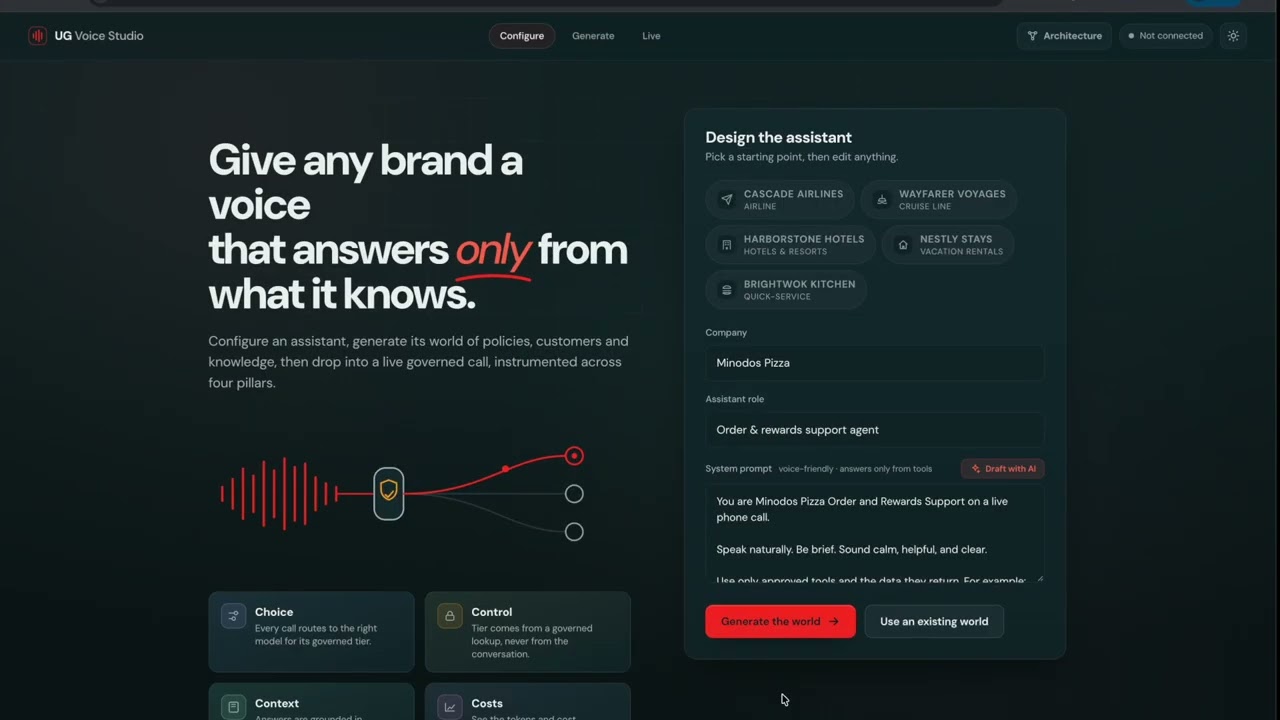
▶ Watch the walkthrough (about 15 min): the architecture, then a live demo of the whole app on Databricks, from Lakebase Search and Unity Gateway to AI Decide and the MLflow trace.
Read the blog (4 min read): the worries that come with voice agents, and the Databricks pieces that answer them. Stills from a call follow.
A call in the standard voice. Choice routes the Standard tier to system.ai.gpt-5-nano through Unity Gateway, and
Control shows the governance checks and the voice mode:

The lower panels: Context (empty until the caller asks something), Costs (927 tokens, an indicative $0.0004) and the live transcript:

Ask for a spooky voice and AI Decide decides on that turn. The panel shows the decision (confidence 0.90, 583 ms), the probability of each option, and the ElevenLabs voice now speaking, and the whole studio changes theme:

%%{init: {"flowchart": {"nodeSpacing": 18, "rankSpacing": 26, "padding": 8}}}%%
flowchart LR
    B["Browser<br/>studio UI"]

    subgraph EXT["Voice infrastructure"]
        LK["LiveKit Cloud<br/>WebRTC + agent dispatch"]
        DG["Deepgram<br/>speech-to-text, default voice"]
        EL["ElevenLabs<br/>Halloween voice (optional)"]
    end

    subgraph APP["Databricks App · one container"]
        W["Web tier<br/>studio, tokens,<br/>world generator"]
        A["Custom voice agent<br/>LiveKit Agents worker"]
    end

    subgraph WS["Your Databricks workspace"]
        UG["Unity Gateway<br/>every chat + embedding call"]
        LB[("Lakebase<br/>+ Lakebase Search")]
        AD["AI Decide<br/>per-turn voice-mode decision"]
        ML[("Unity Catalog + MLflow<br/>call traces")]
    end

    B -->|"studio, token"| W
    B <-->|"audio + data"| LK
    LK <-->|"audio + data"| A
    A <-->|"STT + TTS"| DG
    A -.-> EL
    A -->|"chat + embeddings"| UG
    A -->|"bind + tools"| LB
    A -.->|"each turn"| AD
    A -.->|"OTLP spans"| ML
    W -->|"generate a world"| UG
    W <-->|"worlds"| LB

    classDef dbx fill:#FF3621,stroke:#B22416,color:#ffffff
    classDef ext fill:#F3F4F6,stroke:#9CA3AF,color:#111827
    class W,A,UG,LB,AD,ML dbx
    class B,LK,DG,EL ext
    style APP fill:#FFF1EE,stroke:#FF3621
    style WS fill:#FFF1EE,stroke:#FF3621
    style EXT fill:#FAFAFA,stroke:#D1D5DB
The red boxes run on Databricks, and dotted lines are optional. A call goes like this:
- Join. The web tier mints a short-lived LiveKit token, the browser joins a room on LiveKit Cloud, and LiveKit dispatches the agent into it.
- Bind. The agent reads the caller's tier from Lakebase (never from what they say) and picks the model for it. The model itself never sees the tier.
- Talk. Deepgram turns speech into text, the routed model answers through Unity Gateway, and a voice speaks the reply.
- Ground.
semantic_searchruns a Lakebase Search ANN query over the caller's dataset, after embedding the question through the gateway.record_lookupreads only the caller's own records. - Decide. On every turn AI Decide runs beside the model and may switch the voice mode. A deterministic policy applies the change, and the model, the tier and the governance rules stay as they were (one exception: a made-up spooky story needs no tool).
- Show and trace. Evidence (routing decision, retrieval hits, token usage, voice mode) streams to the UI over the LiveKit data channel. With tracing on, spans flush over OTLP into Unity Catalog, where they read as MLflow traces.
Before any call the studio can generate a world: a fictional company with documents, customers and records. Unity
Gateway drafts them and embeds the documents, and everything is written to Lakebase in one transaction. The full
walkthrough is in
docs/architecture.md, and the running app serves an interactive version at
/architecture.html.
| You need | For |
|---|---|
| A Databricks workspace with Unity Gateway (chat models for the tiers and for generation, plus an embedding model) | Every chat and embedding call |
A Lakebase database with Lakebase Search turned on (lakebase_vector + lakebase_text) |
The data and retrieval |
| A LiveKit project (LiveKit Cloud is fine) and a Deepgram API key | Audio transport, speech-to-text, the default voice |
A Databricks personal access token for that workspace, the Databricks CLI, and uv (Python 3.12+) |
The agent and web tier authenticate with the token. The CLI and the setup scripts use a profile you pick, and nothing here picks one for you: pass --profile <name> to CLI commands and set DATABRICKS_CONFIG_PROFILE for the scripts. |
| Optional: a Unity Catalog catalog and schema for trace tables, plus an MLflow experiment and a SQL warehouse to browse them | Traces. Tracing turns on only when DATABRICKS_TRACE_CATALOG, _SCHEMA and _TABLE_PREFIX are all set. |
Optional: ai_decide enabled on the workspace (a Previews feature, turned on by an admin), and an ElevenLabs key |
Halloween mode |
uv sync
cp .env.example .env.local     # fill in LiveKit, Deepgram, Databricks (host + token), Lakebase and model settings

# One-time Lakebase setup. These two scripts read the shell environment, not .env.local
# (export UG_GEN_MODEL / UG_EMBED_MODEL too if you use models other than the defaults).
export DATABRICKS_CONFIG_PROFILE=<your-profile>      # or DATABRICKS_HOST + DATABRICKS_TOKEN
export LAKEBASE_ENDPOINT=projects/<project>/branches/<branch>/endpoints/<endpoint>
export LAKEBASE_DATABASE=databricks_postgres UG_SCHEMA=ug
uv run python infra/apply_schema.py                  # schema + ANN/BM25 indexes
uv run python generate.py "Northwind Outfitters"     # optional: generate a world from the CLI

# Run each of these in its own terminal: the agent and the web tier keep running until you stop them.
uv run python app/agent.py dev                       # terminal 1: agent worker; wait for "registered worker"
uv run python app/web_server.py                      # terminal 2: studio UI on http://localhost:8000 (PORT overrides)
uv run pytest -q --ignore=tests/test_integration_data_plane.py   # terminal 3: that one test is live and writes two worlds
The agent worker and the web tier read .env.local themselves; only the two setup scripts need the exports.
Open the studio, generate a world (or pick a ready one), enter the call, choose a caller and press Connect & talk. The studio suggests what to ask. Try an order question (Context), a Standard caller against a VIP one (Choice), then "switch to the spooky voice" (AI Decide).
The full walkthrough is in the skill at
skills/building-voice-agents-on-databricks/references/deployment.md,
or you can hand it to a coding agent with the skill loaded. The short version:
- Compile the worker dependencies for the Apps runtime (Python 3.11):
uv pip compile agent-requirements.in --python-version 3.11 -o agent-requirements.txt. - Put the 6 secrets (LiveKit URL, key and secret; Deepgram key; Databricks token; ElevenLabs key) in a secret scope and
attach each to the app as a resource.
app.yamlreads them throughvalueFrom, which only resolves once the resource exists, so attach all six before the first deploy (details). No ElevenLabs key? Delete theELEVEN_API_KEYentry fromapp.yamland attach the other five: Halloween mode then uses the Deepgram voice. - Give the app's service principal
READon the scope andCAN_MANAGEon the workspace source folder. - Start the app,
databricks synca staging folder with--full, then rundatabricks apps deploy. - Tail
databricks apps logs. You should see the web tier listening, thenregistered worker30–60 seconds later.
Stuck? docs/gotchas.md lists the traps we hit (LiveKit, the Databricks platform, deploys, tracing)
and the fix for each.
Say "switch to the spooky voice" and the whole studio changes with it. AI Decide
classifies each turn outside the LLM, the agent switches to an ElevenLabs monster voice that performs audio cues such as
[whispers] and [laughs], and the UI cross-fades into an "All Hallows' Console" theme. The tier, the model and the
governance rules don't change (one exception: on request the monster tells a made-up story, which needs no tool). It's
optional: without ElevenLabs the call uses a darker Deepgram voice, and UG_AI_DECIDE=0 turns it off. Setup, settings,
the cue palette and how to verify the voice are in docs/halloween-voice.md.
For local runs, copy .env.example to .env.local. The deployed app reads the same settings from app.yaml. Swap
these placeholders for your own values:
| Placeholder | Replace with |
|---|---|
https://your-workspace.cloud.databricks.com |
your workspace URL |
projects/your-project/branches/production/endpoints/primary |
your Lakebase endpoint (LAKEBASE_ENDPOINT; database databricks_postgres) |
your_catalog, your_schema |
the catalog and schema for trace tables (DATABRICKS_TRACE_CATALOG, DATABRICKS_TRACE_SCHEMA) |
/Users/you@example.com/ugvoice |
your MLflow experiment path (only for reading traces back; export doesn't use it) |
your-sql-warehouse-id |
the SQL warehouse that reads traces (same) |
You'll see ReferenceApp / <reference-app> in a few comments and docs. That's an earlier LiveKit-on-Databricks app
this blueprint grew out of; it isn't in this repo.
The repo ships skills/building-voice-agents-on-databricks/, an
Agent Skills bundle with what it took to get voice agents running on Databricks: the deploy
recipe, the worker and its Lakebase tools, Unity Gateway wiring, MLflow tracing, and the traps that cost the most time.
Copy it into ~/.cursor/skills/ or ~/.claude/skills/, or leave it in the repo and open the workspace
(install notes). Then try:
Deploy this voice agent as a Databricks App using the skill.
Add a Lakebase record_lookup tool the way the skill does.
The call connects but no agent joins. Follow the skill.
| Path | What it is |
|---|---|
app/ |
The LiveKit agent worker (agent.py), its tools and tracing, the web tier (web_server.py) and the studio UI (web/public/) |
src/ |
Routing policy, the governance prompt, the synthetic-world generator, and the Lakebase / gateway / retrieval services |
infra/ |
The Lakebase schema, ANN and BM25 indexes, and apply_schema.py |
start_app.py, app.yaml |
The single-container Databricks App launcher and spec |
skills/ |
The agent skill |
tools/ |
Manual voice checks: a live AI Decide check, the TTS→STT cue bake-off and the live LLM cue check (see Halloween mode) |
docs/ |
Architecture, Halloween mode, gotchas, verified platform contracts and design specs (index) |
tests/ |
Over 1,000 tests. Leave out test_integration_data_plane.py unless you mean to run it: it is live and writes two worlds to Lakebase |
The repo is datasciencemonkey/diva. If you're sharing it with someone, start
with these; docs/README.md has the longer list.
- This project: the blog, Building Voice Agents on Databricks, and the walkthrough video
- Agent Bricks and Databricks Apps: Agent Bricks at Data + AI Summit 2026 · Docs: Databricks Apps
- Unity Gateway: Generally Available · Docs: Unity Gateway
- Lakebase: Lakebase Search: full text and vector search for Postgres
(
lakebase_vectorANN +lakebase_textBM25; DIVA builds both and the voice tool uses ANN) · Docs: Lakebase Postgres - MLflow traces: Docs: Store OpenTelemetry traces in Unity Catalog
- AI Decide: Introducing ai_decide: make fast decisions on your governed data ·
Docs: REST API ·
ai_decideSQL function - The voice stack: LiveKit Agents · Deepgram
MIT. See LICENSE.