
A file browser and viewer for the OpenCode TUI: walk the project folder inside the terminal, preview Markdown rendered, and read code with syntax highlighting — without leaving OpenCode.
Built for OpenCode V2 (tested on v2.2.5). It is a TUI-only plugin, so it keeps working when the TUI is connected to a remote server.
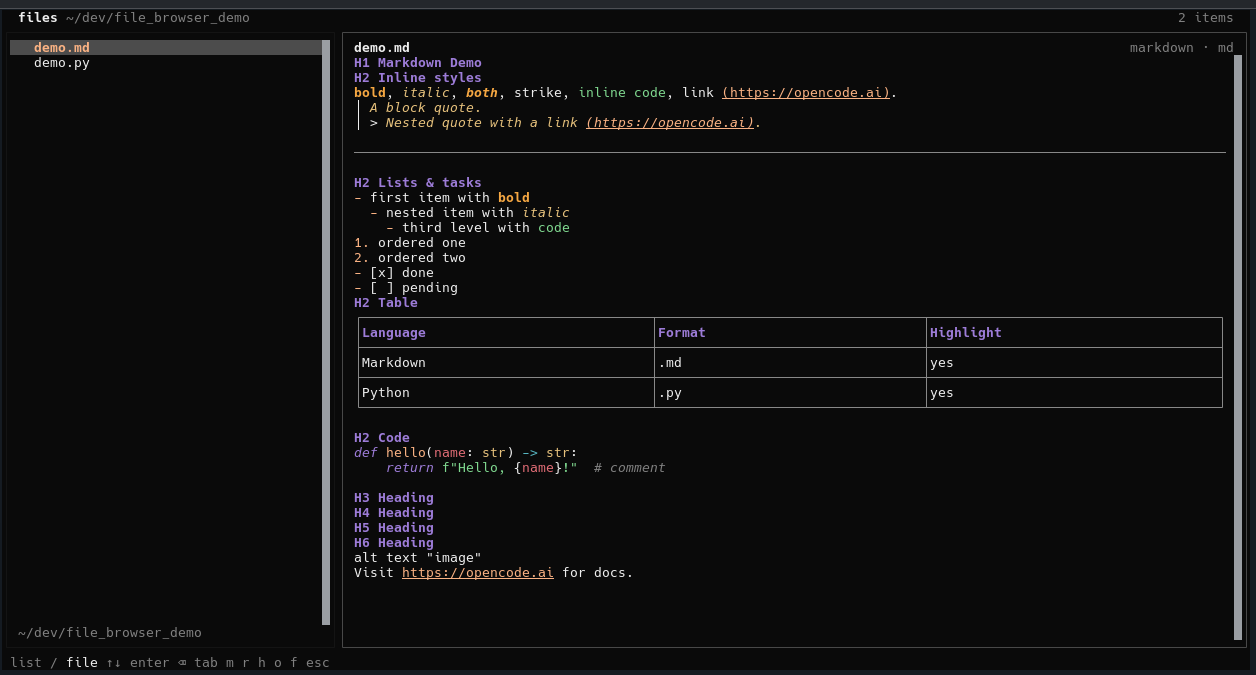
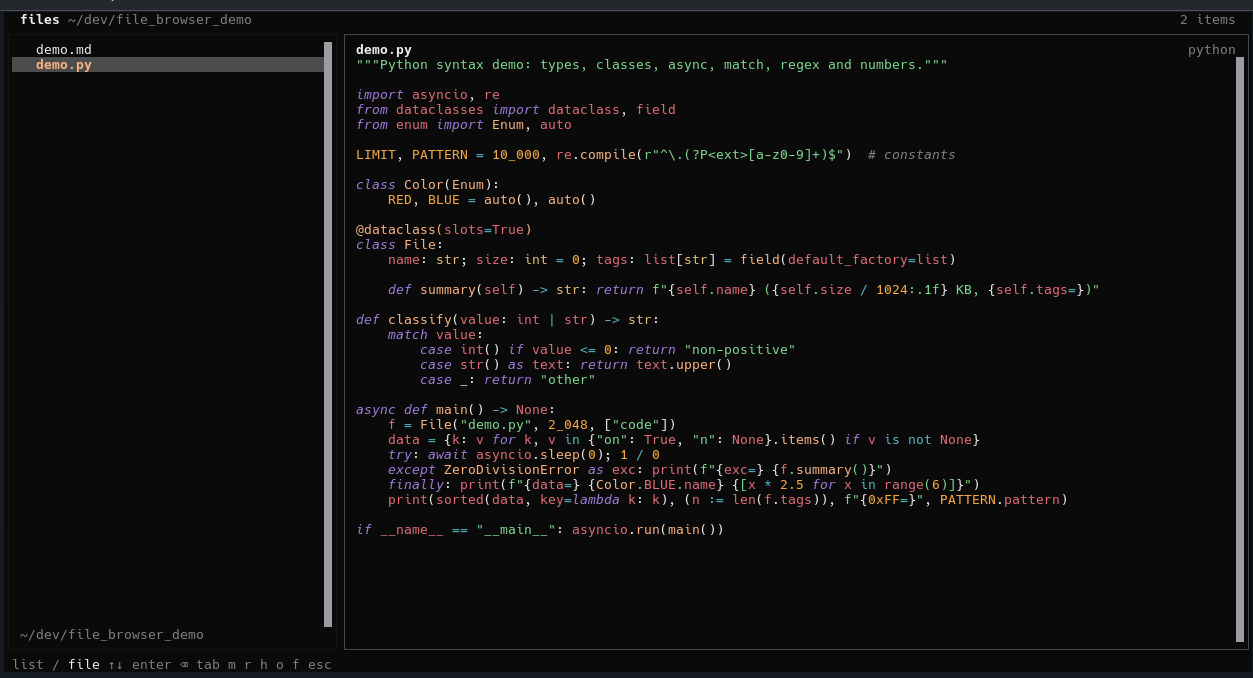
- Folder navigation from the project (or session) directory, parents first.
- Markdown preview rendered by OpenTUI; press
mto flip to the source. - Code preview with tree-sitter highlighting (TypeScript, JS, Go, Rust, Python, JSON, YAML, shell, and many more).
- Two layouts, picked automatically:
- side panel next to the chat while you are in a session;
- full page from the home screen (no session).
ftoggles full screen in the panel, hiding the chat.- Mouse and keyboard navigation.
- Open any file by path with a prompt: absolute paths,
~, or a path relative to the current folder — even files outside the project. - Project files are read through the OpenCode filesystem API, so the plugin also works against a remote server.
- No dependencies beyond the ones OpenCode already provides.
opencode plugin add opencode-file-browserThat installs the package into OpenCode's cache and adds it to
~/.config/opencode/cli.json. The published entry is the prebuilt
dist/tui.js, so nothing compiles on install.
Update later with:
opencode plugin update opencode-file-browsergit clone https://github.com/arthurrogado/opencode-file-browser \
~/.config/opencode/plugins/file-browserOr run the installer:
curl -fsSL https://raw.githubusercontent.com/arthurrogado/opencode-file-browser/main/install.sh | shOpenCode discovers plugin directories under the config directory. Restart the
TUI (or run /reload) if it does not appear. Update with git -C ~/.config/opencode/plugins/file-browser pull or /files-update.
opencode plugin add github:arthurrogado/opencode-file-browsercan fail withNpmInstallFailedErroron some 2.2.x builds while npm prepares the Git dependency. Use the npm package or a clone instead.
Point ~/.config/opencode/cli.json at a checkout:
{
  "plugins": ["/home/you/dev/opencode-file-browser"]
}If installed from npm:
opencode plugin update opencode-file-browserIf installed by cloning:
git -C ~/.config/opencode/plugins/file-browser pullOr run /files-update inside OpenCode; it pulls the checkout and lets the TUI
reload. Package installs get a pointer to opencode plugin update.
You can also ask OpenCode to update it for you: “update the file-browser plugin” — it can run the right command.
Run opencode, then:
/files(aliases:/browse,/arquivos)/files-update(aliases:/update-files) to update a cloned installCtrl+XthenFCtrl+P→ Open file browser
To jump straight to one file:
Ctrl+XthenO, orCtrl+P→ Open file by path- inside the browser, press
o
The prompt accepts an absolute path, a ~ path, or a path relative to the
current folder (for example ../notes.md).
Inside a session it opens as a side panel; on the home screen it opens full screen.
| Key | Action |
|---|---|
↑ / ↓, j / k |
Move in the list (or scroll the file, depending on focus) |
Enter |
Open folder / file |
Tab |
Switch focus between list and file |
Backspace, u |
Go up one level |
PageUp / PageDown |
Page up / down |
g / Shift+G |
Start / end |
m |
Toggle rendered Markdown ↔ source |
o |
Open a file by typing its path |
r |
Reload the folder and the file |
h |
Show/hide dotfiles |
f |
Toggle full screen (panel only; hides the chat) |
Esc, q |
Close |
Clicking works too: click a folder to enter it, a file to open it.
Rebind the open command in ~/.config/opencode/cli.json:
{
  "keybinds": {
    "file-browser.open": "ctrl+shift+e"
  }
}
Disable the plugin:
{
  "plugins": ["-opencode-file-browser"]
}context.ui.router.register+context.ui.slot("session.panel")provide the two layouts.context.client.file.list/context.client.file.readuse the OpenCode filesystem API for files inside the project.- Files outside the project are read from the local machine with
node:fs(the server API is confined to the project directory). <code>and<markdown>from OpenTUI render the preview; theSyntaxStyleis built fromcontext.theme, so it matches the active theme.- The starting directory comes from the session location, falling back to the global location when there is no session.
- Read-only; it does not edit files.
- Files larger than 6,000 lines or 512 KB are truncated in the preview.
- Binary files (images, PDFs, …) show their size only.
- The folder list is confined to the project/session directory; use Open file by path to reach files elsewhere.
- Paths outside the project are read from the machine running the TUI, so they are not available when the TUI is connected to a remote server.
The published entry is dist/tui.js. It is built from src/tui.tsx with the
same Babel/Solid transform OpenCode uses for local plugins, so the output has
explicit imports that the host can rewrite to its own solid-js and
@opentui/solid instances.
npm install --no-save @babel/core @babel/preset-typescript babel-preset-solid
npm run bundle
The build tools are intentionally not devDependencies: npm installs those
while preparing a Git dependency, which makes opencode plugin add slower and
more fragile. The compiled dist/tui.js is committed.
To try a local checkout, either add its path to cli.json or symlink it into
the discovery directory:
ln -s "$PWD" ~/.config/opencode/plugins/file-browserOpenCode watches that directory and reloads the plugin on save. Rebuild after
editing src/tui.tsx.
Issues and pull requests are welcome. Keep the plugin dependency-free: import
only @opencode/plugin, @opentui/*, and solid-js, which the host provides
at runtime.
MIT