
Small UI widgets for Pygame: buttons, checkboxes, radio buttons, sliders, dropdowns, text inputs, labels, progress bars, and animated bar charts. You control the layout; the kit handles interaction and drawing.
Requires Python 3.11+ (tested through 3.15). Uses pygame-ce, which provides the familiar import pygame API. Use a fresh environment when upgrading from classic pygame; the two packages share the same import name.
uv add PygameUIKitOr use pip install PygameUIKit.
With uv installed:
git clone https://github.com/Times0/PygameUIKit.git
cd PygameUIKit
uv run pygameuikit-demo
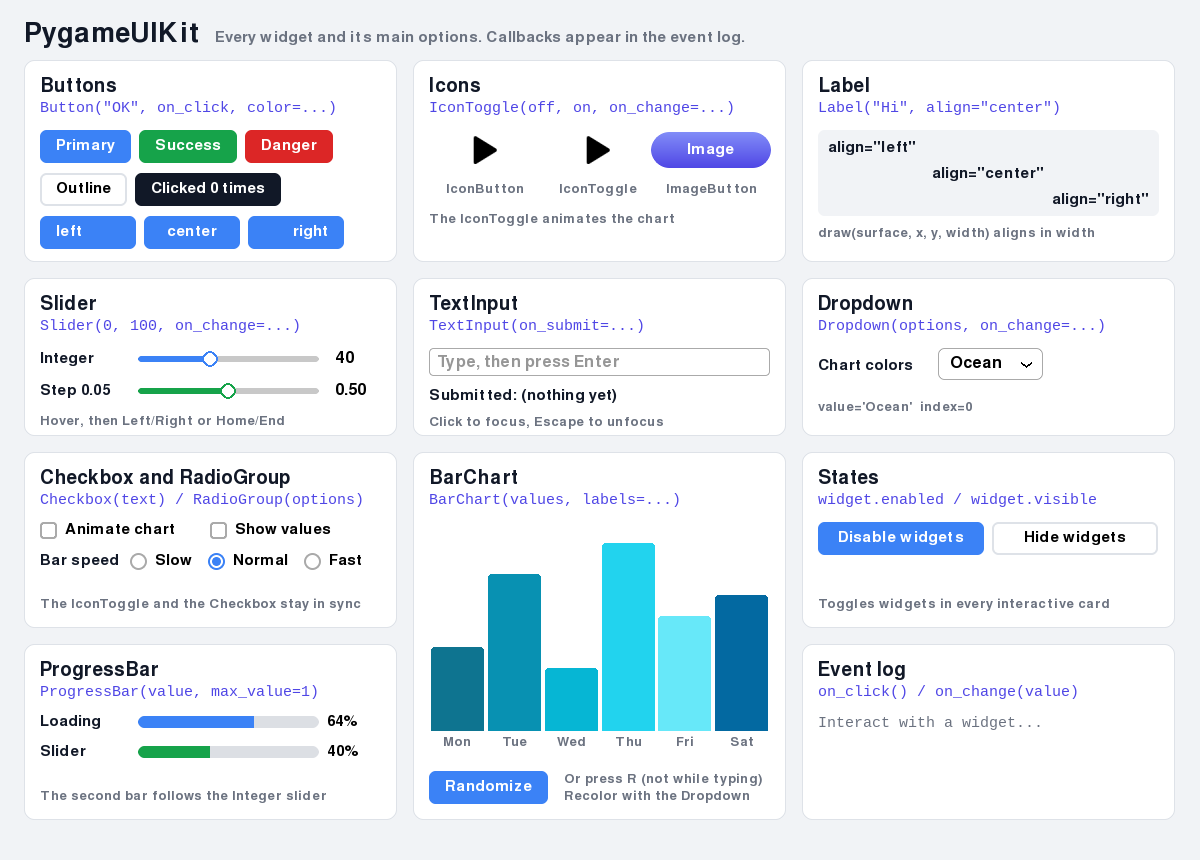
uv installs Python and dependencies automatically. The demo is also included in the installed package: pygameuikit-demo or python -m PygameUIKit.demo. It shows every widget with its main options, and an event log shows each callback as it fires. Its source, demo.py, is meant to be copied from. --screenshot demo.png saves one frame without opening a window.
import pygame
from PygameUIKit import Button, Dropdown, Group, Label, Slider

pygame.init()
screen = pygame.display.set_mode((640, 360))
clock = pygame.time.Clock()

ui = Group()
title = Label("Volume")
volume = Slider(0, 100, value=50, show_value=True, on_change=print, ui_group=ui)
quality = Dropdown(["Low", "Medium", "High"], on_change=print, ui_group=ui)


def mute():
    volume.value = 0  # setting a value never calls on_change


mute_button = Button("Mute", mute, ui_group=ui)

running = True
while running:
    dt = clock.tick(60) / 1000
    for event in pygame.event.get():
        if event.type == pygame.QUIT:
            running = False
        elif not ui.handle_event(event):
            pass  # no widget used this event: handle your own keys and clicks here
    ui.update(dt)

    screen.fill("white")
    title.draw(screen, 20, 20)
    volume.draw(screen, 20, 60, width=240)
    mute_button.draw(screen, 340, 45)
    quality.draw(screen, 20, 100)  # dropdowns last, so their menu covers other widgets
    pygame.display.flip()

pygame.quit()- Group. Pass
ui_group=uito every interactive widget. Forward each event once withui.handle_event(event). It returnsTruewhen a widget used the event (a button click, typing into a focused text input), so check it before your own handling. Callui.update(dt)with seconds every frame; it animates charts and repeats held keys. After each event and update, the group sets the cursor of the hovered widget. - Drawing. There is no layout system. Call
widget.draw(surface, x, y, ...)every frame. The widget stores the drawn area inwidget.rect, which is also its clickable area. Draw dropdowns last. - Callbacks.
on_click(),on_change(value)andon_submit(text)are keyword arguments, and attributes you can reassign;Nonemeans no callback. They run only for user interaction, never when you setvalueortextyourself. - States. Every widget has
enabledandvisible, bothTrueby default. A disabled widget is drawn greyed out; a hidden one draws nothing. Both ignore events, and turning either off clears hover, press, drag, focus and open menus, sosubmit.enabled = Falseis all it takes to block a button while work is in progress. - Colors and fonts. Colors are anything
pygame.Coloraccepts. Passfont=pygame.font.Font(...)for a particular font or character set; default fonts are created when the widget is.
Options after * are keyword-only, and every widget also takes ui_group.
Label(text, color="black", *, font=None, align="left"). Draws at exactly (x, y).draw(surface, x, y, width=None)aligns the text withinwidth("left","center"or"right"). Properties:text,color.Button(text, on_click=None, *, color=(59, 130, 246), text_color=None, outline_color=None, border_radius=6, padding=(16, 8), font=None, width=None, align="center"). Sized to its text unlesswidthis set;alignplaces the text withinwidth. Hover and pressed shades come fromcolor, and the text is black or white for contrast unlesstext_coloris set. Properties:text(resizes the button),hovered,pressed. Callback:on_click().ImageButton(image, on_click=None, *, hover_image=None, text="", text_color="white", font=None). An image, swapped forhover_imagewhile hovered or pressed, with optional centeredtext.IconButton(image, on_click=None, *, hover_color=(128, 128, 128), hover_alpha=128, padding=6, border_radius=6). An icon with a translucent backdrop while hovered. The clickable area is the icon pluspadding, starting at (x, y).IconToggle(image_off, image_on, on_change=None, *, value=False, ...). LikeIconButton, but each click switchesvalueand the icon. Callback:on_change(value)with the new bool.Checkbox(text="", *, value=False, on_change=None, color=(59, 130, 246), text_color="black", font=None). A box with a check mark and an optional label to its right; clicking either togglesvalue. Properties:value,text. Callback:on_change(value)with the new bool.RadioGroup(options, *, index=0, on_change=None, direction="vertical", spacing=10, color=(59, 130, 246), text_color="black", font=None). One widget that draws every option with a radio circle, stacked or in a row (direction="horizontal");spacingis the gap between options. Click an option or its circle to select it.rectcovers all options. Properties:value(the option),index,highlighted(the hovered option's index orNone). Callback:on_change(value)when the user picks a different option.Slider(min, max, step=1, *, value=None, on_change=None, show_value=False, font=None, fill_color, track_color, knob_color, text_color).draw(surface, x, y, width=200, height=6). Drag or click the track; Left/Right, Home and End work while it is hovered.valueis clamped and snapped tostep, andshow_valueprints it to the right of the track. Callback:on_change(value).TextInput(text="", *, placeholder="", width=200, font=None, text_color, placeholder_color, background_color, border_color, focus_color, border_radius=4, on_change=None, on_submit=None). A fixed-width, single-line field. Click it to focus it; Enter callson_submit(text)and Escape unfocuses. Properties:text,focused. Callbacks:on_change(text)after each edit,on_submit(text). It readsTEXTINPUTevents for Unicode text andKEYDOWNfor editing, so forward both, once, through the group.Dropdown(options, *, index=0, on_change=None, width=None, font=None, color, text_color, highlight_color, outline_color, border_radius=6). Click to open the menu, then pick with the mouse or with Up/Down and Enter. Escape or a click elsewhere closes it. Properties:value(the option),index,is_open. Callback:on_change(value)when the user picks a different option.BarChart(values, *, labels=None, max_value=None, colors=None, font=None, label_color="black", speed=200).draw(surface, x, y, width=300, height=100). Bars move toward their values atspeedunits per second duringui.update(dt).set_value(index, value)changes one bar; settingvaluesreplaces them all. Values must be non-negative. Withoutlabels, each bar shows its value; withoutmax_value, the tallest bar fills the height.colorscycle.ProgressBar(value=0.0, *, max_value=1.0, color=(59, 130, 246), track_color=(220, 223, 228), border_radius=None, show_text=False, font=None, text_color="black").draw(surface, x, y, width=200, height=12). Display only: it ignores events and needs no group.valueis clamped to 0..max_value;fractionis how full the bar is (0 to 1).border_radius=Nonerounds the ends fully, andshow_textprints the percentage (percent_text) to the right of the bar.
uv sync --locked
uv run ruff check .
uv run ruff format --check .
uv run pytest
uv build
Tests use SDL's dummy drivers and don't need a display. CI checks Python 3.11–3.15 on Linux and Python 3.15 on Windows and macOS. See RELEASING.md for publishing.
MIT licensed. Contributions welcome.