Decomposing Images into Editable RGBA Layers
Paper Project Page Model (Hugging Face) Code
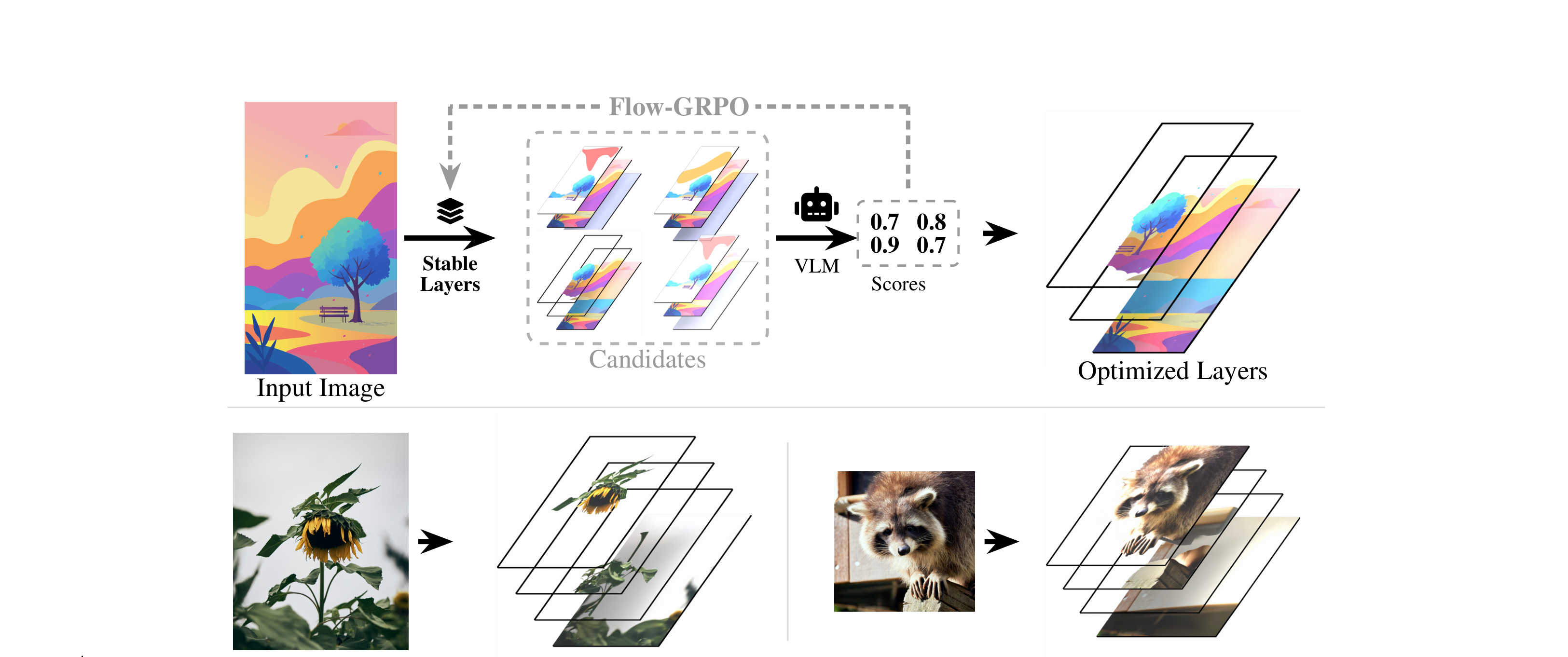
This is an inference-only release of Stable Layers, a model that decomposes a single RGB image into a small stack of back-to-front RGBA layers (background plus object layers) suitable for compositing and editing.
The model is a LoRA adapter over Qwen/Qwen-Image-Layered. This model was trained
using Qwen 3.5 9b as the VLM teacher.
Stable-Layers/
  decompose.py   # inference entry point (single image or directory)
  model/         # LoRA adapter (adapter_config.json, adapter_model.safetensors)
  LICENSE.md     # Stability AI Community License Agreement
  README.md
pip install torch diffusers transformers peft pillow numpyTested with torch 2.11, diffusers 0.37, transformers 5.5, peft 0.18.
Requires one GPU — the base model is ~40 GB in bf16, so an 80 GB-class card
(A100-80 / H100 / H200) is comfortable.
The base model is pulled from Hugging Face automatically
(Qwen/Qwen-Image-Layered). The LoRA adapter is bundled in ./model and is also
available at https://huggingface.co/StabilityLabs/Stable-Layers. Override its
location with --lora.
| Setting | Value | Flag |
|---|---|---|
| Sampler | Heun (2nd order) | always used — not configurable |
| Steps | 50 | --steps 50 |
| CFG / guidance | 1.0 (off) | --guidance-scale 1.0 |
| Resolution | 640 px (max dim) | --size 640 |
| Layers | 4 | --num-layers 4 |
Note: using a higher resolution, lower steps, or a non-Heun sampler will garble the results.
# single image
python decompose.py --input photo.png --output results/

# a directory of images
python decompose.py --input images/ --output results/

# RGBA layers with real alpha (for compositing / editors)
python decompose.py --input images/ --output results/ --transparent

# explicit LoRA location
python decompose.py --input photo.png --output results/ --lora ./modelresults/<image_name>/
source.png # input, resized
composite.png # layers recomposited — compare against source as a sanity check
layer_0.png # background (inpainted behind the removed objects)
layer_1.png # object layers, back-to-front
layer_2.png
layer_3.png
Layers are ordered back-to-front: layer_0 is the background, higher indices sit
on top. Not every image needs all 4 — unused layers come out blank, which is
normal.
By default layers are composited onto white (easy to eyeball). Pass
--transparent to get RGBA with real alpha, which is what you want when
importing into an editor or compositing them yourself.
Notes:
- Reproducible: noise is seeded per image as
seed + image_index(--seed 42by default), so the same inputs give the same outputs. - Prompt: decomposition is driven by the source image; the text prompt only
nudges guidance. The default (
"a clean, well composed image") is fine — override with--promptif you want. - Aspect ratio is preserved; the longest side is scaled to
--sizeand both dimensions are rounded to multiples of 16.
This code and model usage are subject to Stability AI Community License terms.
For individuals or organizations generating annual revenue of USD 1,000,000 (or local currency equivalent) or more, commercial usage requires an enterprise license from Stability AI.
- License details: https://stability.ai/license
- Enterprise request: https://stability.ai/enterprise
@article{stablelayers2026,
  author  = {},
  title   = {Stable Layers: Decomposing Images into Editable RGBA Layers},
  journal = {arXiv preprint arXiv:2605.30257},
  year    = {2026}
}