
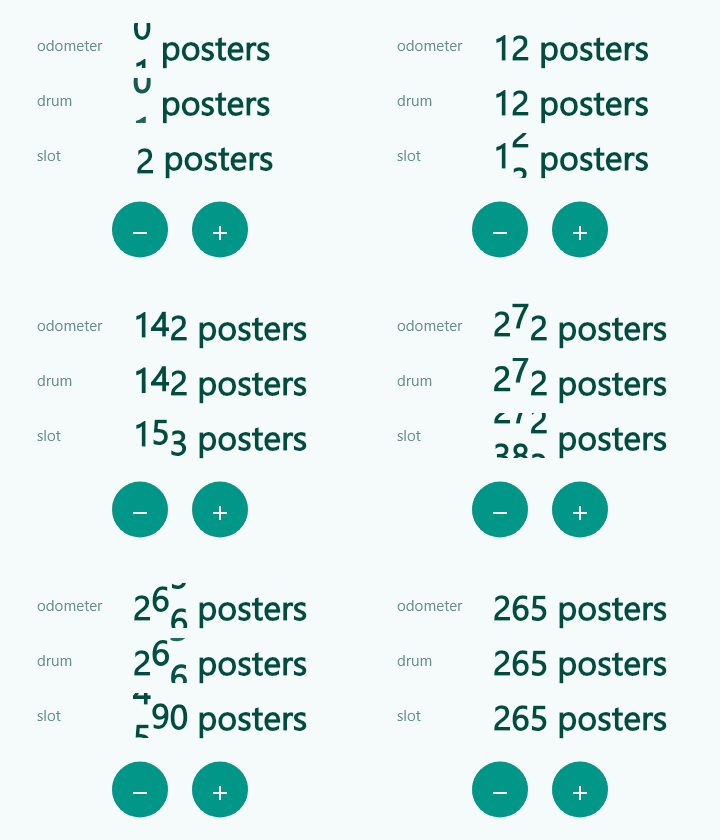
Tiny Flutter widgets that count a number up or down to its new value: AnimatedCount for integers, AnimatedDecimal for decimals and currencies, and RollingCount for odometer-style rolling digits (shown above, three looks).
It renders one plain Text, so font scaling, line wrapping, baseline alignment and
screen readers behave like for any other text. No custom painting, no extra dependencies.
AnimatedCount(
  value: posterCount,
  suffix: posterCount == 1 ? ' poster' : ' posters',
  style: const TextStyle(fontSize: 34, fontWeight: FontWeight.w800),
)- int, double and currency:
AnimatedCountfor integers,AnimatedDecimalfor decimals, and aformatcallback for thousands separators, percentages or any currency. - Your own curve and duration:
curve(defaultCurves.easeOutCubic) andduration(default 600 ms) on both widgets. - Remember the last shown number with
initialValue, so a re-opened screen counts only when something changed.
A runnable demo lives in example/.
- The first frame shows
valueimmediately. Only later changes animate (up and down). countFromZero: trueadditionally counts up from 0 when the widget first appears.- Screen readers always read the final text (
prefix + number + suffix), never the in-between numbers. - If the system disables animations, the number jumps straight to the target.
- The animation ends exactly on
value, with no stale digits when the number gets shorter.
| Parameter | Default | Purpose |
|---|---|---|
value |
required | The number to show. |
prefix / suffix |
'' |
Text before / after the number, part of the same Text. |
style, textAlign |
null |
Passed to the Text. |
countFromZero |
false |
Count up from 0 on first appearance. |
initialValue |
null |
Start the first count from this number (wins over countFromZero). |
duration |
600 ms | Length of the animation. |
curve |
Curves.easeOutCubic |
Easing. |
format |
int.toString |
Formats every shown number, e.g. to add thousands separators. |
AnimatedCount(
  value: 1234567,
  format: (n) => NumberFormat.decimalPattern('en_US').format(n), // package:intl
)AnimatedDecimal(
value: total, // a double
duration: const Duration(seconds: 1),
curve: Curves.easeInOut,
format: (v) => NumberFormat.currency(locale: 'en_US', symbol: r'$').format(v), // package:intl
)Without format, the number is shown with fractionDigits decimals (default 2).
prefix, suffix, style, textAlign, countFromZero and initialValue work like on
AnimatedCount.
By default the first frame shows value right away. If you want the number to count
only when it actually changed since the last visit, keep the last shown number yourself
and pass it as initialValue:
final last = prefs.getInt('posterCount'); // null on the very first visit
prefs.setInt('posterCount', posterCount); // remember it for next time

AnimatedCount(
  value: posterCount,
  initialValue: last, // null: no animation (or 0 with countFromZero)
)
If initialValue equals value, nothing is animated. It is only used on the first
appearance; later changes of value count from the number currently shown.
RollingCount shows every digit as its own wheel, like an odometer. Wheels roll through the
digits in between (up when the number grows, down when it shrinks), start one after another
from the right and settle with a small bounce. New digits slide in, vanished ones slide out.
RollingCount(
  value: posterCount,
  suffix: posterCount == 1 ? ' poster' : ' posters',
  style: const TextStyle(fontSize: 34, fontWeight: FontWeight.w800),
)
Three looks, set with roll:
RollStyle |
Look |
|---|---|
odometer (default) |
Flat wheels rolling through the digits in between, started one after another from the right. |
drum |
The same, but digits sit on a cylinder: they tilt away with perspective and fade towards the edge. |
slot |
Slot machine: every wheel spins one extra turn, all at once, then they stop one after another from the left. Use about 1 s duration. |
More knobs: direction (byChange by default, or always up / down), stagger (delay between
wheels, 40 ms), and upColor / downColor to tint the text while it rolls, for example green for
more and red for fewer.
RollingCount(
  value: score,
  roll: RollStyle.slot,
  duration: const Duration(seconds: 1),
  upColor: Colors.green,
  downColor: Colors.red,
)
It takes the same parameters as AnimatedCount (prefix, suffix, style, format,
duration, curve, countFromZero, initialValue); the defaults are 700 ms and
Curves.easeOutBack. Separators from format stay plain text, screen readers read the final
text, and the number jumps if the system disables animations.
RollingCount puts every digit in its own Text, so find.text('142 posters') finds nothing.
Find it by its final text instead:
Finder count(String text) =>
    find.byWidgetPredicate((w) => w is RollingCount && w.text == text);

expect(count('142 posters'), findsOneWidget);
or use find.bySemanticsLabel('142 posters') (needs tester.ensureSemantics()).
Rolling digits need a custom layout (one fixed-width cell per digit), so RollingCount is not a
single Text: it does not wrap and ignores textAlign. Prefer AnimatedCount or
AnimatedDecimal when the number sits inside running text, or when you need decimals.
MIT