



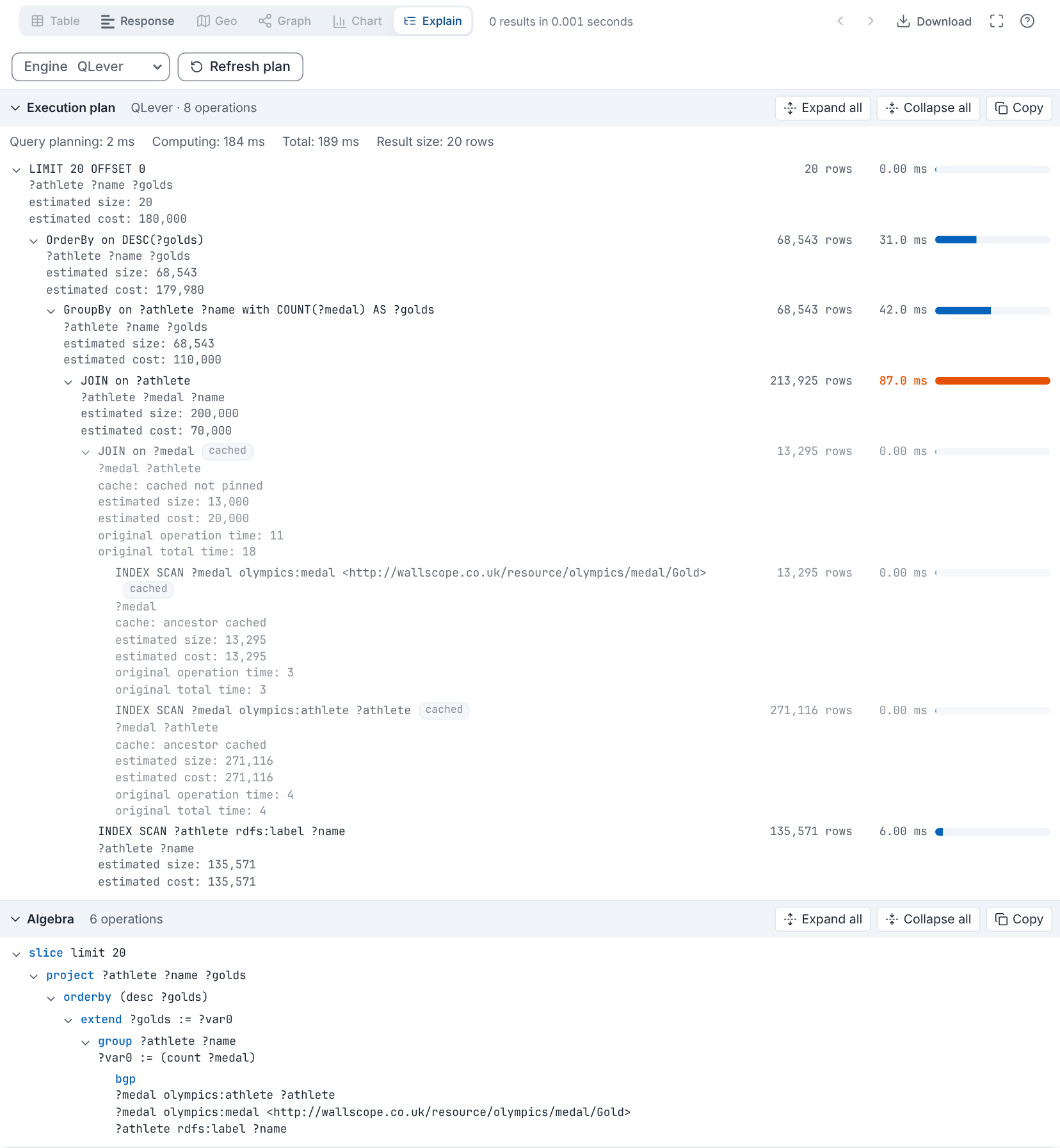
An Explain result view for YASGUI and MatGUI that shows how a SPARQL query is executed:
- Execution plan: the operations the triple store ran for your query, with the rows and the time of each, asked from the endpoint after the query completed. Supported engines: QLever, GraphDB, Stardog, Blazegraph and Amazon Neptune.
- Algebra: the query translated to SPARQL algebra (section 18 of the SPARQL specification), computed in the browser for any endpoint, as a collapsible tree and as the s-expression used by ARQ and the specification.
npm install @matdata/yasgui-explain-pluginOr from a CDN:
<script src="https://unpkg.com/@matdata/yasgui-explain-plugin/dist/yasgui-explain-plugin.min.js"></script>
<link rel="stylesheet" href="https://unpkg.com/@matdata/yasgui-explain-plugin/dist/yasgui-explain-plugin.min.css" />import Yasgui from '@matdata/yasgui';
import ExplainPlugin from '@matdata/yasgui-explain-plugin';
import '@matdata/yasgui-explain-plugin/dist/yasgui-explain-plugin.css';
Yasgui.Yasr.registerPlugin('Explain', ExplainPlugin);
const yasgui = new Yasgui(document.getElementById('yasgui'), {
yasr: { pluginOrder: ['Table', 'response', 'Explain'] },
});With the CDN build, the plugin registers itself as Explain when Yasgui is a global; otherwise register YasguiExplainPlugin yourself.
Run a query, then open the Explain tab. The algebra is there at once. The plan is fetched from the endpoint with one background request, when the plugin knows which engine the endpoint runs; pick the engine in the Engine list when it is not recognised from the URL. The choice is remembered per endpoint.
| Engine | How the plan is asked | What you get |
|---|---|---|
| QLever | the query again, with Accept: application/qlever-results+json (served from QLever's cache) |
the operation tree with the time, rows and cache status of each operation, and the slowest one highlighted |
| GraphDB | the query with FROM <http://www.ontotext.com/explain> |
the plan as text: the order of the patterns and the estimated sizes |
| Stardog | /{db}/explain with profile=true |
the profiled plan as text: rows, wall time and memory per operator |
| Blazegraph | the query with explain=details |
Blazegraph's explain page, in a sandboxed frame |
| Neptune | the query with explain=details |
Neptune's explain table as text |
Virtuoso, Jena Fuseki, Oxigraph, RDF4J and Comunica publish no plan over the SPARQL protocol: the view then shows the algebra only.
Only MatGUI's YASR runs the plan request with the authentication and request settings of the tab. In other hosts the plugin sends the request itself, without them. Stardog, Blazegraph and Neptune need extra request parameters, which MatGUI passes on from version 6.9 (yasr.hostApi.queryRequest); older hosts send those requests directly too.
Options go in the plugin constructor, or in yasr.config.plugins.Explain.dynamicConfig:
| Option | Default | Meaning |
|---|---|---|
engine |
detect | Force an engine (qlever, graphdb, stardog, blazegraph, neptune) or none for every endpoint |
engines |
all | The engines offered in the list, in order |
autoFetch |
true |
Fetch the plan when the view opens; with false, the Refresh button does |
getQuery |
the host's query link | A function returning the query text |
getEndpoint |
the host's query link | A function returning the endpoint URL |
baseIRI |
http://base/ |
Base for relative IRIs in the algebra |
requestPlan |
the host or fetch |
(request, signal) => Promise<response> to send the plan request yourself |
The plugin also exports translate(query), toTree(algebra, prefixes), toSExpression(algebra, prefixes) and detectEngine(url) for use outside YASR.
npm install
npm run dev          # demo at http://localhost:5173
npm test
npm run build        # dist/
npm run build:demo   # demo/dist, published to GitHub Pages
The demo opens on a QLever endpoint, with buttons for public QLever, GraphDB, Blazegraph and Stardog endpoints; the sample buttons show recorded plans without an endpoint (?sample=qlever|graphdb|stardog).
Apache-2.0