A simple script generator for lazy devs like moi 😊.
It generates INSERT queries from a SELECT statement. This is a ported version of the original extension for Azure Data Studio (LzScripts).
In the editor, simply select, right-click on the SQL script and click on the Generate Insert from Result context menu, Select To Clipboard or To New Tab to generate query to the clipboard or a new tab respectively.
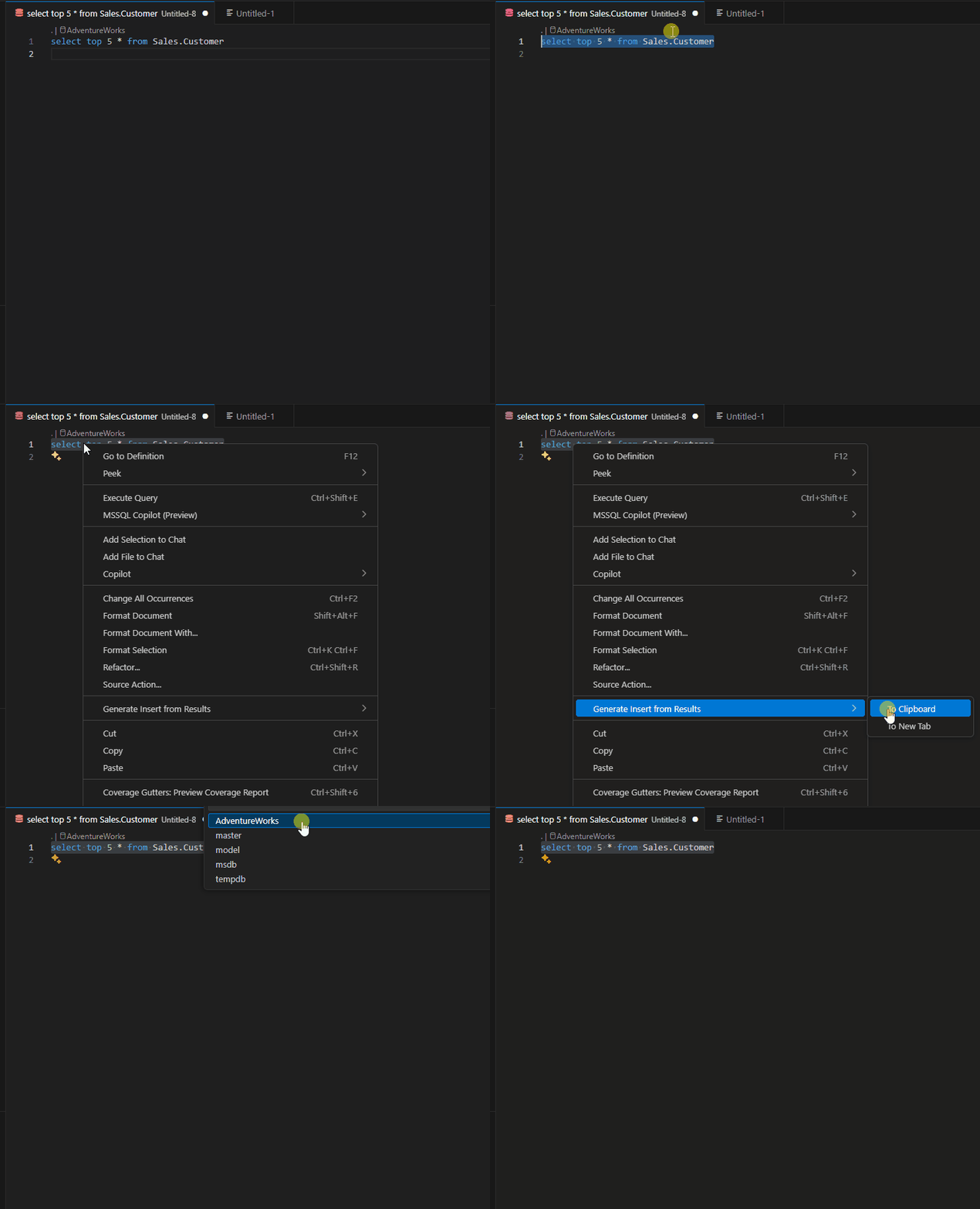
- ☕ Fueled by questionable amounts of caffeine and a weekend's worth of determination, this extension came to life in a glorious sprint. If it hiccups, glitches, or throws a tantrum, don’t be shy, open an issue and give it a gentle nudge back to sanity. Bugs happen, but together we squash them.
- Currently supports only
MSSQL. - Supports any database schema if added.
- Uses the first table it finds after the
fromclause in your select query as the target table for Insert. Soselect * from tableandselect * from databaseName.dbo.tableis supported. See below for more examples. - Generates a single insert with multiple values by default, you can disable this behavior, via the settings page,
Ctl+,. Under theExtensions > LzScripts, section enable Allow Insert Per Row. - 🚀 Heads up! This extension currently taps into
connectionSharing.connect(...)from the mighty vscode-mssql API. That means it dives straight into the server-level pool—yep, the default landing spot is usually the master database. But don’t worry, you’ll get a friendly popup inviting you to pick the database you actually want to work with. We're keeping our eyes peeled for a slicker workaround, so this behavior might evolve in future updates. Stay tuned—smarter connections are on the horizon!
plain old joins
select t1.* from table1 t1
inner join table2 t2 on t1.ItemID  = t2.ItemID
where t1.ItemID = 10
with subqueries
select t1.* from table1 t1
where t1.ItemID in (
  select top (20) t2.ItemID from table2 t2
)
- Initial release
This project is licensed under the MIT License - see the LICENSE.md file for details
-
This project was highly inspired by the extraSqlScriptAs Extension by pacoweb
-
Many thanks to Eugene Adobow the Sql Doctor 👌
Enjoy!