






Transform your ordinary GitHub contribution graph into a beautiful animated Jet Heatmap that brings your profile to life. Powered by Node.js, SVG animations, and GitHub Actions, this project automatically generates an animated heatmap from your GitHub contributions and keeps it updated with every new commit. Whether you're a developer, student, open-source contributor, or portfolio enthusiast, GitHub Jet Heatmap adds a modern and professional touch to your GitHub profile.
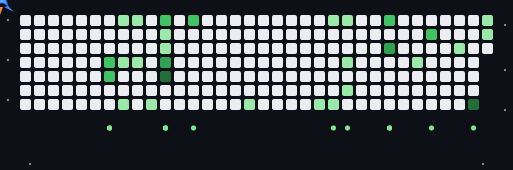
GitHub's default contribution graph is static and simple. This project transforms that contribution graph into a beautiful animated Jet Heatmap, making your GitHub profile stand out with smooth SVG animations that automatically adapt to the visitor's preferred light or dark theme. Instead of displaying a traditional contribution calendar, the generated SVG showcases your coding activity through dynamic animations that can be embedded directly into your GitHub Profile README. The entire generation process is automated, allowing your heatmap to stay synchronized with your latest GitHub contributions with minimal effort. Whether you're building a portfolio, showcasing open-source activity, or simply enhancing your profile, GitHub Jet Heatmap offers a clean, modern, and visually engaging solution.
- 🛩️ Beautiful animated Jet Heatmap
- 🎨 Automatic Light & Dark theme support
- ⚡ Smooth SVG animations
- 📈 Visualizes your real GitHub contributions
- 🔄 Automatic updates using GitHub Actions
- 💻 Cross-platform support
- 🚀 Lightweight and fast
- 📦 Easy to set up
- 🔧 Beginner-friendly installation
- 🌐 Fully responsive SVG output
- 🎯 Perfect for GitHub Profile READMEs
- 🛡️ Secure GitHub Personal Access Token integration
- 📂 Clean project structure
- ❤️ Open Source and MIT Licensed
JetCommit/
│
├── .github/
│   └── workflows/
│       └── jet-heatmap.yml          # GitHub Actions workflow for automatic updates
│
├── dist/                            # Generated SVG output
│   ├── github-jet.svg
│
│
├── ascii_to_svg.py                  # Converts ASCII contribution data into SVG
├── generate.mjs                     # Main script that generates the animated Jet Heatmap
├── preview-test.mjs                 # Preview and testing script
├── update.py                        # Utility script for updates
│
├── dark.svg                         # Generated Dark Theme SVG
├── light.svg                        # Generated Light Theme SVG
├── preview-sample.svg               # Sample preview animation
│
├── package.json                     # Project metadata & dependencies
├── package-lock.json                # Locked dependency versions
│
├── README.md                        # Project documentation
├── LICENSE                          # Project License (optional)
│
└── .gitignore                       # Ignored files (recommended)
flowchart TD

    A[👤 GitHub User]
    B[📊 GitHub Contribution Graph]
    C[⚡ generate.mjs]
    D[🔄 Fetch Contribution Data]
    E[🐍 ascii_to_svg.py]
    F[🎨 SVG Animation Generator]
    G[🌙 dark.svg]
    H[☀️ light.svg]
    I[📂 dist/]
    J[☁️ GitHub Repository]
    K[📄 GitHub Profile README]
    L[🛩️ Animated Jet Heatmap]

    A --> B
    B --> C
    C --> D
    D --> E
    E --> F

    F --> G
    F --> H

    G --> I
    H --> I

    I --> J
    J --> K
    K --> L
| File / Folder | Description |
|---|---|
.github/workflows/jet-heatmap.yml |
Automates SVG generation using GitHub Actions |
dist/ |
Stores the generated SVG files |
ascii_to_svg.py |
Converts contribution data into SVG graphics |
generate.mjs |
Main entry point for generating the Jet Heatmap |
preview-test.mjs |
Used for previewing and testing animations |
update.py |
Helper script for update-related tasks |
dark.svg |
Animated dark theme output |
light.svg |
Animated light theme output |
preview-sample.svg |
Sample output for demonstration |
package.json |
Node.js project configuration |
package-lock.json |
Dependency lock file |
README.md |
Documentation for the project |
Follow these steps to generate your own animated GitHub Jet Heatmap and add it to your GitHub Profile README.
Before you begin, ensure you have the following installed:
- Git
- Node.js (v18 or later recommended)
- npm (comes with Node.js)
- A GitHub account
- A GitHub Profile Repository
- A GitHub Personal Access Token (PAT)
Tip: Download the latest LTS version of Node.js for the best compatibility.
Clone this repository to your local machine:
git clone https://github.com/LoganthP/jetcommit.gitThen navigate into the directory:
cd jetcommitInstall all required packages:
npm installThis command installs every dependency listed in package.json.
The generator requires a GitHub token to fetch your contribution graph. Navigate to:
- GitHub → Settings → Developer Settings → Personal Access Tokens → Tokens (Classic)
- Click "Generate New Token"
- Grant only the following permissions:
- ✅
read:user - ✅
public_repo(for public repositories) - ✅
repo(only if your profile repository is private)
- ✅
- Do not grant unnecessary permissions such as:
delete_repoworkflowadmin:orgpackages
- After creating the token, copy it immediately. GitHub will not display it again.
Windows (PowerShell)
$env:GH_USERNAME="YOUR_GITHUB_USERNAME"
$env:GH_TOKEN="YOUR_GITHUB_PAT"
Example:
$env:GH_USERNAME="LoganthP"
$env:GH_TOKEN="ghp_xxxxxxxxxxxxxxxxx"
macOS / Linux
export GH_USERNAME="YOUR_GITHUB_USERNAME"
export GH_TOKEN="YOUR_GITHUB_PAT"
Or
GH_USERNAME="YOUR_GITHUB_USERNAME" GH_TOKEN="YOUR_GITHUB_PAT" node generate.mjsRun the generator:
node generate.mjsThe script will:
- Connect to GitHub
- Fetch your contribution graph
- Generate the animated SVG
- Save it locally
After a successful run, you'll find the generated animation. Depending on the version of the project, it may generate:
dark.svg
light.svg
or
dist/
└── github-jet.svg
Open the SVG in your browser to preview the animation.
Copy the generated SVG into your GitHub Profile Repository.
Example:
LoganthP/

├── README.md
├── github-jet.svg
Your profile repository must have the same name as your GitHub username.
Example:
https://github.com/LoganthP/LoganthPgit add .
git commit -m "Add GitHub Jet Heatmap"
git pushThe repository includes a preconfigured GitHub Actions workflow that automatically regenerates your Jet Heatmap on a scheduled basis.
Navigate to your repository and click the Actions tab.
Repository
    └── Actions
If prompted, click I understand my workflows, go ahead and enable them.
Open
Settings
    ↓
Actions
    ↓
General
Scroll to Workflow permissions.
Select
✅ Read and write permissions
Click
Save
⚠️ ImportantWithout enabling Read and write permissions, GitHub Actions cannot commit the generated SVG back to your repository.
Open
Actions
Select
Update Jet Heatmap SVG
Click
Run workflow
Choose the main branch and click Run workflow.
Wait for approximately 30–60 seconds.
Once the workflow completes successfully, the generated SVG files will appear inside the dist directory.
dist/
├── dark.svg
└── light.svg
Open the generated SVG file and click Raw.
The URL should look similar to:
https://raw.githubusercontent.com/YOUR_USERNAME/YOUR_REPOSITORY/main/dist/dark.svg
or
https://raw.githubusercontent.com/YOUR_USERNAME/YOUR_REPOSITORY/main/dist/light.svg
If the SVG opens successfully in your browser, the generation process is working correctly.
Add the following snippet to your GitHub Profile README.
<p align="center">
<picture>

<source
    media="(prefers-color-scheme: dark)"
    srcset="https://raw.githubusercontent.com/YOUR_USERNAME/YOUR_REPOSITORY/main/dist/dark.svg">

<source
    media="(prefers-color-scheme: light)"
    srcset="https://raw.githubusercontent.com/YOUR_USERNAME/YOUR_REPOSITORY/main/dist/light.svg">

<img
    src="https://raw.githubusercontent.com/YOUR_USERNAME/YOUR_REPOSITORY/main/dist/dark.svg"
    width="100%"
    alt="GitHub Jet Heatmap">

</picture>
</p>
Replace:
YOUR_USERNAMEYOUR_REPOSITORY
with your own GitHub username and repository name.
After pushing your changes, your GitHub Profile README will automatically display the animated Jet Heatmap. Whenever the GitHub Actions workflow runs, the SVG files will be regenerated automatically, ensuring your profile always reflects your latest GitHub contributions.
If your project generates github-jet.svg
<p align="center">
  <img
    src="https://raw.githubusercontent.com/YOUR_USERNAME/YOUR_USERNAME/main/github-jet.svg"
    width="100%"
    alt="GitHub Jet Heatmap"
  />
</p>
Replace YOUR_USERNAME with your GitHub username.
Example:
https://raw.githubusercontent.com/LoganthP/JetCommit/main/dist/github-jet.svgIf your project generates dark.svg and light.svg
<p align="center">
<picture>

<source media="(prefers-color-scheme: dark)"
srcset="https://raw.githubusercontent.com/YOUR_USERNAME/YOUR_USERNAME/main/dark.svg">

<source media="(prefers-color-scheme: light)"
srcset="https://raw.githubusercontent.com/YOUR_USERNAME/YOUR_USERNAME/main/light.svg">

<img
src="https://raw.githubusercontent.com/YOUR_USERNAME/YOUR_USERNAME/main/dark.svg"
width="100%"
alt="GitHub Jet Heatmap">

</picture>
</p>flowchart TD
A[🛠️ Install Git & Node.js] --> B[📥 Clone the Repository]
B --> C[📦 Install Dependencies<br/>npm install]
C --> D[🔑 Create a GitHub Personal Access Token]
D --> E[🌍 Configure Environment Variables<br/>GH_USERNAME & GH_TOKEN]
E --> F[⚡ Generate the Jet Heatmap<br/>node generate.mjs]
F --> G[🎨 Generate SVG Files<br/>dark.svg & light.svg]
G --> H[📂 Verify Generated Files]
H --> I[📤 Commit & Push Changes]
I --> J[🤖 Enable GitHub Actions Workflow]
J --> K[🔐 Grant Read & Write Permissions]
K --> L[▶️ Run the Workflow]
L --> M[🔄 Automatic SVG Regeneration]
M --> N[📄 Embed SVG in GitHub Profile README]
N --> O[🛩️ Live Animated GitHub Jet Heatmap]
Congratulations! Your GitHub Jet Heatmap is now fully configured. From now on, GitHub Actions will automatically regenerate your animated SVG files, ensuring your profile always showcases your latest GitHub contributions. Happy Coding! 🛩️🚀