



LinaPro is an AI-native full-stack framework engineered for sustainable delivery.
It unifies a specification-driven AI R&D workflow, a comprehensive AI skill system spanning the full development lifecycle, a complete plugin runtime, and an integrated full-stack design — with enterprise-grade capabilities like access control, system configuration, and job scheduling built right in.
Teams skip the infrastructure bootstrapping phase and put AI to work on real business development from day one.
| Resource | URL |
|---|---|
| Repository | https://github.com/linaproai/linapro |
| Live Demo | http://demo.linapro.ai/ Username: admin Password: admin123 |
| Website | https://linapro.ai/ |
LinaPro is designed for individual developers, engineering teams, and enterprises that need:
- AI-native R&D workflow:
OpenSpecis an optional but recommended dependency for specification-driven delivery.LinaProprovides first-class conventions, prompts, skills, and repository structure for it, so AI can lead analysis, design, and implementation while your team stays focused on direction rather than execution details. - A rich AI skill ecosystem: Over a dozen built-in AI skills cover the entire development lifecycle — backend development, frontend design, test writing, code review, performance auditing, and more. These skills are embedded directly in the framework's AI collaboration conventions, so AI automatically applies the right expertise in each context without requiring you to re-explain project rules in every session.
- Fast business development: A batteries-included management workspace and a rich set of built-in modules dramatically shorten the path from zero to production.
- Integrated full-stack design: Frontend and backend are designed as a unified whole — API contracts, permission models, and design conventions are fully aligned, so there's no manual integration overhead.
- Complete API documentation: All host and plugin API endpoints are automatically aggregated into a single browsable and debuggable doc site.
- Extensible plugin ecosystem: A dual-mode plugin system (source plugins +
WASMdynamic plugins) lets any capability be extended or replaced via a plugin. - Enterprise-grade governance: JWT authentication with a declarative RBAC permission system, plus built-in operation logs, login logs, and session management for comprehensive auditability.
- Distribution-ready by design: Built-in distributed locking, key-value caching, and horizontal scaling — no architectural changes needed as your system grows.
graph TB
    subgraph Workflow["Optional AI R&D Workflow  openspec/"]
        direction LR
        Explore["🔍 Explore"] --> Propose["📋 Propose"] --> Implement["⚙️ Implement"] --> Review["🔎 Review"] --> Archive["📦 Archive"]
    end

    subgraph Frontend["Default Management Workspace  lina-vben"]
        UI["Vue 3 + Vben5 + Ant Design"]
    end

    subgraph Host["Core Host Service  lina-core"]
        direction TB
        API["API Layer\n(g.Meta route definitions + DTOs)"]
        Ctrl["Controller Layer\n(HTTP request handling)"]
        Svc["Service Layer\n(core business logic)"]
        Plugin["Plugin Runtime\n(lifecycle orchestration · sandbox isolation)"]
        Gov["Governance\n(JWT · RBAC · Logging · Sessions)"]
        API --> Ctrl --> Svc
        Svc --> Plugin
        Svc --> Gov
    end

    subgraph Plugins["Plugin Layer  lina-plugins"]
        direction LR
        Source["Source Plugins\ncompiled and shipped with host"]
        Dynamic["WASM Dynamic Plugins\nhot-loaded at runtime"]
    end

    DB[("Data Store\nPostgreSQL")]

    Workflow -.->|spec-driven| Frontend
    Workflow -.->|spec-driven| Host
    UI -->|HTTP| API
    Plugin -->|loads| Source
    Plugin -->|sandbox execution| Dynamic
    Svc --> DB
    Gov --> DB
LinaPro has first-class support for OpenSpec, an optional but recommended specification-driven workflow that closes the loop from requirement to delivery:
- Projects can run without
OpenSpec; adopting it enables a five-stage cycle — Explore → Propose → Implement → Review → Archive - Changes can be anchored to incremental specification files and matching automated tests, preventing architectural drift and coverage gaps without making
OpenSpeca runtime requirement - AI can build forward from a verified foundation rather than generating code in a vacuum
- Developers own direction and key decisions; AI handles analysis, design, implementation, and testing within the constraints of the established specs
LinaPro ships with over a dozen built-in AI skills covering the full development lifecycle — backend development, frontend design, test assurance, code review, performance auditing, and more. These skills are embedded as domain knowledge directly in the framework's AI collaboration conventions. No separate installation is needed; AI tooling activates the relevant skill automatically when working in each context, ensuring that AI makes framework-aware decisions at every step without requiring repeated re-explanation of project rules in each session.
- The core host service (
lina-core) is a pure backend runtime, completely decoupled from any frontend implementation - The default management workspace (
lina-vben) is a reference UI implementation of the host's capabilities — it can be swapped out for any frontend, including mobile apps, mini-programs, or a custom admin system - The host exposes all capabilities through stable
RESTful APIcontracts that are entirely frontend-agnostic - Multiple frontends can connect to the same host simultaneously to serve different interface requirements
lina-core is the stable foundation of the entire framework, built on GoFrame:
- API contract layer: A complete
RESTful APIinterface covering system management, plugin governance, and shared platform capabilities - Service layer: Unified implementations of auth, permissions, users, roles, menus, dictionaries, configuration, file management, and other core services
- Plugin runtime: Loads source plugins and
WASMdynamic plugins, orchestrates their full lifecycle, and exposes stable extension seams - Governance: Built-in JWT authentication, declarative RBAC permissions, operation auditing, and session management
- Job scheduling: A built-in
Cronsubsystem supporting job groups, execution history, and exception tracking - Infrastructure: Distributed locking, key-value caching, i18n internationalization, database migrations, and other foundational capabilities
Plugins are the primary extension point in LinaPro. Each plugin is a self-contained module package:
- Source plugins: Compiled and packaged with the host at build time — ideal for core business modules maintained long-term, with zero runtime overhead
WASMdynamic plugins: Hot-loaded at runtime with full online install, enable, disable, and uninstall support — no host restarts required- Plugins run in isolated sandboxes with namespaced database and filesystem access, so plugins cannot interfere with each other
- Each plugin independently declares its own API routes, business logic, database schema, frontend pages, and menu entries — fully self-contained with zero host intrusion
The official source plugins live in a separate repository and are mounted into this host at apps/lina-plugins from https://github.com/linaproai/official-plugins.git.
- Initialize it after cloning with
git submodule update --init --recursive - Host-only commands work without the submodule
make dev,make build,make image, andmake image.buildauto-enable plugin-full mode whenapps/lina-pluginscontains plugin manifests; passplugins=0to force host-only mode- Plugin-full mode generates or refreshes the ignored
temp/go.work.pluginsworkspace from the host-only rootgo.work, then uses it viaGOWORK - Plugin-only tests and plugin E2E require the submodule to be initialized
User projects that want to maintain plugins directly in their own repository should convert apps/lina-plugins into a normal directory instead of keeping the official submodule. Configure plugin sources in hack/config.yaml under plugins.sources, then use:
make plugins.initto detachapps/lina-pluginsfrom submodule metadata while preserving existing plugin codemake plugins.installto install configured plugins intoapps/lina-plugins/<plugin-id>make plugins.updateto update configured plugins, with local changes blocked unlessforce=1is passedmake plugins.statusto inspect workspace type, plugin versions, local changes, lock state, and remote update status
- JWT authentication paired with a declarative RBAC permission system — permissions are declared as struct tags in the API definition layer, making the permission model inherently visible and auditable
- Permission granularity down to the button level, with three-tier control covering menus, pages, and operations
- Permission topology changes propagate immediately on single-node deployments and within three seconds across a cluster — no service restarts needed
- Session management supports force-logout
- Login logs capture complete IP addresses, device information, and login results
lina-vben is the framework's fully featured built-in management workspace. Teams can build business applications directly on top of it:
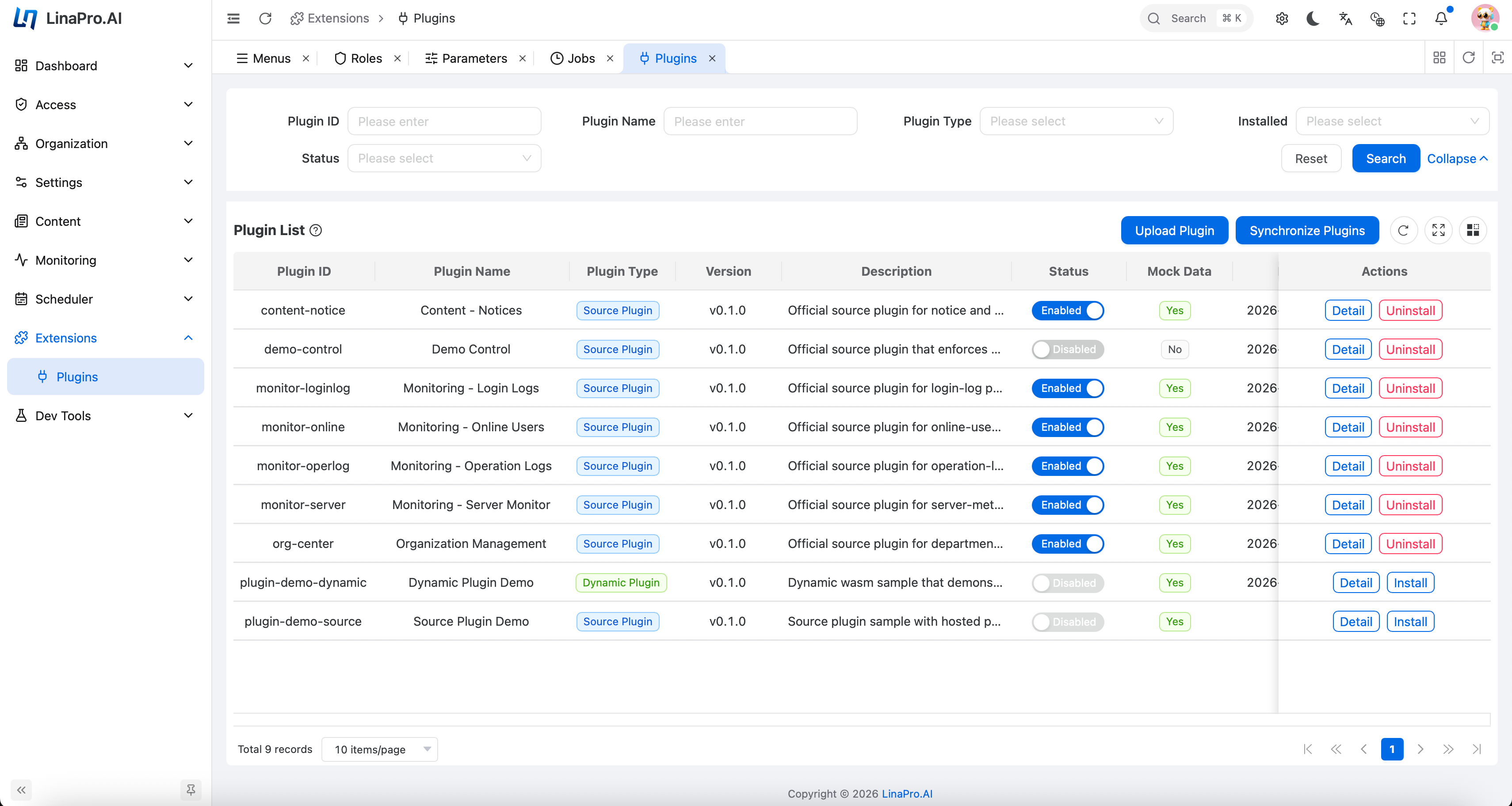
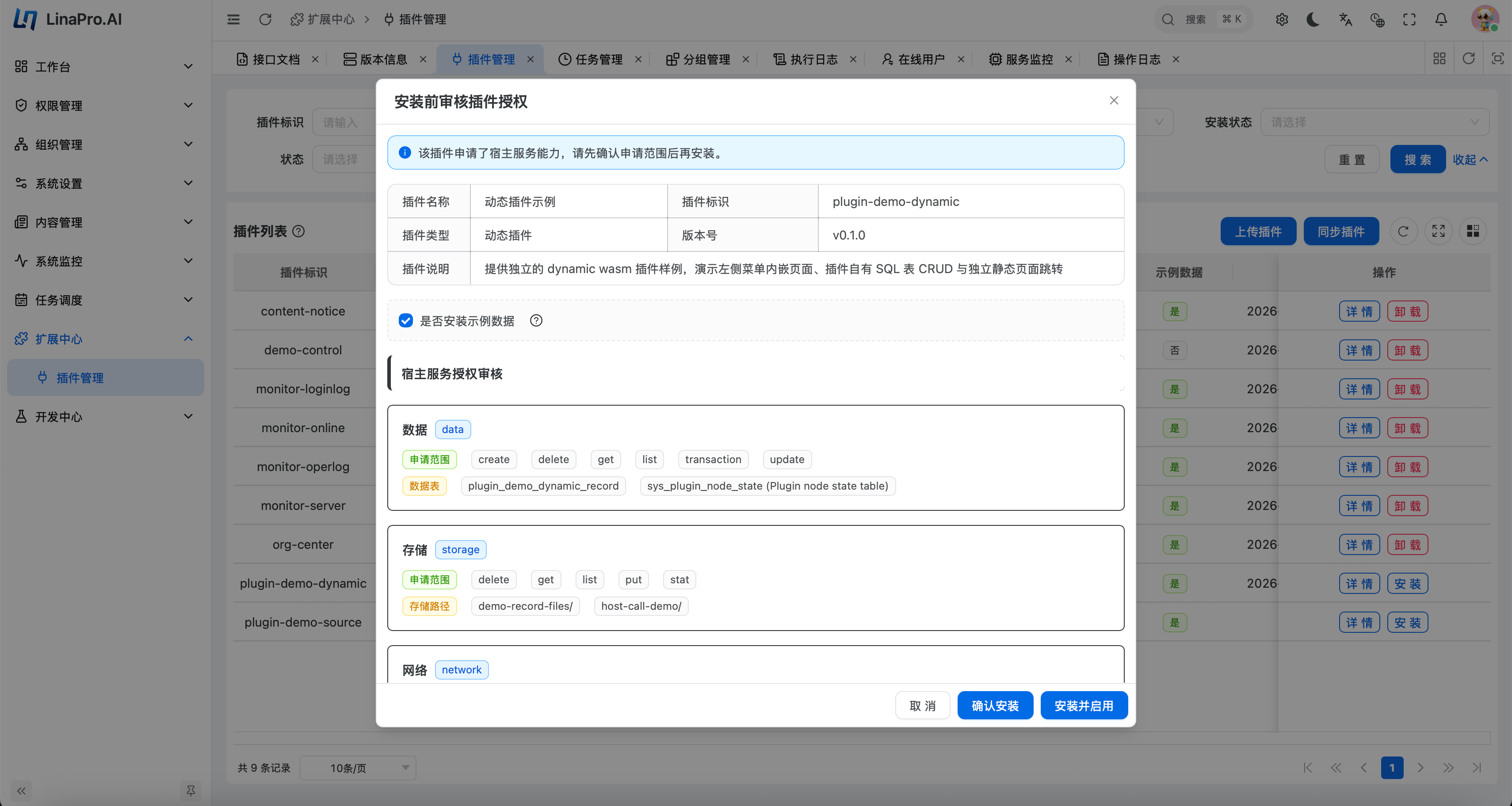
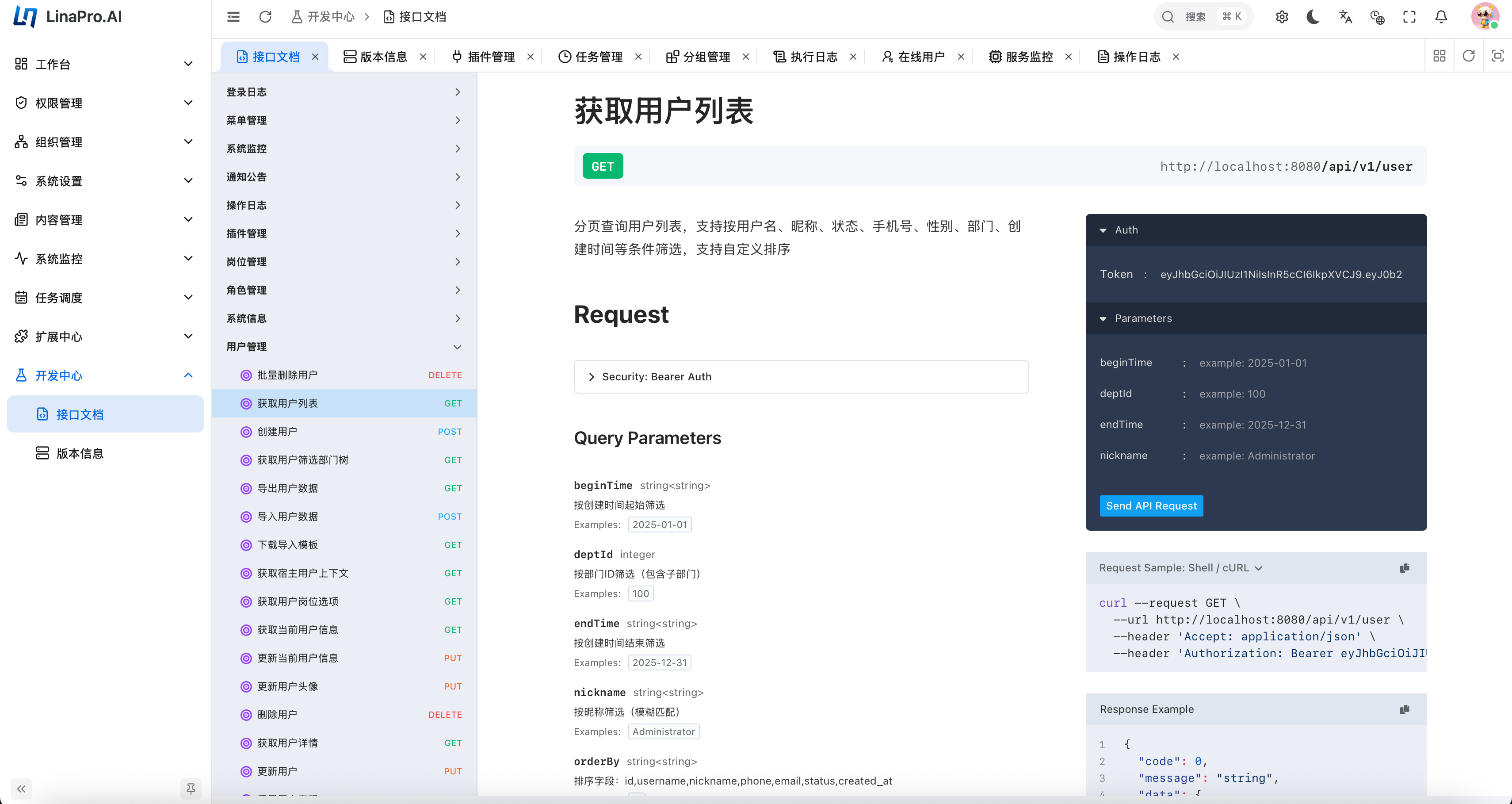
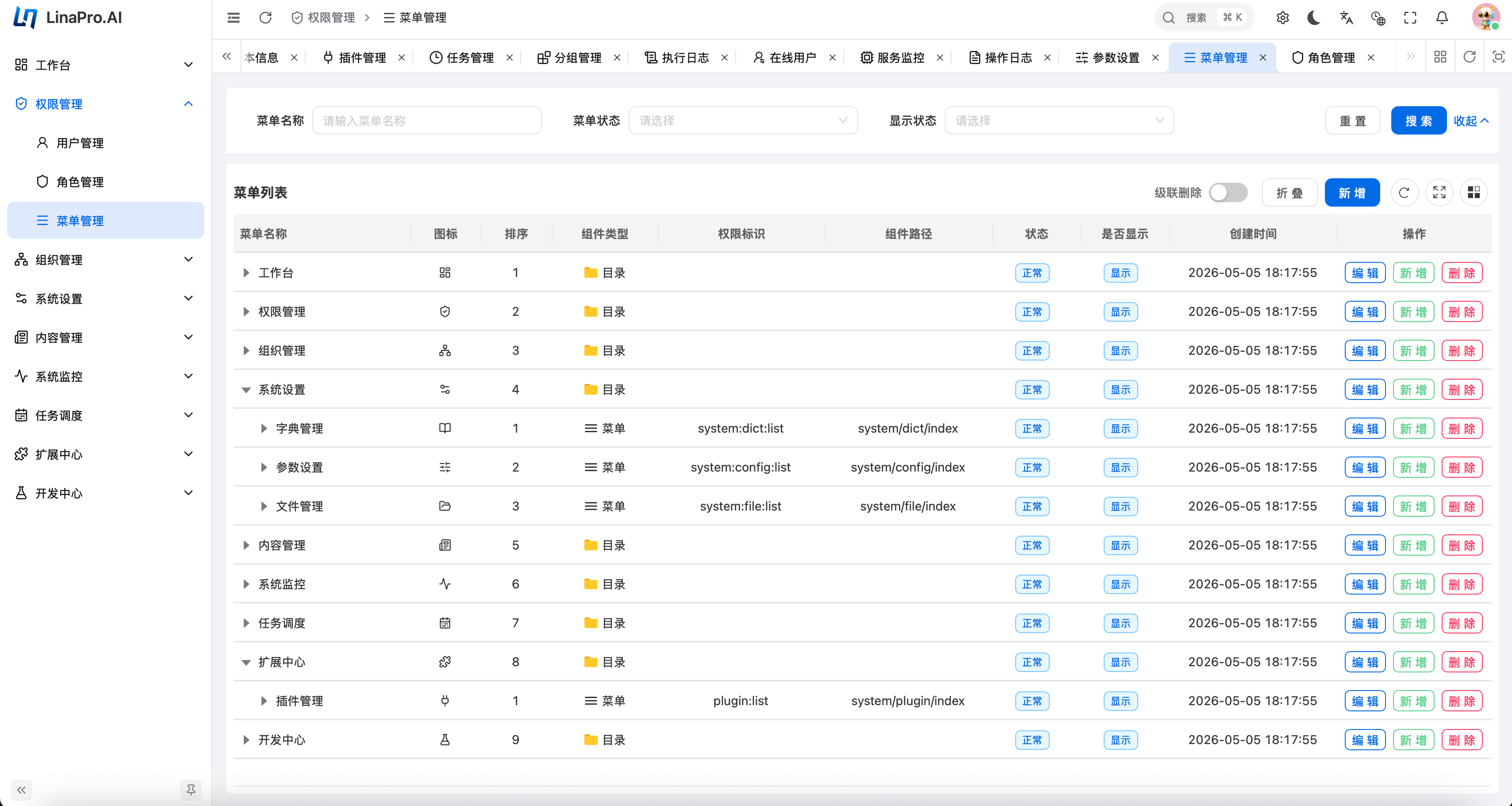
- Supports both single-node and distributed cluster deployments — horizontal scaling requires zero changes to business code
- Built-in distributed locking and key-value caching, with core components that are natively cluster-aware
- The job scheduling subsystem is distribution-aware, automatically preventing duplicate execution across cluster nodes
- Single-node mode does not require
Redis; whencluster.enabled=true, the host requirescluster.coordination: redisand a reachablecluster.redisendpoint before it starts. The current coordination backend isRedis, with the configuration shape intentionally kept open for future backends. - Optional Redis integration tests are disabled by default. Set
LINA_TEST_REDIS_ADDR, for exampleLINA_TEST_REDIS_ADDR=127.0.0.1:6379, to enable tests that require a real Redis instance.
LinaPro is being extended with a pool-based multi-tenant model that keeps the single-tenant experience available by default. When the multi-tenant plugin is not installed or enabled, host and plugin data use tenant_id = 0, which represents the PLATFORM tenant.
When the multi-tenant plugin is enabled:
- Tenant identity is resolved by the built-in chain:
override,jwt,session,header,subdomain, anddefault; supported runtime policy changes are stored by the plugin, not by the host config template. - The isolation model is code-owned and currently fixed to
pool. - User-to-tenant cardinality is code-owned and defaults to
multi, allowing one user to belong to multiple tenants. - Plugins declare
scope_nature,supports_multi_tenant, anddefault_install_modeinplugin.yaml; new-tenant auto-enable policy is managed by the platform registry, not by the manifest. platform_onlyplugins are governed globally, whiletenant_awareplugins can be enabled globally or per tenant.- LifecycleGuard hooks may veto plugin disable or uninstall operations, and
plugin.allowForceUninstallcontrols whether platform administrators can force an audited override.
Typical internal BU usage starts with the built-in multi cardinality, prompt ambiguity handling, and tenant-scoped enablement for audit or content plugins. This iteration uses the pool model only; rootDomain is reserved for a later settings release and is not configurable yet. Schema-per-tenant, database-per-tenant, quotas, billing, and branding customization are reserved for future work.
| Category | Technology | Notes |
|---|---|---|
| Backend Language | Go |
v1.25.0 |
| Backend Framework | GoFrame |
v2.10.1 — routing, ORM, configuration, and more |
| Frontend Framework | Vue 3 |
Built on the Vben 5 admin template |
| Frontend UI | Ant Design Vue |
Enterprise-grade UI component library |
| Build Tool | Vite |
Lightning-fast frontend builds |
| Database | PostgreSQL / optional SQLite |
PostgreSQL 14+ is the default data store. SQLite can be used for local demo or smoke testing; it is single-node only and not for production. |
| Plugin Runtime | WebAssembly |
tetratelabs/wazero, powering WASM dynamic plugins |
LinaPro uses PostgreSQL as the default database. Prepare a PostgreSQL 14+ instance before running make init or make dev; those commands do not start or manage the database.
For local development, start a matching container:
docker run --name linapro-postgres \
  -e POSTGRES_USER=postgres \
  -e POSTGRES_PASSWORD=postgres \
  -e POSTGRES_DB=linapro \
  -p 5432:5432 \
  --health-cmd pg_isready \
  --health-interval 10s \
  --health-timeout 5s \
  --health-retries 5 \
  -d postgres:14-alpine
If local port 5432 is already occupied, map the container to another host port
such as 15432:5432 and update database.default.link to use that host port.
Install frontend dependencies once, then initialize and run the project:
corepack enable
cd apps/lina-vben
pnpm install
cd ../..
cd hack/tools/linactl
go run . init confirm=init
go run . mock confirm=mock
go run . dev
Linux and macOS users can keep using the compatibility Makefile entrypoint:
make init confirm=init
make mock confirm=mock
make dev
Windows users can use the cross-platform Go entrypoint above. The repository also provides a thin make.cmd wrapper for cmd.exe; because cmd.exe resolves executable file extensions in the current directory, the .cmd suffix can be omitted and the command can be written as make:
make init confirm=init
make mock confirm=mock
make dev
In PowerShell, call the wrapper with the current-directory prefix. On default Windows environments, the .cmd suffix can also be omitted as .\make. Use .\make.cmd when you want to avoid ambiguity with another installed make command:
.\make init confirm=init
.\make mock confirm=mock
.\make dev
The default backend link is:
database:
  default:
    link: "pgsql:postgres:postgres@tcp(127.0.0.1:5432)/linapro?sslmode=disable"
linactl init and make init are operations bootstrap commands. They use the configured database account and require permission to connect to the system database, create and drop the target database, terminate target-database connections, create tables and indexes, write comments, and insert seed data. If those permissions are missing, initialization fails instead of falling back to a lower-privilege runtime mode.
For external hosted PostgreSQL, such as RDS or Aliyun PolarDB, point database.default.link at the provider host and port. Use an initialization account with the permissions above for linactl init or make init, then run the service with the same configured database unless your deployment process replaces the config with a runtime account after initialization.
For a single-node development demo, switch the link to SQLite:
database:
  default:
    link: "sqlite::@file(./temp/sqlite/linapro.db)"
SQLite mode is for local demo and smoke testing only. It is not a production deployment mode.