Conversation


|
Thank you for submitting an extension. The result looks impressive. The code is quite big. Does it come from a library or did you wrote it specifically for this extension?
A few suggestions from a quick look:
Let me know if this makes sense and if you can make these changes or part of it. This will help update the extension when new GDevelop versions are released. |

|
Tried it and it looks very very cool. It's a big extension but let's see if we can get it inside the experimental extensions! |

|
!update NatureElements.zip |
|
Extension updated with errors: |

 github-actions
bot
force-pushed
the
extension/baldieandbaldie-commits/2058
branch
from
github-actions
bot
force-pushed
the
extension/baldieandbaldie-commits/2058
branch
from
40b91ca to
3133e84
Compare
|
Hello, just to make sure, are you waiting for feedback or are you still working on the extension? |
I've done the refactoring per your comments. Tried updating a few days ago but got an error (again). See here Currently traveling, but I'll give it another go later today. Got a nice new demo as well. |
|
Actually, this is not an error, your update came though, you can see the commit above. 
|
|
@D8H awesome! I'll update the demo as well in a bit. It uses the incorrect extension version anyways. |
3 participants


Description
This extension adds wind swaying ability and optional GPU instancing to 3D objects (trees, grass, bushes) with frustum and distance culling.
How to use the extension
How to use:
Import your 3D object (tree, bush, grass...) and add the Foliage swaying behavior to it.
Choose from various object settings and parameters, then add the object to your scene.
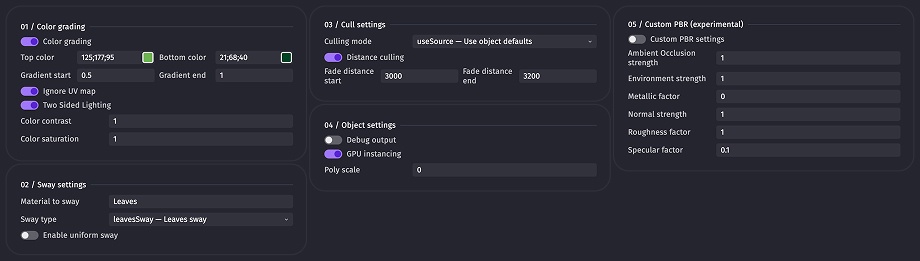
Add the Update foliage sway action, choose its parameters, and run it every frame.

Optionally use the Set wind gust action at the beginning of the scene.

Play your scene.
Checklist
Example file
NatureElementsDemo.zip
Please do not redestribute.
Extension file
NatureElements.zip
Extension by @baldieandbaldie-commits
You can update the extension on this "Pull Request" by commenting the update command: in the comment field, type
!update, then drag and drop a zip file with your extension file in the commenting field, like how you initially submitted the extension. It should look like this:It can take a few seconds for the file to fully upload and show as the above. Once it is like shown above, click "Comment" and let the bot do the rest!