Skip to content

[Payment due @hoangzinh] Add Paid by search filter UI, table column, sorting, and export - #98326

Merged
JS00001 merged 20 commits into
Expensify:mainfrom
c3024:chaitanya/670393-payer-search-filter
Aug 31, 2026
Merged

[Payment due @hoangzinh] Add Paid by search filter UI, table column, sorting, and export#98326
JS00001 merged 20 commits into
Expensify:mainfrom
c3024:chaitanya/670393-payer-search-filter

Conversation

@c3024

@c3024 c3024 commented Aug 11, 2026

Copy link
Copy Markdown
Contributor

Explanation of Change

  • Adds a new paidBy: filter (also typable as paid-by:, like expense-type:) to the advanced filters and filter bar as a multi-select user filter for expense, expense report, invoice, and trip searches. It matches the user who actually paid a report. The existing payer: filter (the responsible payer, powering the Pay to-do) is unchanged and stays hidden from the filters UI, per the Slack naming decision.
  • Adds a Paid by column to expense report search views, derived from the actor of the latest payment report action in the snapshot (same pattern as First approver), with sorting and CSV export support.

Fixed Issues

$ https://github.com/Expensify/Expensify/issues/670393
PROPOSAL:

Tests

  1. Sign in as a workspace member who has paid reports.
  2. Go to Reports > Expense reports and open the columns picker. Enable the Paid by column.
  3. Verify the Paid by column shows the person who paid each paid report and is blank for unpaid reports.
  4. Click the Paid by column header and verify the rows sort by that name.
  5. Open Filters, choose Paid by, select one or more users, and apply.
  6. Verify the results only include reports paid by the selected users (unpaid reports never match), and the filter bar shows a Paid by chip.
  7. Select the paid reports and click on Export from the selected drop down > Current View. Verify the exported file has a Paid by column with the name of the user who paid.
Screen.Recording.2026-08-18.at.4.54.26.PM.mov
  • Verify that no errors appear in the JS console

Offline tests

NA

QA Steps

Same as tests.

  • Verify that no errors appear in the JS console

PR Author Checklist

  • I linked the correct issue in the ### Fixed Issues section above
  • I wrote clear testing steps that cover the changes made in this PR
    • I added steps for local testing in the Tests section
    • I added steps for the expected offline behavior in the Offline steps section
    • I added steps for Staging and/or Production testing in the QA steps section
    • I added steps to cover failure scenarios (i.e. verify an input displays the correct error message if the entered data is not correct)
    • I turned off my network connection and tested it while offline to ensure it matches the expected behavior (i.e. verify the default avatar icon is displayed if app is offline)
    • I tested this PR with a High Traffic account against the staging or production API to ensure there are no regressions (e.g. long loading states that impact usability).
  • I included screenshots or videos for tests on all platforms
  • I ran the tests on all platforms & verified they passed on:
    • Android: Native
    • Android: mWeb Chrome
    • iOS: Native
    • iOS: mWeb Safari
    • MacOS: Chrome / Safari
  • I verified there are no console errors (if there's a console error not related to the PR, report it or open an issue for it to be fixed)
  • I followed proper code patterns (see Reviewing the code)
    • I verified that comments were added to code that is not self explanatory
    • I verified that any new or modified comments were clear, correct English, and explained "why" the code was doing something instead of only explaining "what" the code was doing.
    • I verified any copy / text that was added to the app is grammatically correct in English. It adheres to proper capitalization guidelines (note: only the first word of header/labels should be capitalized), and is either coming verbatim from figma or has been approved by marketing (in order to get marketing approval, ask the Bug Zero team member to add the Waiting for copy label to the issue)
  • If a new code pattern is added I verified it was agreed to be used by multiple Expensify engineers
  • I followed the guidelines as stated in the Review Guidelines
  • I tested other components that can be impacted by my changes (i.e. if the PR modifies a shared library or component like Avatar, I verified the components using Avatar are working as expected)
  • If a new CSS style is added I verified that:
    • A similar style doesn't already exist
    • The style can't be created with an existing StyleUtils function (i.e. StyleUtils.getBackgroundAndBorderStyle(theme.componentBG))
  • If new assets were added or existing ones were modified, I verified that:
    • The assets are optimized and compressed (for SVG files, run npm run compress-svg)
    • The assets load correctly across all supported platforms.
  • If the PR modifies code that runs when editing or sending messages, I tested and verified there is no unexpected behavior for all supported markdown - URLs, single line code, code blocks, quotes, headings, bold, strikethrough, and italic.
  • If the PR modifies a generic component, I tested and verified that those changes do not break usages of that component in the rest of the App (i.e. if a shared library or component like Avatar is modified, I verified that Avatar is working as expected in all cases)
  • If the PR modifies a component related to any of the existing Storybook stories, I tested and verified all stories for that component are still working as expected.
  • If the PR modifies a component or page that can be accessed by a direct deeplink, I verified that the code functions as expected when the deeplink is used - from a logged in and logged out account.
  • If the PR modifies the UI (e.g. new buttons, new UI components, changing the padding/spacing/sizing, moving components, etc) or modifies the form input styles:
    • I verified that all the inputs inside a form are aligned with each other.
    • I added Design label and/or tagged @Expensify/design so the design team can review the changes.
  • I added unit tests for any new feature or bug fix in this PR to help automatically prevent regressions in this user flow.
  • If the main branch was merged into this PR after a review, I tested again and verified the outcome was still expected according to the Test steps.

Screenshots/Videos

Android: Native
Android: mWeb Chrome
iOS: Native
iOS: mWeb Safari
MacOS: Chrome / Safari
Screen.Recording.2026-08-18.at.4.54.26.PM.mov

The payer filter is now shown in the advanced filters and filter bar as a
multi-select user filter, and a Payer column is available on expense report
search views. The column is derived from the actor of the latest payment
report action returned in the search snapshot, matching how First approver
is derived, and is sortable and exportable.
@melvin-bot

melvin-bot Bot commented Aug 11, 2026

Copy link
Copy Markdown

Hey, I noticed you changed src/languages/en.ts in a PR from a fork. For security reasons, translations are not generated automatically for PRs from forks.

If you want to automatically generate translations for other locales, an Expensify employee will have to:

  1. Look at the code and make sure there are no malicious changes.
  2. Run the Generate static translations GitHub workflow. If you have write access and the K2 extension, you can simply click: [this button]

Alternatively, if you are an external contributor, you can run the translation script locally with your own OpenAI API key. To learn more, try running:

npx ts-node ./scripts/generateTranslations.ts --help

Typically, you'd want to translate only what you changed by running npx ts-node ./scripts/generateTranslations.ts --compare-ref main

@codecov

codecov Bot commented Aug 11, 2026

Copy link
Copy Markdown

c3024 added 8 commits August 12, 2026 13:12
Matches the backend gate on report status, so canceled or reopened reports fall back to having no payer column value.
The payer filter keeps its existing responsible-payer meaning (hidden
from the filters UI as before) and the payment-actor work moves to a
new paidBy filter key, table column, and translations. The paid-by
syntax also accepts paid-by: like the other multi-word keys.
@c3024 c3024 changed the title Add Payer search filter UI, table column, sorting, and export Add Paid by search filter UI, table column, sorting, and export Aug 12, 2026
@quinthar quinthar removed the #migrate label Aug 13, 2026
@melvin-bot

melvin-bot Bot commented Aug 17, 2026

Copy link
Copy Markdown

Hey, I noticed you changed src/languages/en.ts in a PR from a fork. For security reasons, translations are not generated automatically for PRs from forks.

If you want to automatically generate translations for other locales, an Expensify employee will have to:

  1. Look at the code and make sure there are no malicious changes.
  2. Run the Generate static translations GitHub workflow. If you have write access and the K2 extension, you can simply click: [this button]

Alternatively, if you are an external contributor, you can run the translation script locally with your own OpenAI API key. To learn more, try running:

npx bun ./scripts/generateTranslations.ts --help

Typically, you'd want to translate only what you changed by running npx bun ./scripts/generateTranslations.ts --compare-ref main

c3024 added 2 commits August 17, 2026 18:21
…r-search-filter

# Conflicts:
#	src/libs/SearchParser/autocompleteParser.js
#	src/libs/SearchParser/searchParser.js
@c3024
c3024 marked this pull request as ready for review August 18, 2026 11:37
@c3024
c3024 requested review from a team as code owners August 18, 2026 11:37
@melvin-bot
melvin-bot Bot requested a review from hoangzinh August 18, 2026 11:37
@melvin-bot

melvin-bot Bot commented Aug 18, 2026

Copy link
Copy Markdown

@hoangzinh Please copy/paste the Reviewer Checklist from here into a new comment on this PR and complete it. If you have the K2 extension, you can simply click: [this button]

@melvin-bot
melvin-bot Bot requested review from joekaufmanexpensify and removed request for a team August 18, 2026 11:37
Comment thread src/libs/SearchUIUtils.ts Outdated
@c3024

c3024 commented Aug 28, 2026

Copy link
Copy Markdown
Contributor Author

@hoangzinh the pr is ready for rereview.

@hoangzinh

Copy link
Copy Markdown
Contributor

@c3024, can you check this bug?

Screen.Recording.2026-08-28.at.18.22.43.mov

@hoangzinh

Copy link
Copy Markdown
Contributor

Other than that, I believe we're all set.

@c3024

c3024 commented Aug 28, 2026

Copy link
Copy Markdown
Contributor Author
Screen.Recording.2026-08-28.at.5.25.38.PM.mov

Fixed.

@JS00001

JS00001 commented Aug 31, 2026

Copy link
Copy Markdown
Contributor

@hoangzinh can you hit another review please?

@hoangzinh hoangzinh left a comment

Copy link
Copy Markdown
Contributor

Choose a reason for hiding this comment

The reason will be displayed to describe this comment to others. Learn more.

🚢

@melvin-bot melvin-bot Bot changed the title Add Paid by search filter UI, table column, sorting, and export [Payment due @hoangzinh] Add Paid by search filter UI, table column, sorting, and export Aug 31, 2026
@melvin-bot

melvin-bot Bot commented Aug 31, 2026

Copy link
Copy Markdown

🎯 @hoangzinh, thanks for reviewing and testing this PR! 🎉

A payment issue will be created for your review once this PR is deployed to production.
E/E issue linked to the PR - https://www.github.com/Expensify/Expensify/issues/670393.

If payment is not needed (e.g., regression PR review fix etc), react with 👎 to this comment to prevent the payment issue from being created.

@hoangzinh

Copy link
Copy Markdown
Contributor

@hoangzinh can you hit another review please?

all yours @JS00001

@JS00001
JS00001 merged commit 4636467 into Expensify:main Aug 31, 2026
38 of 40 checks passed
@github-actions

Copy link
Copy Markdown
Contributor

🚧 JS00001 has triggered a test Expensify/App build. You can view the workflow run here.

@OSBotify

Copy link
Copy Markdown
Contributor

🚀 Deployed to staging by https://github.com/JS00001 in version: 9.4.65-0 🚀

platform result
🕸 web 🕸 success ✅
🤖 android 🤖 success ✅
🍎 iOS 🍎 success ✅

@MelvinBot

Copy link
Copy Markdown
Contributor

Yes — help site changes were required. Draft PR: #99963

This PR added a paid-by: search operator and a Paid by column, and neither appeared anywhere under docs/articles. payer: stays hidden from the filters UI, so it needs no documentation.

What the docs PR changes

File Change
Use-Search-Operators-to-Filter-and-Analyze.md Adds paid-by: to the report operator list, next to paid-status:. Covers comma-separated values, that unpaid reports never match, and that it also works on expense, invoice, and trip searches
Using-Reports-in-New-Expensify.md Adds Paid by to the Spend column list, noting it stays blank until the report is paid

Keywords in both articles were extended so "paid by" searches reach them. No new article — both changes extend existing lists, so the one-workflow-per-article rule in HELP_AUTHORING_GUIDELINES.md is unaffected. No headings changed and no screenshots added.

UI verification

Ran the web tester against the live app to confirm exact labels before writing.

Step Status Observation
Columns picker on Reports contains a Paid by entry pass Reports view → DisplayEdit columns opens a Columns picker with a row labeled exactly Paid by
Filters panel on Reports has a Paid by row pass Filters → left column lists Type, Status, From, To, Paid by, Date, Total… Opens an is / is not sub-page with a user checkbox list
Search bar accepts paid-by: partial Token is accepted with no error state. The suggestion dropdown did not paint in the harness — a known-good control (from:) behaved identically, so this looks like a harness limitation, not a gap in the feature
Evidence (5)

Columns picker on the Reports view showing the Paid by entry
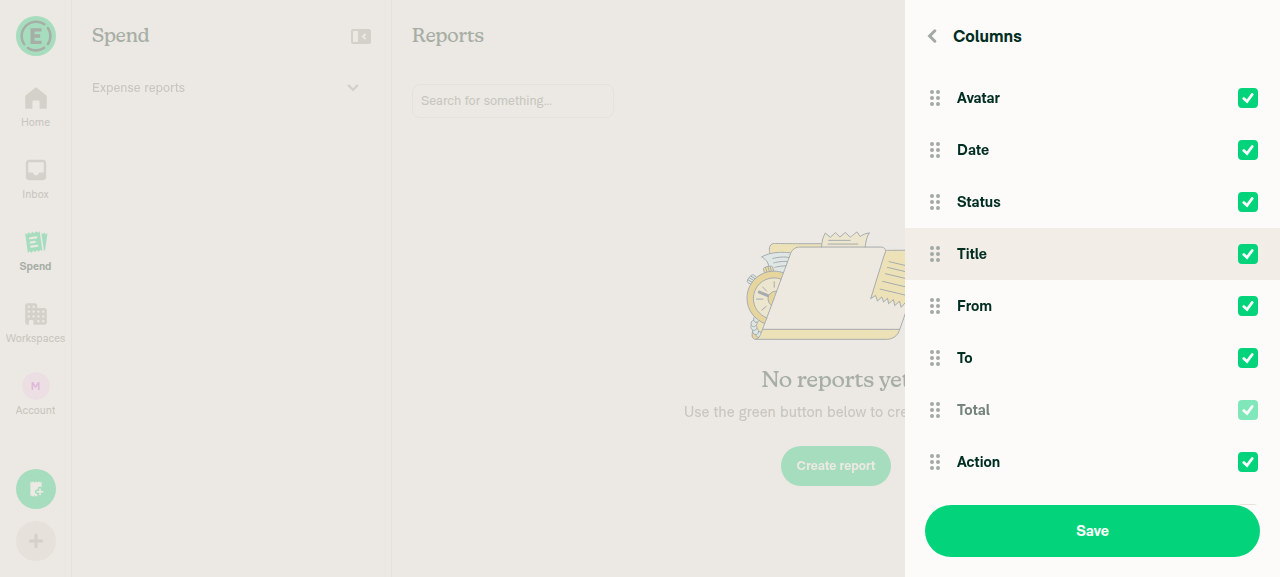
Columns picker on the Reports view showing the Paid by entry

Filters panel on the Reports view showing the Paid by row
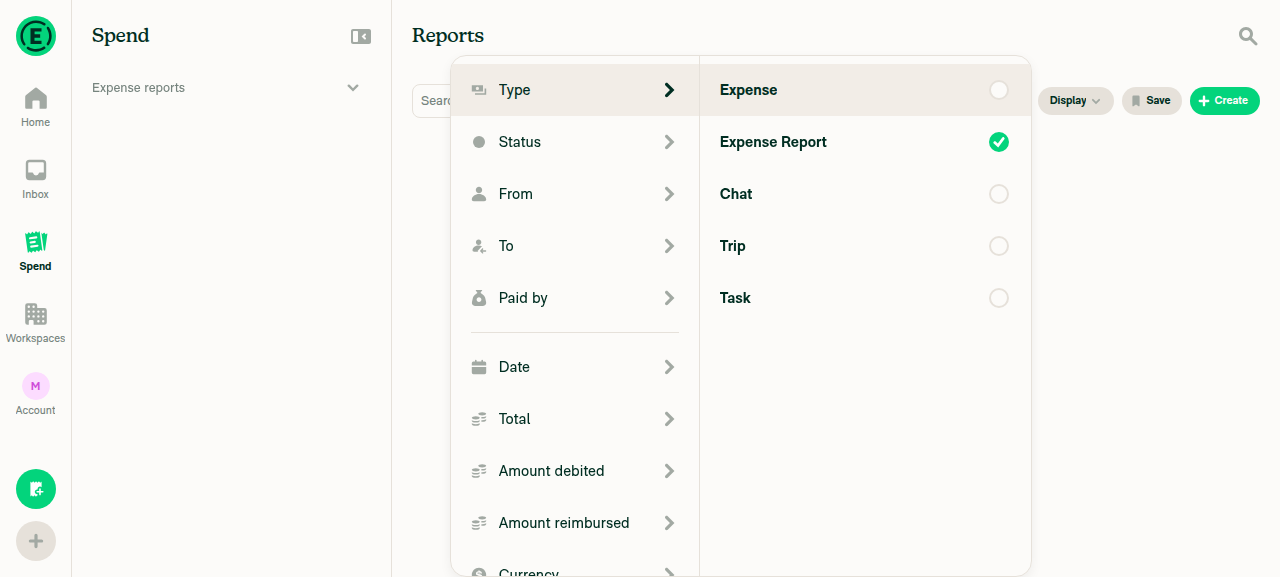
Filters panel on the Reports view showing the Paid by row

Paid by filter sub-page with a user selected
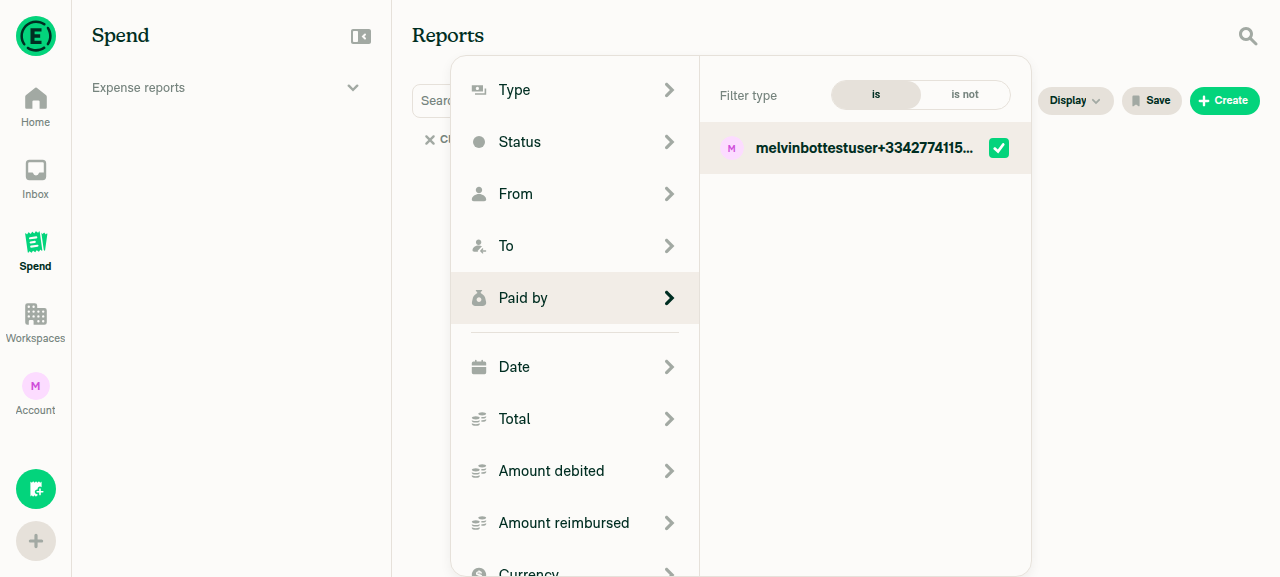
Paid by filter sub-page with a user selected

Paid by filter applied as a chip in the search bar
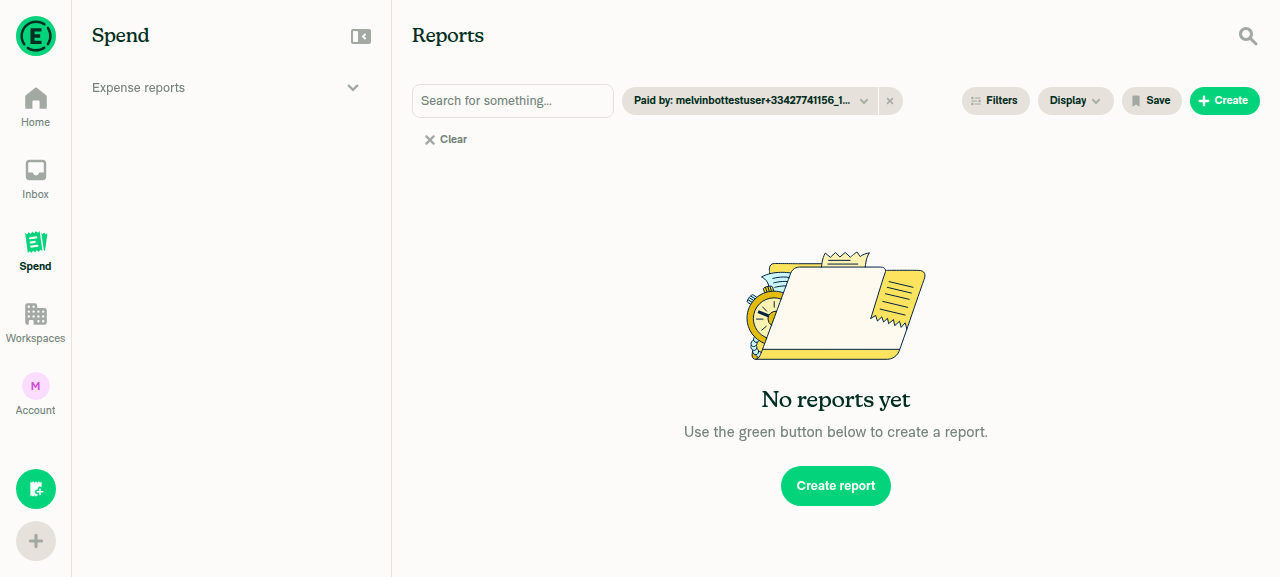
Paid by filter applied as a chip in the search bar

paid-by: typed and accepted in the Reports search bar
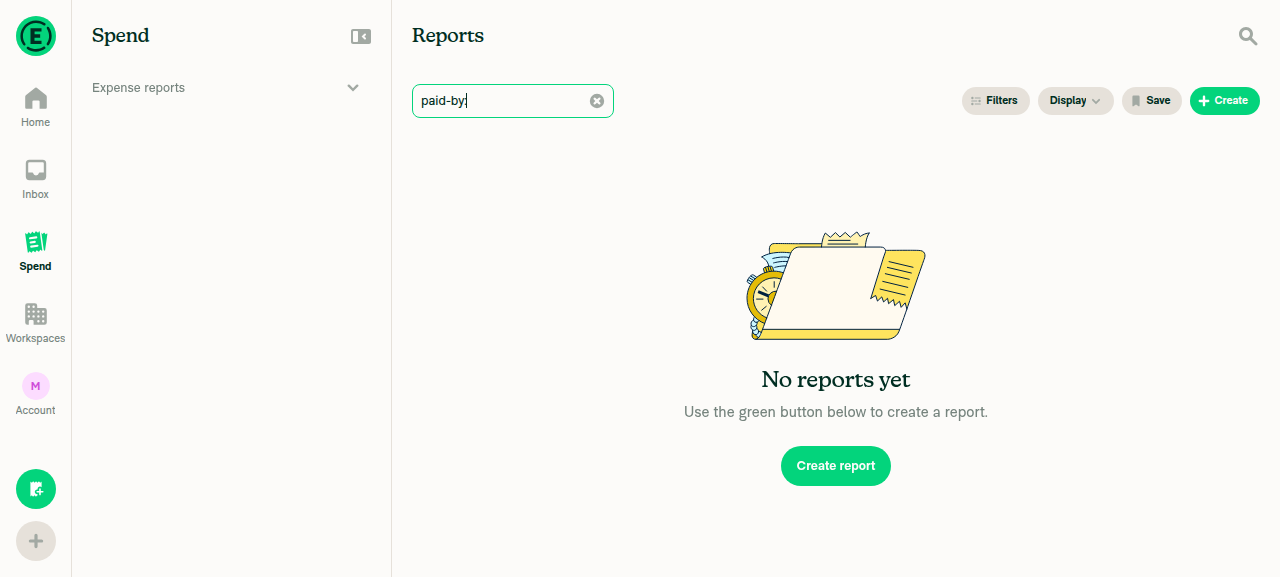
paid-by: typed and accepted in the Reports search bar

Two pre-existing doc inaccuracies I left alone

Both are unrelated to this PR, so they are out of scope for the docs PR — flagging in case you want them fixed separately:

  • Using-Reports-in-New-Expensify.md says to click the Columns icon next to Filters. Live, the path is DisplayEdit columns.
  • Getting-Started-with-the-Spend-Page.md tells web users to click View Results. Live, desktop web filters apply immediately with no apply button.

@c3024, please review the linked help site PR and confirm it reflects the current behavior. Then mark the linked help site PR Ready for review


view run

@mitarachim

Copy link
Copy Markdown

Deploy Blocker #99968 was identified to be related to this PR.

@jponikarchuk

Copy link
Copy Markdown

Deploy Blocker #99969 was identified to be related to this PR.

@trjExpensify

Copy link
Copy Markdown
Contributor

Why did we put this so high up in the filters list in that like "most common" section?

image

Can we move it down to next to Paid-status please? Perhaps @c3024 you can do that in this PR to fix one of the bugs found with this PR?

@c3024

c3024 commented Sep 1, 2026

Copy link
Copy Markdown
Contributor Author

No reason. I didn’t check the position closely. Moved it below “Paid status” in this PR.

@dubielzyk-expensify

Copy link
Copy Markdown
Contributor

Agree with that Tom!

@OSBotify

OSBotify commented Sep 2, 2026

Copy link
Copy Markdown
Contributor

🚀 Deployed to production by https://github.com/francoisl in version: 9.4.65-3 🚀

platform result
🕸 web 🕸 success ✅
🤖 android 🤖 success ✅
🍎 iOS 🍎 success ✅

Bundle Size Analysis (Sentry):

@melvin-bot

melvin-bot Bot commented Sep 2, 2026

Copy link
Copy Markdown

🤖 Payment issue created: #100091

Sign up for free to join this conversation on GitHub. Already have an account? Sign in to comment

Labels

None yet

Projects

None yet

Development

Successfully merging this pull request may close these issues.