


Free, open-source, and portable 60 FPS screen & audio sharing over local Wi-Fi, Ethernet LAN, or mobile hotspot without internet.
Viewers connect instantly via any web browser on desktop, tablet, or smartphone (iOS Safari, Android Chrome) with zero client software, browser extensions, or cloud accounts required.
🌐 Official Website: https://screentask.eslamx.com/ · 🚀 What's New in 2.0: https://screentask.eslamx.com/v2 · 📦 Legacy v1.2 Archive: https://screentask.eslamx.com/v1
| Edition | Target OS | Package Size | Download Link |
|---|---|---|---|
ScreenTask 2.0 Standalone Single-File .EXE (Recommended) |
Windows 10 & 11 (64-bit) | ~160 MB (Includes .NET 9 Runtime) | Download Standalone .EXE |
ScreenTask 2.0 Lightweight Portable .ZIP |
Windows 10 & 11 (64-bit, requires .NET 9) | ~7.0 MB | Download Portable .ZIP |
SHA-256 Checksums (SHA256SUMS.txt) |
Verification | 210 B | View SHA256SUMS.txt |
| ScreenTask v1.2 Classic (Legacy Archive) | Windows Vista, 7, 8, 10, 11 (32-bit & 64-bit) | 750 KB (.exe) / 292 KB (.zip) |
Legacy v1.2 Archive |
ScreenTask 2.0 is a ground-up modernization of the original 2015 utility:
- 🚀 Real-Time 30-60 FPS Streaming: Replaced 2 FPS image polling with a high-performance, low-latency dual-channel binary WebSocket streaming pipeline (<50ms LAN latency).
- 🔊 System & Microphone Audio Sharing: Stream live PC system audio (WASAPI Loopback) or microphone input synchronized with the video so viewers can watch movies, presentations, and games with full sound.
- 🪟 Window & Application Sharing: Share individual open applications (e.g. Visual Studio Code, PowerPoint, browser windows) using the visual thumbnail picker (
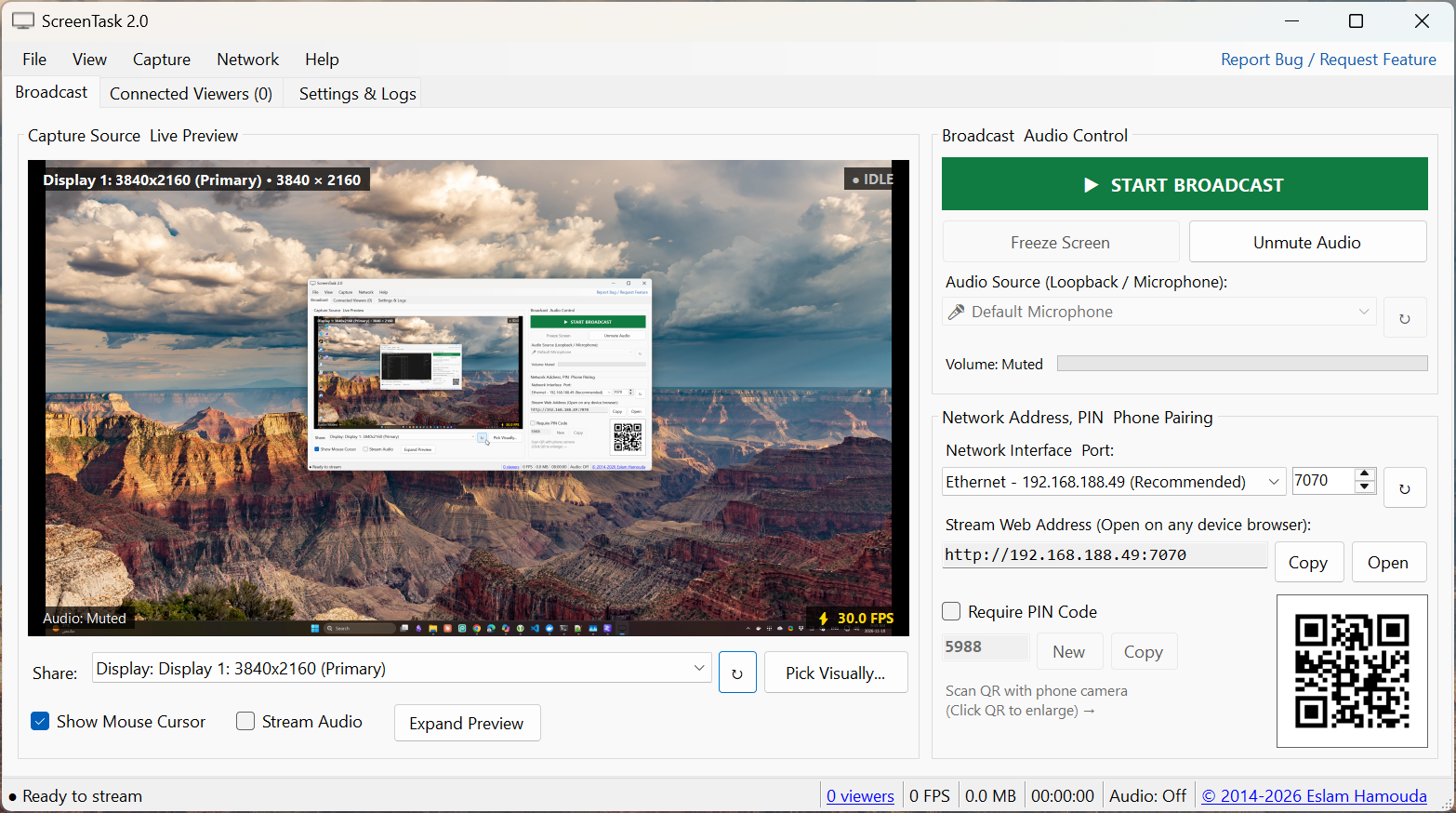
Pick Visually...) instead of exposing your entire desktop. - 📱 Instant QR Code Pairing: Desktop app generates a crisp vector QR code right on the main Broadcast tab (with click-to-enlarge projector modal) so viewers can point their phone camera at the PC screen and start watching immediately.
- 👥 Connected Viewers & Fleet Management: Real-time LAN viewer list with device & browser identification, live RTT ping measurement, active view mode detection (Pinch Zoom, Fullscreen), individual viewer audio mute, disconnect/kick controls, and on-screen broadcast toast announcements.
- 🖥️ Clean Native Windows 11/10 UI: Compact 3-tab native WinForms console (
Broadcast,Connected Viewers,Settings & Logs) using standardTabControl,GroupBox, andTableLayoutPanelcontainers in the clean native Windows Light theme with a live 16:9 confidence monitor and opt-in audio streaming (muted by default). - 💾 Zero-Disk Architecture: Video frames, audio chunks, and embedded web viewer assets are processed and served entirely in-memory (
ArrayPool<byte>); zero files are written to SSD/HDD. - 🔒 Lock Screen & Sleep Resilience: Handles Windows lock screen (
Win + L) and desktop session switching gracefully without crashing or disconnecting viewers. - 🎨 Next-Gen Mobile-First Web Viewer: Redesigned with the Slate & Dynamic Indigo theme from screentask.eslamx.com, featuring:
- Fullscreen & mobile pinch-to-zoom (up to 5x) plus double-tap zoom for reading fine text and code on smartphones.
- Web Audio API player with volume slider and mute controls.
- Live stream HUD (FPS counter, resolution, RTT latency).
- Clean 4-digit PIN authentication dialog.
- ⚡ Modern .NET 9 & Standalone Portability: Upgraded from legacy .NET Framework 4.8 to modern .NET 9 with pure Single-File publishing and embedded web assets.
| Feature | ScreenTask 1.x (2015–2022) | ScreenTask 2.0 (2026) |
|---|---|---|
| Streaming Protocol | HTTP Polling (img.src = ...?rand=) |
Dual-Channel Binary WebSockets |
| Frame Rate | ~2–5 FPS (slideshow) | 30–60 FPS (fluid real-time) |
| Latency | 500ms – 2000ms | Sub-50ms |
| Audio Streaming | ❌ No | ✅ Yes (WASAPI System & Mic Audio) |
| Capture Sources | Full monitors only | Full monitors + Individual app windows |
| Viewer Management | ❌ None (blind broadcast) | ✅ Live viewer list, RTT ping, mute/kick & toast alerts |
| Disk I/O | Constantly writes ScreenTask.jpg to disk |
Zero disk writes (100% in RAM) |
| Mobile Pairing | Manual IP & port typing | Instant QR Code Camera Scan |
| Mobile Gestures | Fixed viewport | Pinch-to-zoom (5x) & two-finger pan |
| Host Runtime | Legacy .NET Framework 4.5 / 4.8 | Modern .NET 9 Standalone Single-File |
- Download the latest
ScreenTask-v2.0-win-x64-standalone.exefrom Releases or screentask.eslamx.com. - Launch the executable (zero installation or external
WebServerfolder required). - Select your Network Interface & Port (Wi-Fi, Mobile Hotspot, or Ethernet).
- Choose your capture source under Share (full Display or click Pick Visually... to choose a specific application window).
- Check Stream Audio (or click Unmute Audio) if you want to broadcast PC system sound or microphone audio.
- Click ▶ START BROADCAST.
- On Mobile / Tablet: Scan the QR code shown in the bottom-right corner of the ScreenTask window using your phone camera.
- On Desktop / Laptop / Smart TV: Open any modern web browser and navigate to the displayed Stream Web Address (e.g.
http://192.168.1.100:7070).
- Windows 10 (version 1809+) or Windows 11
- .NET 9.0 SDK
# Clone repository
git clone https://github.com/EslaMx7/ScreenTask.git
cd ScreenTask

# Build solution
dotnet build -c Release

# Run automated unit, integration, and STA UI tests
dotnet test -c Release

# Publish standalone single-file binary (with embedded web viewer assets)
dotnet publish ScreenTask/ScreenTask.csproj -c Release -r win-x64 --self-contained true `
  -p:PublishSingleFile=true -p:IncludeNativeLibrariesForSelfExtract=true
The published executable will be available at:
ScreenTask/bin/Release/net9.0-windows10.0.19041.0/win-x64/publish/ScreenTask.exe
Have an idea for ScreenTask 2.0 or encountered an issue?
- In-App: Click Report Bug / Request Feature in the top menu bar (or Help → Report a Bug...) to generate a pre-filled template with system & session diagnostics.
- GitHub Issues (Recommended): Open an Issue on GitHub
- Email Support: Send feedback or private diagnostic logs to support@eslamx.com
Explore step-by-step tutorials on the official website:
- How to Share PC Screen Over Wi-Fi Without Internet (Mobile Hotspot)
- How to Stream PC Screen to Phone or Tablet Browser
- Windows 11 ScreenTask Setup & Firewall Guide
- Troubleshooting ScreenTask: Fixing Port Conflicts & Firewall
ScreenTask is released under the GNU General Public License v3.0 (GPLv3). See LICENSE for details.