
This Ansible collection provides control over a Check Point machine using Check Point's web-services APIs.
This is the repository of the gaia collection which can be found here - https://galaxy.ansible.com/check_point/gaia
Red Hat customers should install this certified collection from Red Hat Ansible Automation Hub.
Installing from Automation Hub requires an offline token, which you can get from
https://console.redhat.com/ansible/automation-hub/token. Configure Automation Hub as a
Galaxy server in your ansible.cfg:
[galaxy]
server_list = automation_hub, release_galaxy

[galaxy_server.automation_hub]
url=https://console.redhat.com/api/automation-hub/content/published/
auth_url=https://sso.redhat.com/auth/realms/redhat-external/protocol/openid-connect/token

[galaxy_server.release_galaxy]
url=https://galaxy.ansible.com/
Provide the token through an environment variable, so it isn't stored in ansible.cfg:
export ANSIBLE_GALAXY_SERVER_AUTOMATION_HUB_TOKEN=<your_offline_token>See Configuring Red Hat automation hub as the primary content source for more details.
Install this collection with the Ansible Galaxy command-line tool:
ansible-galaxy collection install check_point.gaiaYou can also include it in a requirements.yml file and install it with
ansible-galaxy collection install -r requirements.yml:
collections:
  - name: check_point.gaia
To install a specific version, for example 7.1.0:
ansible-galaxy collection install check_point.gaia:==7.1.0To upgrade the collection to the latest available version:
ansible-galaxy collection install check_point.gaia --upgradeSee using Ansible collections for more details.
- The
ansible.netcommoncollection (installed automatically as a dependency). - The Check Point server should have Gaia API engine installed on. More information can be found at Gaia REST API SK.
- Edit the
hostsso that it will contain a section similar to this one:
[check_point]
%CHECK_POINT_MANAGEMENT_SERVER_IP%
[check_point:vars]
ansible_httpapi_use_ssl=True
ansible_httpapi_validate_certs=False
ansible_user=%CHECK_POINT_GAIA_USER%
ansible_password=%CHECK_POINT_GAIA_PASSWORD%
ansible_network_os=check_point.gaia.checkpoint
2. Run a playbook:
ansible-playbook your_ansible_playbook.ymlExample playbook:
---
- name: Playbook name
  hosts: check_point
  connection: httpapi
  tasks:
    - name: task to have network
      check_point.gaia.cp_gaia_hostname:
        name: "newhost"
cp_gaia_hostname– Manage the hostname of a Check Point machine over Web Services API.cp_gaia_hostname_facts– Get the hostname of a Check Point machine over Web Services API.cp_gaia_physical_interface– Manage physical interface of a Check Point machine over Web Services API.cp_gaia_physical_interfaces_facts– Get information about physical interfaces of a Check Point machine over Web Services API.cp_gaia_put_file– Add a new file to a Check Point machine over Web Services API.cp_gaia_allowed_clients– manage allowed clients of a Check Point machine over Web Services API.cp_gaia_allowed_clients_facts– get allowed clients of a Check Point machine over Web Services API.cp_gaia_api_versions_facts– get api versions of a Check Point machine over Web Services API.cp_gaia_asset_facts– get assets of a Check Point machine over Web Services API.cp_gaia_banner– manage banner message of a Check Point machine over Web Services API.cp_gaia_banner_facts– get banner message of a Check Point machine over Web Services API.cp_gaia_hostname_on_login_page– manage hostname_on_login_page message of a Check Point machine over Web Services API.cp_gaia_hostname_on_login_page_facts– get hostname_on_login_page message of a Check Point machine over Web Services API.cp_gaia_message_of_the_day– manage message_of_the_day message of a Check Point machine over Web Services API.cp_gaia_message_of_the_day_facts– get message_of_the_day message of a Check Point machine over Web Services API.cp_gaia_bond_interface– manage bond interface of a Check Point machine over Web Services API.cp_gaia_bond_interface_facts– get bond interface of a Check Point machine over Web Services API.cp_gaia_vlan_interface– manage vlan interface of a Check Point machine over Web Services API.cp_gaia_vlan_interface_facts– get vlan interface of a Check Point machine over Web Services API.cp_gaia_bridge_interface– manage bridge interface of a Check Point machine over Web Services API.cp_gaia_bridge_interface_facts– get bridge interface of a Check Point machine over Web Services API.cp_gaia_dhcp_server– manage dhcp server of a Check Point machine over Web Services API.cp_gaia_dhcp_server_facts– get dhcp server of a Check Point machine over Web Services API.cp_gaia_radius_server– manage radius server of a Check Point machine over Web Services API.cp_gaia_radius_server_facts– get radius server of a Check Point machine over Web Services API.cp_gaia_tacacs_server– manage tacacs server of a Check Point machine over Web Services API.cp_gaia_tacacs_server_facts– get tacacs server of a Check Point machine over Web Services API.cp_gaia_dns– manage dns configuration of a Check Point machine over Web Services API.cp_gaia_dns_facts– get dns configuration of a Check Point machine over Web Services API.cp_gaia_ntp– manage ntp configuration of a Check Point machine over Web Services API.cp_gaia_ntp_facts– get ntp configuration of a Check Point machine over Web Services API.cp_gaia_proxy– manage proxy configuration of a Check Point machine over Web Services API.cp_gaia_proxy_facts– get proxy configuration of a Check Point machine over Web Services API.cp_gaia_password_policy– manage password policy configuration of a Check Point machine over Web Services API.cp_gaia_password_policy_facts– get password policy configuration of a Check Point machine over Web Services API.cp_gaia_extended_commands_facts– get extended commands of a Check Point machine over Web Services API.cp_gaia_features_facts– get features of a Check Point machine over Web Services API.cp_gaia_ipv6– manage ipv6 configuration of a Check Point machine over Web Services API.cp_gaia_ipv6_facts– get ipv6 configuration of a Check Point machine over Web Services API.cp_gaia_initial_setup– manage initial setup (FTW) configuration of a Check Point machine over Web Services API.cp_gaia_run_script– run script on a Check Point machine over Web Services API.cp_gaia_run_reboot– run reboot on a Check Point machine over Web Services API.cp_gaia_remote_syslog– manage remote syslog configuration of a Check Point machine over Web Services API.cp_gaia_remote_syslog_facts– get remote syslog configuration of a Check Point machine over Web Services API.cp_gaia_syslog– manage syslog configuration of a Check Point machine over Web Services API.cp_gaia_syslog_facts– get syslog configuration of a Check Point machine over Web Services API.cp_gaia_role– manage roles configuration of a Check Point machine over Web Services API.cp_gaia_role_facts– get roles configuration of a Check Point machine over Web Services API.cp_gaia_user– manage users configuration of a Check Point machine over Web Services API.cp_gaia_user_facts– get users configuration of a Check Point machine over Web Services API.cp_gaia_routes_aggregate_facts– get routes aggregate configuration of a Check Point machine over Web Services API.cp_gaia_routes_bgp_facts– get routes bgp configuration of a Check Point machine over Web Services API.cp_gaia_routes_direct_facts– get routes direct configuration of a Check Point machine over Web Services API.cp_gaia_routes_facts– get routes configuration of a Check Point machine over Web Services API.cp_gaia_routes_kernel_facts– get routes kernel configuration of a Check Point machine over Web Services API.cp_gaia_routes_ospf_facts– get routes ospf configuration of a Check Point machine over Web Services API.cp_gaia_routes_rip_facts– get routes rip configuration of a Check Point machine over Web Services API.cp_gaia_routes_static_facts– get routes static configuration of a Check Point machine over Web Services API.cp_gaia_scheduled_job– manage scheduled job configuration of a Check Point machine over Web Services API.cp_gaia_scheduled_job_facts– get scheduled job configuration of a Check Point machine over Web Services API.cp_gaia_scheduled_job_mail– manage scheduled job mail configuration of a Check Point machine over Web Services API.cp_gaia_scheduled_job_mail_facts– get scheduled job mail configuration of a Check Point machine over Web Services API.cp_gaia_scheduled_snapshot– manage scheduled snapshot configuration of a Check Point machine over Web Services API.cp_gaia_scheduled_snapshot_facts– get scheduled snapshot configuration of a Check Point machine over Web Services API.cp_gaia_diagnostics_facts– get diagnostics configuration of a Check Point machine over Web Services API.cp_gaia_diagnostics_topics_facts– get diagnostics topics configuration of a Check Point machine over Web Services API.cp_gaia_ssh_server_settings– manage ssh server settings of a Check Point machine over Web Services API.cp_gaia_ssh_server_settings_facts– get ssh server settings of a Check Point machine over Web Services API.cp_gaia_static_route– manage static route configuration of a Check Point machine over Web Services API.cp_gaia_static_route_facts– get static route configuration of a Check Point machine over Web Services API.cp_gaia_task_facts– show task in a Check Point machine over Web Services API.cp_gaia_timezones_facts– show time zones in a Check Point machine over Web Services API.cp_gaia_version_facts– show gaia version in a Check Point machine over Web Services API.cp_gaia_expert_password– manage expert password of a Check Point machine over Web Services API.cp_gaia_expert_password_facts– get expert hash password of a Check Point machine over Web Services API.cp_gaia_time_and_date– manage time and date and timezone of a Check Point machine over Web Services API.cp_gaia_time_and_date_facts– get time and date and timezone of a Check Point machine over Web Services API.cp_gaia_virtual_systems_facts– get virtual-system objects facts on Check Point VSNext over Web Services API.cp_gaia_virtual_switch– manages virtual switch on Check Point VSNext machine over Web Services API.cp_gaia_virtual_switch_facts– get virtual-switch objects facts on Check Point VSNext machine Point over Web Services API.cp_gaia_virtual_gateway– manages virtual-gateway objects on Check Point VSNext machine over Web Services API.cp_gaia_virtual_gateway_facts– get virtual-gateway objects facts on Check Point VSNext machine over Web Services API.cp_gaia_virtual_vsnext_state_facts– get the VSNext state on Check Point VSNext machine over Web Services API.cp_gaia_dynamic_content– install policy on a dynamic layer Check Point machine over Web Services API.cp_gaia_dynamic_content_layer_facts– get the details of the installed policy on a given dynamic layer on a Check Point machine over Web Services API.cp_gaia_dynamic_content_layers_facts– get the details of all dynamic layers on a Check Point machine over Web Services API.cp_gaia_simulate_packet– simulate packet rulebase execution on a Check Point machine over Web Services API.cp_gaia_alias_interface– Manage Alias interface of a Check Point machine over Web Services API.cp_gaia_alias_interface_facts– Get information about alias interfaces of a Check Point machine over Web Services API.cp_gaia_system_group– Manage system groups of a Check Point machine over Web Services API.cp_gaia_system_group_facts– Get information about system groups of a Check Point machine over Web Services API.cp_gaia_grub_password– manage grub password of a Check Point machine over Web Services API.cp_gaia_grub_password_facts– get grub hash password of a Check Point machine over Web Services API.cp_gaia_snmp– manage SNMP configuration of a Check Point machine over Web Services API.cp_gaia_snmp_facts– get SNMP configuration of a Check Point machine over Web Services API.cp_gaia_snmp_custom_trap– manage SNMP custom trap configuration of a Check Point machine over Web Services API.cp_gaia_snmp_custom_trap_facts– get SNMP custom trap configuration of a Check Point machine over Web Services API.cp_gaia_snmp_pre_defined_traps– manage SNMP pre defined traps configuration of a Check Point machine over Web Services API.cp_gaia_snmp_pre_defined_traps_facts– get SNMP pre defined traps configuration of a Check Point machine over Web Services API.cp_gaia_snmp_trap_receiver– manage SNMP trap receiver configuration of a Check Point machine over Web Services API.cp_gaia_snmp_trap_receiver_facts– get SNMP trap receiver configuration of a Check Point machine over Web Services API.cp_gaia_snmp_user– manage SNMP USM user configuration of a Check Point machine over Web Services API.cp_gaia_snmp_user_facts– get SNMP USM user configuration of a Check Point machine over Web Services API.cp_gaia_maestro_changes– apply or discard pending Maestro changes over Web Services API.cp_gaia_maestro_gateways– manage Maestro Gateways over Web Services API.cp_gaia_maestro_gateways_facts– get information about Maestro Gateways over Web Services API.cp_gaia_maestro_ports– configure Maestro Orchestrator ports over Web Services API.cp_gaia_maestro_ports_facts- get information about Maestro Orchestrator ports over Web Services API.cp_gaia_maestro_security_groups- manage Maestro Security Groups over Web Services API.cp_gaia_maestro_security_groups_facts- get information about Maestro Security Groups over Web Services API.cp_gaia_maestro_sites- add description to Maestro Sites over Web Services API.cp_gaia_maestro_sites_facts- get information about Maestro Sites over Web Services API.cp_gaia_param– set Config Point parameters of a Check Point machine over Web Services API.cp_gaia_param_facts– get Config Point parameters of a Check Point machine over Web Services API.
This collection follows the Ansible project's Code of Conduct. Please read and familiarize yourself with this document.
As Red Hat Ansible Certified Content, this collection is entitled to support through Ansible Automation Platform (AAP). Red Hat customers can open a support case using the Create issue button on the top right corner of the collection's page on Automation Hub.
If the collection was obtained from Galaxy or GitHub, you can open an issue at https://github.com/CheckPointSW/CheckPointAnsibleGAIACollection/issues.
Release notes are available here. See the Red Hat Ansible Automation Platform Life Cycle for the supported ansible-core versions.
We plan to regularly release minor and patch versions, whenever new features are added or bugs fixed. Our collection follows semantic versioning, so breaking changes will only happen in major releases.
- Ansible network resources
- Ansible Collection overview
- Ansible User guide
- Ansible Developer guide
- Ansible Community code of conduct
GNU General Public License v3.0 or later.
See COPYING to see the full text.
- Modules and plugins require Python 3.10 or newer. They run on the Ansible controller, so use a Python version supported by your ansible-core version.
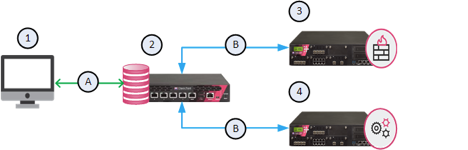
This feature integrating the Proxy API for Check Point Security Gateways through the Management Server. The Proxy API enables the Management Server to forward API requests to designated gateways, eliminating the need to address each gateway individually.
- Source Code:
The revised code introduces a significant enhancement – the 'target gateway' option. This addition allows the specification of a designated gateway to receive API requests, leveraging the Management Server's Proxy API feature. This modification expands the module's capabilities, aligning with advanced network management requirements and enabling more precise API interactions.
- In your inventory, point the hosts at the Management Server, use the management
credentials, and enable Management Proxy mode with
ansible_checkpoint_mgmt_proxy_enabled:
[check_point]
%CHECK_POINT_MANAGEMENT_SERVER_IP%
[check_point:vars]
ansible_httpapi_use_ssl=True
ansible_httpapi_validate_certs=False
ansible_user=%CHECK_POINT_MANAGEMENT_USER%
ansible_password=%CHECK_POINT_MANAGEMENT_PASSWORD%
ansible_network_os=check_point.gaia.checkpoint
ansible_checkpoint_mgmt_proxy_enabled=true
- In the playbook, set the target gateway with
ansible_checkpoint_target, for a play or under each task:
vars:
    ansible_checkpoint_target: <target_gateway>
- Run the playbook as usual. The requests are sent to the Management Server, which forwards them to the target gateway.
Upgrading from versions before 7.1.0: Management Proxy mode is no longer detected from a
mgmt_proxy enabled=True host in /etc/ansible/hosts. Replace it with the inventory variable
ansible_checkpoint_mgmt_proxy_enabled=true. Without it, the requests are not forwarded to the
target gateway: they go to the Gaia API of the inventory host itself (the Management Server).