
Add SVG icons to your JS apps without icon libraries.

Quick Start · Install · Presets · CLI Commands · AI Ready · Configuration
Built from my blog post on Why you might not need an icon library, iconmate is a Rust-powered CLI for developers who want the speed and control of plain files without icon-package bloat.
Use icones.js.org, a direct SVG URL, or raw SVG markup. iconmate drops the icon straight into your project and keeps your exports tidy.
- Made with Rust🦀: Fast TUI that you can use on any IDE (powered by ratatui, nucleo).
- AI-ready automation 🤖: Let your coding agents get icons and add it to your project! A CLI is basically an MCP, just let AI use
iconmate --helpand it should be able to get everything running! - Zero dependencies 📦: No icon library runtime added to your app
- Framework-native output 🧩: Generate files for React, Vue, Svelte, Solid, or plain SVG
- Interactive by default 🎮: Run
iconmateand have a pleasant interactive TUI - Multiple sources 🌐: Pull icons from Iconify names, URLs, or even raw SVG (which means it works with your private icon packs i.e. Anron)
- Fast workflow ⚡: Generate file + export line in one step
- Prototype-friendly 🏗️: Create empty SVG placeholders when needed
# Install
npm install -g iconmate

# Run the TUI in your project 🚀
iconmate
✨ That's it. The interactive TUI guides you through adding icons to your project.
// 👇 Then, you can just easily use any icon on your project like this!

import { IconHeart } from "@/assets/icons";

function MyApp() {
  return <IconHeart />;
}You can also add sensible defaults by passing flags as configs:
iconmate --folder src/components/Icons/ --folder src/components/icons
iconmate --folder src/components/Icons/ --icon heroicons:heart --name Heart
Iconmate now includes config schemas + TS type definitions in the repo:
- Local config schema (repo):
iconmatelocal.schema.json - Global config schema (repo):
iconmateglobal.schema.json - Local config schema (raw):
https://raw.githubusercontent.com/Blankeos/iconmate/main/iconmatelocal.schema.json - Global config schema (raw):
https://raw.githubusercontent.com/Blankeos/iconmate/main/iconmateglobal.schema.json - Schema source:
config-gen/src/schema.ts - TS type definitions:
config-gen/src/types.ts
Regenerate schemas from project root:
just config-schemajust config-schema installs config-gen deps and generates both schema files.
{
  "$schema": "https://raw.githubusercontent.com/Blankeos/iconmate/main/iconmatelocal.schema.json",
  "folder": "src/assets/icons",
  "preset": "normal",
  "output_line_template": "export { default as Icon%name% } from './%icon%%ext%';",
  "svg_view_cmd": "zed %filename%"
}
Use the raw URL for $schema so editors can fetch JSON directly.
Local config keys:
folder(default:src/assets/icons)preset(default:normal, meaning plain.svgmode)output_line_template(default:export { default as Icon%name% } from './%icon%%ext%';)svg_view_cmd(supports%filename%token)
Allowed preset values:
normal(plain SVG mode)reactsveltesolidvueemptysvg
Global config is for user-wide defaults and currently documents svg_view_cmd.
Suggested paths:
- macOS:
~/Library/Application Support/iconmate/config.json - Linux:
~/.config/iconmate/config.json - Windows:
%APPDATA%\\iconmate\\config.json
Example global config:
{
  "$schema": "https://raw.githubusercontent.com/Blankeos/iconmate/main/iconmatelocal.schema.json",
  "svg_view_cmd": "code %filename%"
}
Note
This release adds config schemas and generated docs/types. Runtime loading/precedence wiring in the CLI/TUI is tracked in folder-system-plan.md.
npm install -g iconmate  # npm (or use npx)
bun install -g iconmate  # or bun (or use bunx)
cargo binstall iconmate  # or cargo-binstall (prebuilt binary, faster)
cargo install iconmate   # or cargo (build from source)
curl -sSL https://raw.githubusercontent.com/Blankeos/iconmate/main/install.sh | sh # or linux/macos (via curl)Determines the output filetype and the contents inside that file type.
| Preset | File Type | Framework |
|---|---|---|
normal |
.svg |
Vanilla HTML/CSS |
react |
.tsx |
React Components |
svelte |
.svelte |
Svelte Components |
solid |
.tsx |
Solid Components |
vue |
.vue |
Vue Components |
emptysvg |
.svg |
Placeholder |
Important
If you want to use .svg file types, make sure to setup svgr for your js apps. I covered how to do this in:
- SolidJS (Vite)
- React (Vite)
- React (NextJS)
- Vue - contribution welcome!
- Svelte - couldn't find an svgr integration. Just use the svg preset.
iconmateThis section is helpful for AI:
iconmate add --folder src/assets/icons --icon heroicons:heart --name Hearticonmate add --folder src/assets/icons --icon https://api.iconify.design/mdi:heart.svg --name Hearticonmate add --folder src/assets/icons --icon '<svg>...</svg>' --name HeartYou can also pull raw SVG directly from the Iconify API:
iconmate add --folder src/assets/icons --icon "$(curl -fsSL https://api.iconify.design/mdi:heart.svg)" --name Hearticonmate add --folder src/assets/icons --icon heroicons:heart --name Heart --output-line-template "export { ReactComponent as Icon%name% } from './%icon%.svg?react';"iconmate delete --folder src/assets/iconsiconmate list --folder src/assets/icons
# or use the default folder (src/assets/icons)
iconmate list# Search by keyword (text: one prefix:icon per line)
iconmate iconify search heart
# Search with pagination and JSON output
iconmate iconify search heart --limit 20 --start 0 --format json
# Include collection metadata in JSON search output
iconmate iconify search heart --format json --include-collections
# List all available collections
iconmate iconify collections
# List icons from one collection prefix
iconmate iconify collection mdi
# Get one icon as raw SVG (default)
iconmate iconify get mdi:heart
# Get one icon as raw Iconify JSON
iconmate iconify get mdi:heart --format jsoniconmate iconify get <prefix:icon> --format json uses Iconify's JSON endpoint format,
for example https://api.iconify.design/mdi.json?icons=heart.
iconmate is designed to be easy for AI agents and scripts to drive end-to-end.
# 1) Search in machine-readable JSON
iconmate iconify search heart --format json --limit 20 --include-collections

# 2) Add an icon non-interactively from prefix:name
iconmate add --folder src/assets/icons --icon mdi:heart --name Heart

# 3) Or fetch raw SVG from Iconify API and add directly
iconmate add --folder src/assets/icons --icon "$(curl -fsSL https://api.iconify.design/mdi:heart.svg)" --name Heart
This means an AI can search, choose, and add icons without opening a browser.
For the best AI experience, install the iconmate skill so your agent knows all the commands automatically:
npx skills add Blankeos/iconmateBest practice: Add sensible defaults to your script runner.
- macOS (Intel & Apple Silicon) 🍎
- Linux (x64 & ARM64) 🐧
- Windows (x64) 🪟
- Find your icon: Use https://icones.js.org or
iconmate iconify search <query>. - Pick the icon id: For example
heroicons:heart. - Add with iconmate: Interactive (
iconmate) or direct (iconmate add ...).
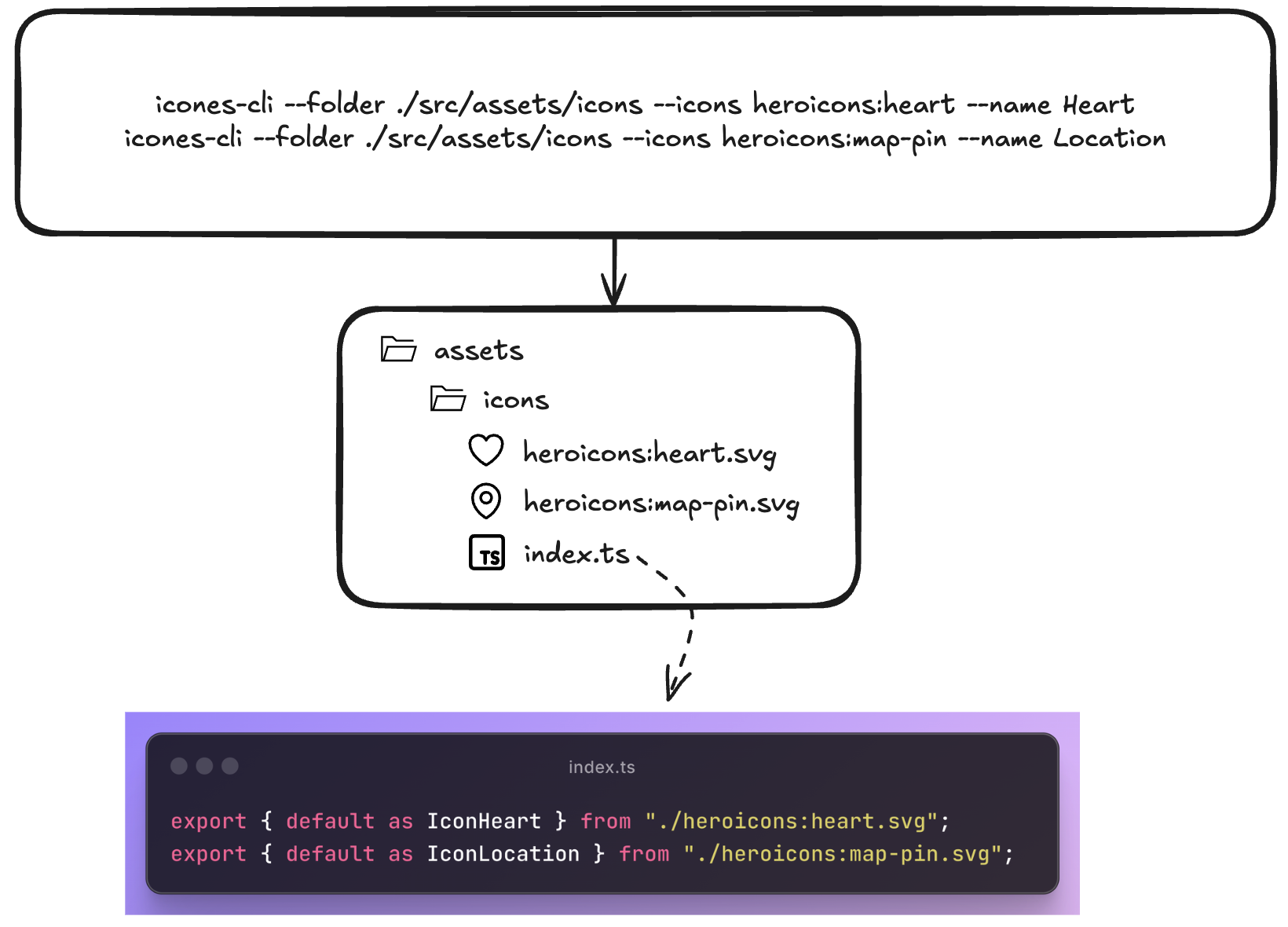
- Copy-paste workflow: Find icon on icones.js.org → copy name → paste into iconmate
- Organized by default: Everything goes into
index.tsexports automatically and just typing<Iconwill autosuggest from your current collection. Just regular TS behavior. - TypeScript ready: Generated code is fully typed. Pass custom width, height, fills, you name it.
- Customizable 🎨: Want to add a default Tailwind class on every icon? custom props? Just add it to the file!
- Git-friendly: Plain SVG files, no binary assets
- Lightning fast: Native Rust binary, no Node.js startup time
Contributions are welcome—pull requests for bug fixes, new framework presets, or improvements are appreciated.
🐱 Repo: github.com/Blankeos/iconmate - Star it if you love it ⭐
- ✅ Interactive prompt mode
- ✅ Framework presets (React, Vue, Svelte, Solid)
- ✅ URL and raw SVG support
- ✅ Custom export templates
- ✅ Zero-config installation
- An empty command. Creates an .svg, adds it to the index.ts with a name you can specify.
- Paste an actual svg instead of an icon
name. - Presets (
normal,react,solid,svelte,vue,emptysvg) override output templates and file types. - Prompt Mode via
iconmate- Interactive mode so you won't need to pass arguments. - Delete an icon using
iconmate delete - An interactive TUI instead of prompt-mode.
- Rename in the TUI (but recommended for you to just use the LSP to do it)
- A lot of TUI functionalities wokr
-
iconmate iconify --helpcommands for AI to easily look for icons itself. - Search and add Iconify icons directly inside the TUI (no need to open https://icones.js.org).
- Other frameworks i.e. --preset=flutter or Go/Rust GUI apps? (Not sure how they work yet though).
-
Zed or VSCode Extension(seems unnecessary now, it's just a CLI)
Made with Rust 🦀 | Based on my blog post