


The AI agent stack behind our apps — chat orchestration and tool rendering — extracted into two reusable packages on Vercel AI SDK v7: an engine-agnostic event protocol with a ready-to-run default engine (@arshdelight/loop-core), and a React rendering layer with tool rows, a renderer registry, markdown and theming (@arshdelight/loop-react).
One design rule shapes everything: the packages provide the mechanism, your app provides the contracts. Zero built-in tool renderers, no opinions on your tool schemas, no host-UI takeover — unregistered tools fall back to a generic card instead of breaking.
npm install @arshdelight/loop-core @arshdelight/loop-react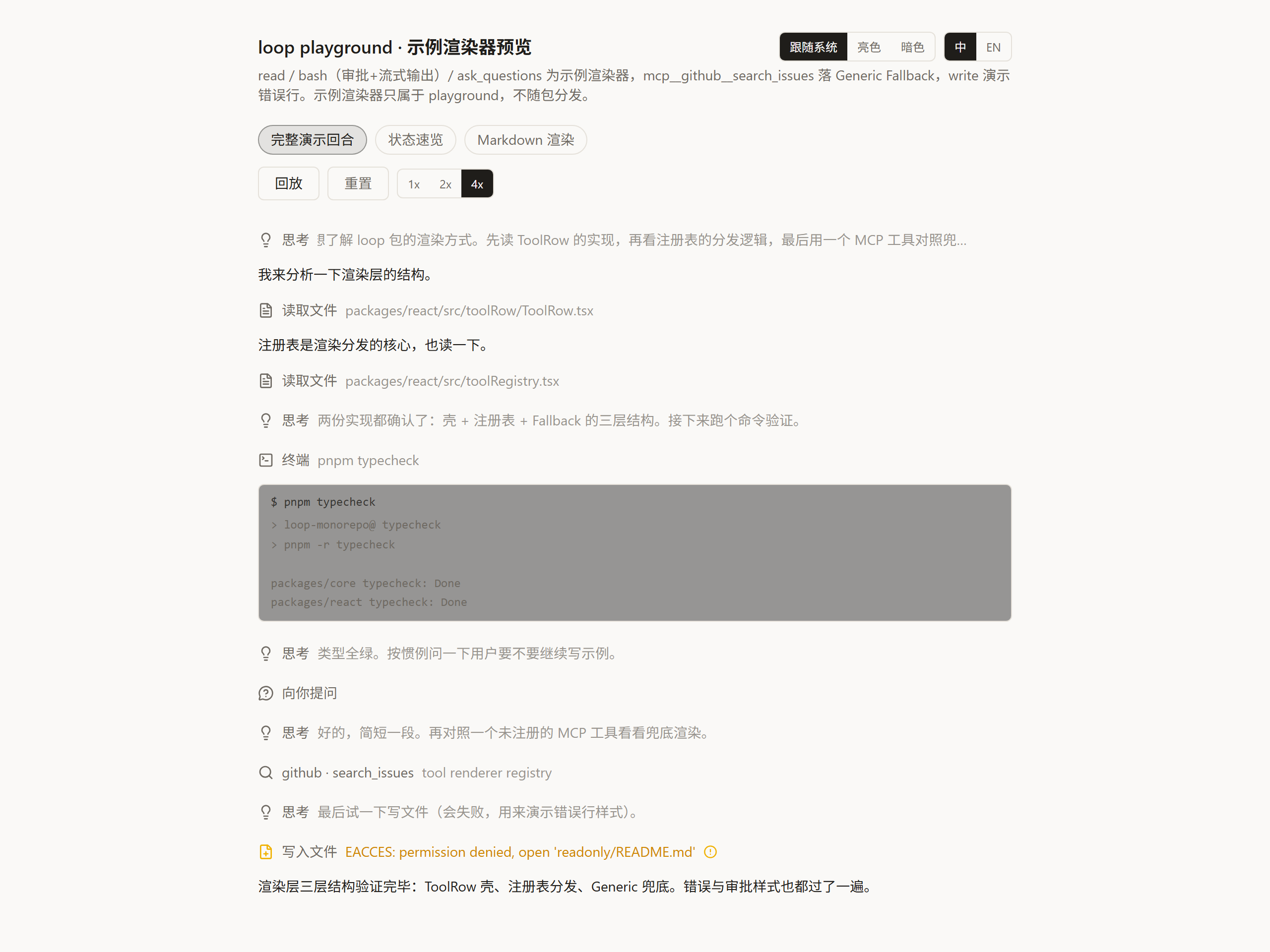
packages/
├── core    @arshdelight/loop-core — zero React
│   AgentEvent protocol · stream-merge reducer · pending-tool selectors ·
│   default engine createLoopAgent: fullStream → events, HITL suspend
│   bridge, image loop-back · provider presets: DeepSeek / GLM / Doubao /
│   any OpenAI-compatible endpoint
└── react   @arshdelight/loop-react
    ToolRow (disclosure row + IN/OUT gutters) · tool renderer registry with
    Generic Fallback · ReasoningBlock · markdown (highlight.js + KaTeX +
    Mermaid + streaming cursor) · bilingual t-protocol i18n · CSS-variable
    theming · /workbench: offline renderer preview
- One event protocol as the public language — every engine emits
AgentEvent; a pure-function reducer merges the stream into renderable entries, so the default engine, your hand-rolled loop, or a server-side proxy can all drive the exact same UI. - A default engine that stays out of the way —
createLoopAgentwraps AI SDK v7'sToolLoopAgent: translatesfullStream→AgentEvent, bridges human-in-the-loop suspension (agent.waitForUser()/resolveUser()), and loops tool-result images back into the next request. - Tool rendering you register, not inherit — register a renderer per tool name (streaming or settled props); everything unregistered lands in a generic fallback card. Labels, lucide icons and one-line summaries derive automatically.
- Markdown that survives streaming — react-markdown with highlight.js, KaTeX, Mermaid, a streaming cursor and LaTeX delimiter normalization; every piece swappable via a components map.
- Offline preview workbench — mount
<RendererWorkbench fixtures={...} />on a dev page of your app to replay fixture event scripts against your registered renderers, with theme / language / speed controls. No model calls, no API keys.
1 · Run the engine, consume events — anywhere Node runs, transport is yours:
import { createLoopAgent, createZaiModel } from '@arshdelight/loop-core'

const agent = createLoopAgent({
  model: createZaiModel({ apiKey: process.env.ZAI_API_KEY! }),
  tools: {
    ask_user: tool({
      inputSchema: jsonSchema({ type: 'object' }),
      execute: () => agent.waitForUser(), // suspends the turn until the host answers
    }),
  },
})

for await (const event of agent.stream({ prompt: 'hi' })) {
  // AgentEvent — pipe over IPC, NDJSON, in-process… the UI only knows this protocol
}
2 · Register renderers and render the stream — React 19 + Tailwind v4:
import {
  LoopI18nProvider, StreamEntriesView,
  registerStreamToolRenderer, useLoopT,
  ToolRow, GutterBlock, type StreamToolRenderProps,
} from '@arshdelight/loop-react'
import '@arshdelight/loop-react/theme.css'

registerStreamToolRenderer('my_tool', (props: StreamToolRenderProps) => {
  const t = useLoopT()
  return (
    <ToolRow toolName={props.toolCall.toolName} input={props.toolCall.input}
             status={props.toolResult ? 'ok' : 'running'} title={t('mytool.running')}>
      <GutterBlock label="OUT">{JSON.stringify(props.toolResult?.output)}</GutterBlock>
    </ToolRow>
  )
})

// entries come from merging AgentEvents with the core reducer
function Chat({ entries }: { entries: StreamEntry[] }) {
  return (
    <LoopI18nProvider lang="zh">
      <StreamEntriesView entries={entries} />
    </LoopI18nProvider>
  )
}
3 · Preview renderers offline — a dev page in your own app:
import { RendererWorkbench } from '@arshdelight/loop-react/workbench'

<RendererWorkbench fixtures={fixtures} title="my renderers" />
For multi-turn history, tool calls must pair assistant(tool-call) with a following role:'tool' message — see appendAssistantTurn in the core README, which assembles turns correctly for you.
- Event protocol reference — every
AgentEvent, the default engine's fullStream mapping, HITL and multimodal conventions - Icon guidelines — lucide icon picks per tool variant
- Package-level docs: loop-core · loop-react
pnpm install
pnpm typecheck   # all workspaces
pnpm test        # vitest: core reducer + react row model
pnpm --filter @loop/playground dev   # renderer workbench demo
Tests never call real AI APIs — model behavior is replayed from fixture event scripts; anything needing a real model lives in tests/integration/, skipped by default.
MIT