

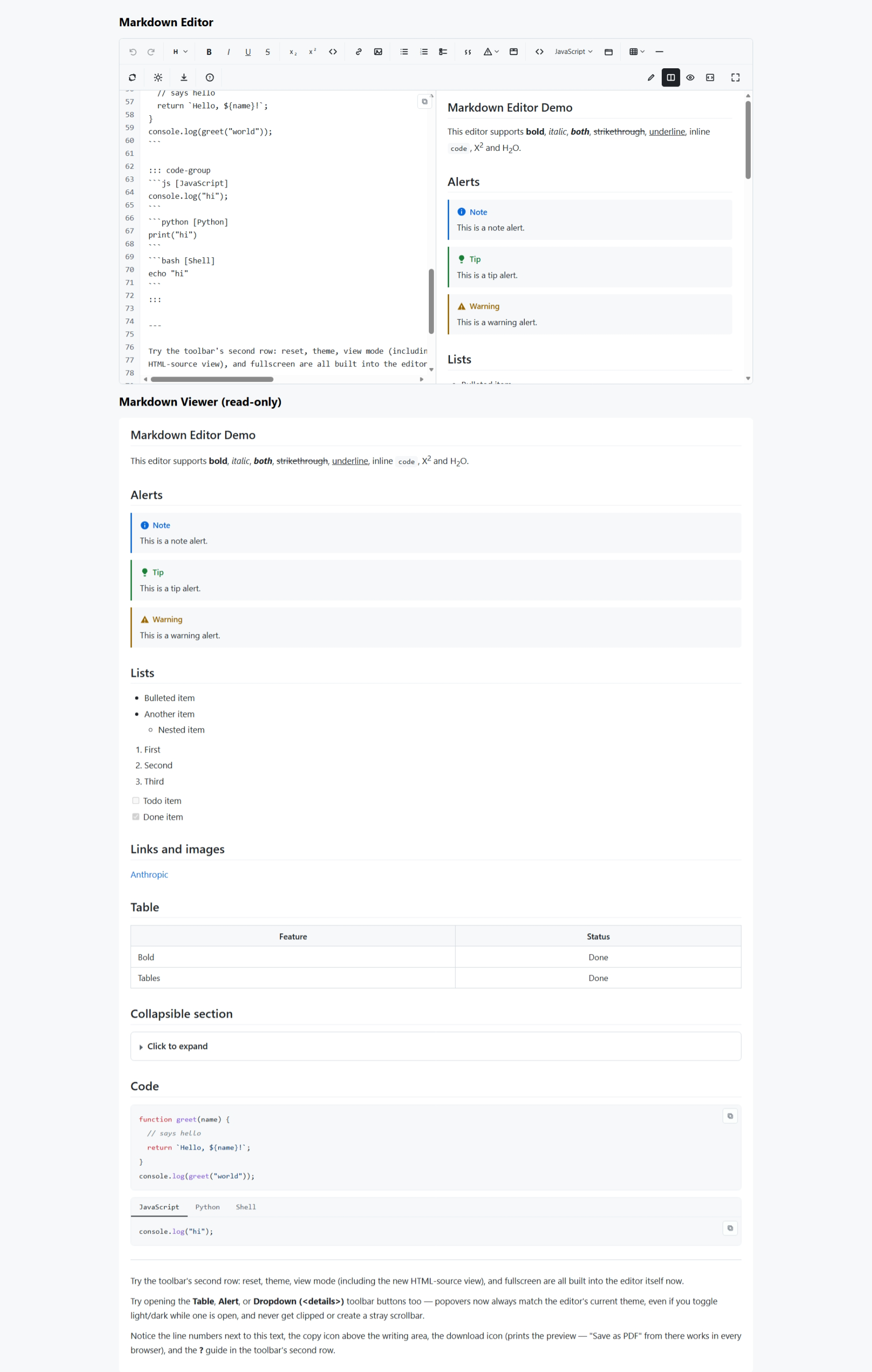
A source + live-preview markdown editor for React, written in TypeScript, with zero runtime dependencies (React is the only peer dependency). Built from scratch: its own markdown parser, its own syntax highlighter, its own undo/redo — nothing pulled in from npm at runtime.
- 📝 Full toolbar: bold, italic, underline, strikethrough, sub/superscript,
inline code, headings, links, images, ordered/unordered/checklist lists,
blockquote, GitHub-style alerts, collapsible sections (dropdowns, via
<details>/<summary>), tables (with a helper UI), fenced code blocks with syntax highlighting, tabbed code groups, horizontal rule - 🧰 A second toolbar row for editor-level controls: reset to original content, download/print the preview as a PDF, a "?" markdown syntax guide, light/dark theme toggle, four view modes (edit, split, preview, and a read-only HTML source view — all in the same body area, not a separate panel), and fullscreen
- 🔢 GitHub-style line numbers next to the markdown source, plus a copy-to-clipboard icon over the writing area for the raw markdown
- 📋 Heading level and code-block language are chosen from icon-triggered
dropdown menus (not native
<select>boxes), consistent with the Table/Alert dropdowns - 👀 Four view modes: edit only, split, preview only, and HTML source, plus fullscreen
- ⌨️ Keyboard shortcuts, Tab-to-indent in lists (escapable elsewhere), Enter auto-continues lists
- ↩️ Its own undo/redo history, with typing coalesced into single steps (reset is undoable too — it's just another history entry)
- 🎨 GitHub-style syntax highlighting for ~19 languages, light + dark themes, fully re-themeable via CSS variables. The editor's own chrome (toolbar active states, focus rings, dropdowns) is deliberately monochrome — no blue — reserving color for things that need it, like preview links.
- 🔒 Safe by construction: only
<u>/<sub>/<sup>and the block-level<details>/<summary>pair (bare forms only, no other attributes) pass through as real HTML — every other tag is escaped; link/image URLs are scheme-checked - ♿ Accessible toolbar (ARIA roles, keyboard navigation), mobile-responsive
(split view becomes a switchable tab below 640px).
<details>sections use the browser's native, fully keyboard-operable disclosure widget. - 🧩 A read-only
<MarkdownViewer />for displaying saved content - 🌐
markdownToHtml()works in Node/SSR too — no DOM required to parse or render to an HTML string
See docs/SYNTAX.md for the full markdown syntax this editor supports, and
docs/API.md for the complete component/function reference.
npm install akash-negi-markdown-editorReact 18 or 19 is required as a peer dependency (react and react-dom).
import { MarkdownEditor } from "akash-negi-markdown-editor";
import "akash-negi-markdown-editor/styles.css";

export default function App() {
  return <MarkdownEditor defaultValue="# Hello" onChange={(md) => console.log(md)} />;
}
Don't forget the stylesheet.
import "akash-negi-markdown-editor/styles.css";is required, once, near your app's entry point. Without it the editor renders completely unstyled.
Next.js: the components already include the "use client" directive, so you can import them from a Server Component file or a Client Component file. In the App Router, import the stylesheet in app/layout.tsx.
import { MarkdownViewer } from "akash-negi-markdown-editor";

<MarkdownViewer
  value={markdown}
  onChange={(next) => save(next)} // called when a task-list checkbox is toggled
/>
Task-list checkboxes are clickable by default in both MarkdownViewer and the editor's preview. Pass interactiveChecklists={false} for a strictly read-only view.
All styles are scoped to .mde-root and driven by --mde-* CSS variables, so you can restyle the editor
without touching the package. The stylesheet also defends itself against common global CSS (Vite's starter
index.css/App.css, Tailwind's preflight, CSS resets): inherited text-align: center, global button/a
hover styles, list-style: none, and so on are neutralized inside the editor.
One thing it cannot fix from the inside is layout rules on the editor's ancestors. If the editor looks narrow or off-centre in a fresh Vite project, delete these starter rules:
/* index.css */
body { display: flex; place-items: center; }
/* App.css */
#root { max-width: 1280px; margin: 0 auto; padding: 2rem; text-align: center; }markdownToHtml() and parseMarkdown() from akash-negi-markdown-editor/core have no React or DOM dependency, so they also work in Node, Next.js Server Components and API routes for rendering saved markdown to HTML:
import { markdownToHtml } from "akash-negi-markdown-editor/core";

const html = markdownToHtml("# Hello **world**");git clone https://github.com/AKASHNEGI-github/Markdown-Editor-React.ts.git
cd Markdown-Editor-React.ts
npm install
npm run dev # opens the demo playground (Vite) at localhost
npm test # runs the test suite (vitest)
npm run typecheck # tsc --noEmit
npm run build:lib # compiles src/ -> dist/ (JS + .d.ts + styles.css)
npm run build:demo # builds the demo app -> dist-demo/
npm run build # both of the above, in orderMIT (c) Akash Negi
src/
  core/         Parser + both renderers. No React, no DOM — works in Node.
    types.ts        AST node types
    parser/          block.ts + inline.ts -> parseMarkdown()
    render/          toHtml.ts (string) and toReact.tsx (React elements)
  highlighter/   Dependency-free syntax highlighter (tokenizer engine + ~19 languages)
  editor/        Pure command functions (bold, headings, lists, tables, ...),
                 undo/redo history, keyboard shortcuts, table helpers
  react/         MarkdownEditor, MarkdownViewer, Toolbar, and the React hooks
                 that wire the editor engine to a <textarea>
  index.ts       Main package entry (React + core, re-exported)
demo/            Vite playground app exercising every feature
tests/           vitest test suite (parser, editor commands, highlighter, security)
docs/
  SYNTAX.md      Full markdown syntax reference ("our flavor")
  API.md         Component props, ref methods, core functions
These are deliberate scope decisions for a from-scratch, dependency-free v1
— see docs/SYNTAX.md for the full list of unsupported syntax and the
reasoning behind each:
- The markdown parser covers a practical CommonMark + GFM subset, not the full CommonMark spec (no setext headings, no indented code blocks, no reference-style links). Common real-world documents parse correctly; very unusual edge-case documents may format slightly differently than on GitHub.
- The built-in syntax highlighter is a hand-written approximate
tokenizer, not a full language grammar. It's tuned to look right for
typical code and stays fast and dependency-free; a
highlighterprop lets you swap in something exact (e.g. Shiki) per-project. - The editor pane is a plain
<textarea>(uncolored source text) in this version; only the preview is syntax-highlighted. Coloring the source pane itself needs an overlay technique that was scoped out for v1. - Images are URL-only — no upload/paste, matching plain markdown.
- Table helper UI covers add/remove row & column, alignment, and auto-formatting; it edits the raw table text directly rather than maintaining separate structured state.
npm test77 tests across the parser (headings, lists, tables, code blocks/groups,
alerts, collapsible sections, emphasis edge cases), editor commands
(toggling, idempotency, checklist toggling, table helpers, insertDetails),
the highlighter, and a security suite (HTML whitelist enforcement — including
the <details>/<summary> whitelist — URL scheme sanitizing, and the static
HTML export's copy-button script).