Skip to content

Latest commit


History

77 Commits

Folders and files

NameName
Last commit message
Last commit date


Repository files navigation

Deploy to Render

Latest Release Build Status Telegram Stars Forks

Banner


📡 WinSysMonitor — LAN System Monitoring

🎯 Monitor every Windows machine on your network from your phone or browser — no internet, no cloud, no subscription!

A complete LAN monitoring system built for privacy-first environments. Lightweight Windows agents connect to a self-hosted Node.js server over WebSocket, serving a beautiful real-time dashboard. A native Kotlin Android app (with embedded Node.js runtime) lets you manage devices, capture live screenshots, and receive instant connect alerts — all on your local network.


🏗️ Architecture

📊 System Overview

Component Technology Purpose Status
🖥️ Windows Agent C# (.NET 8) 24×7 service, WebSocket client, hardware monitoring, screenshots ✅ Production Ready
🌐 Node.js Server Express + WS + SSE Real-time dashboard, agent management, REST API, auth ✅ Production Ready
🖥️ Web Dashboard HTML/CSS/JS 10 themes, live device grid, screenshot viewer, admin panel ✅ Production Ready
📱 Android App Kotlin + Material 3 Native UI, embedded server, notifications, 10 themes ✅ Production Ready

🔄 Data Flow

graph LR
    A[🖥️ Windows Agent<br/>C# .NET 8] -->|WebSocket + Token| B[🌐 Node.js Server<br/>Express + WS + SSE]
    B --> C[🖥️ Browser Dashboard<br/>Real-time SSE]
    B --> D[📱 Android App<br/>Kotlin + libnode]
    B --> E[🔧 REST API<br/>Admin Operations]
    D -.->|Embedded Server| B
    style A fill:#e0f2fe,stroke:#0284c7
    style B fill:#fef3c7,stroke:#f59e0b
    style C fill:#dcfce7,stroke:#16a34a
    style D fill:#fce7f3,stroke:#ec4899
    style E fill:#f3f4f6,stroke:#6b7280
Loading

📱 💡 Phone can ALSO host the server — Start Server → 0.0.0.0 (LAN) or 127.0.0.1 (local)


📸 Screenshots

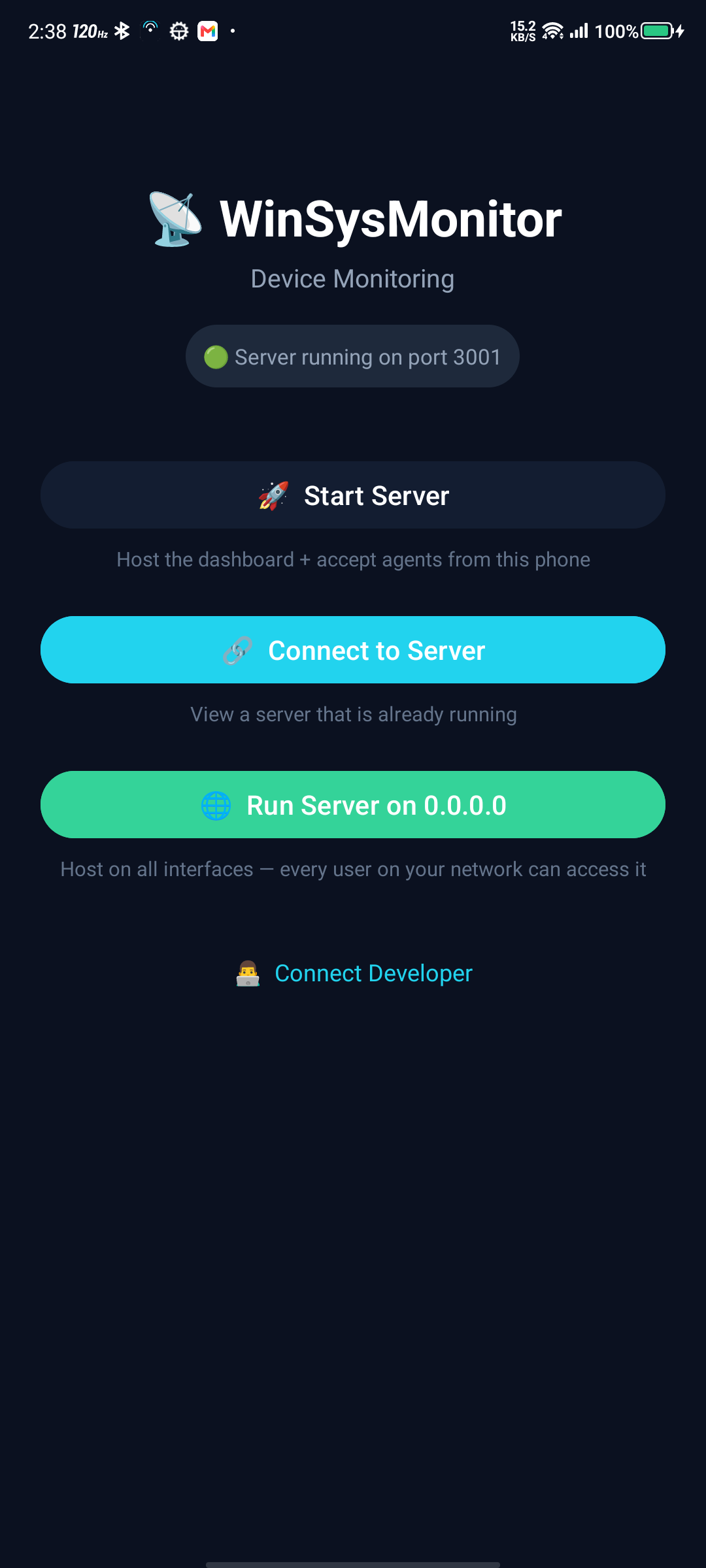
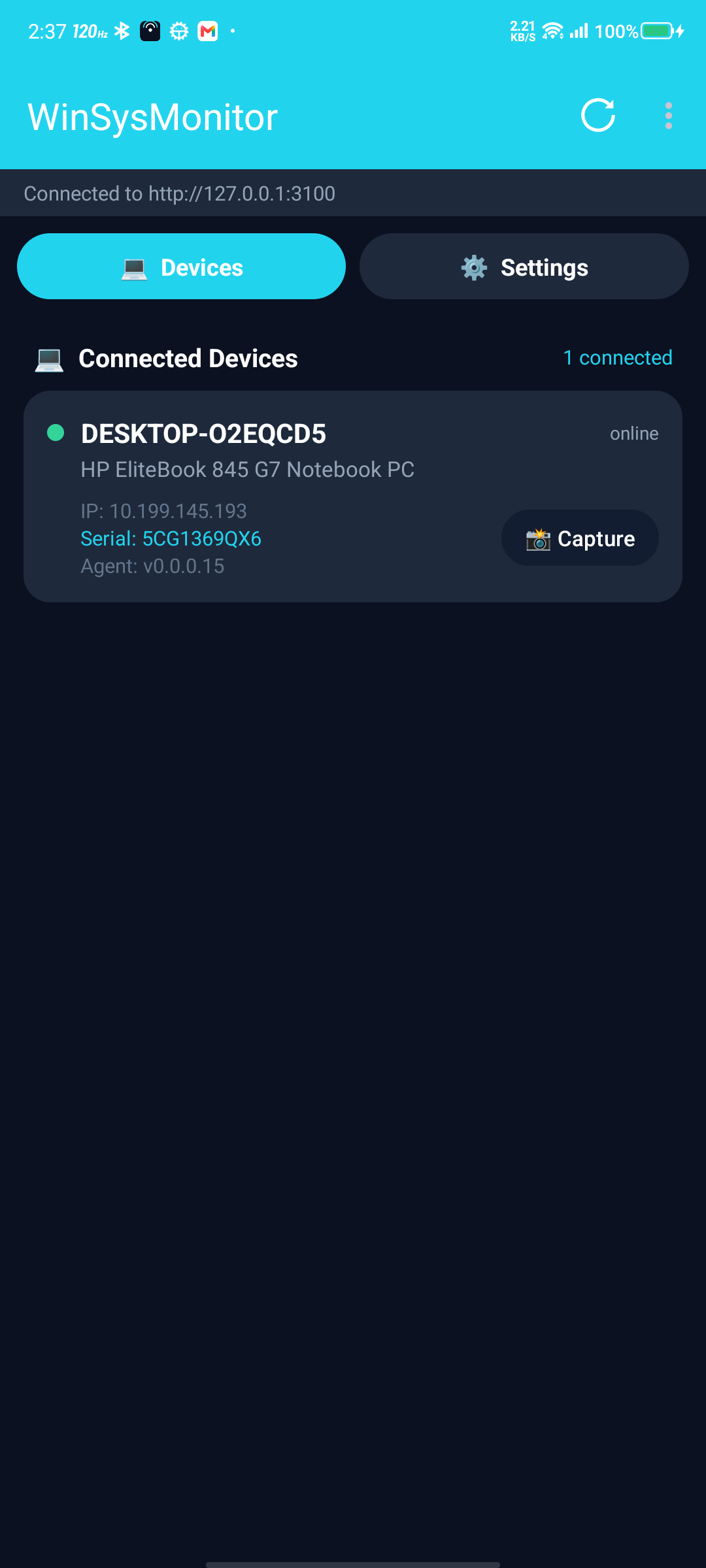
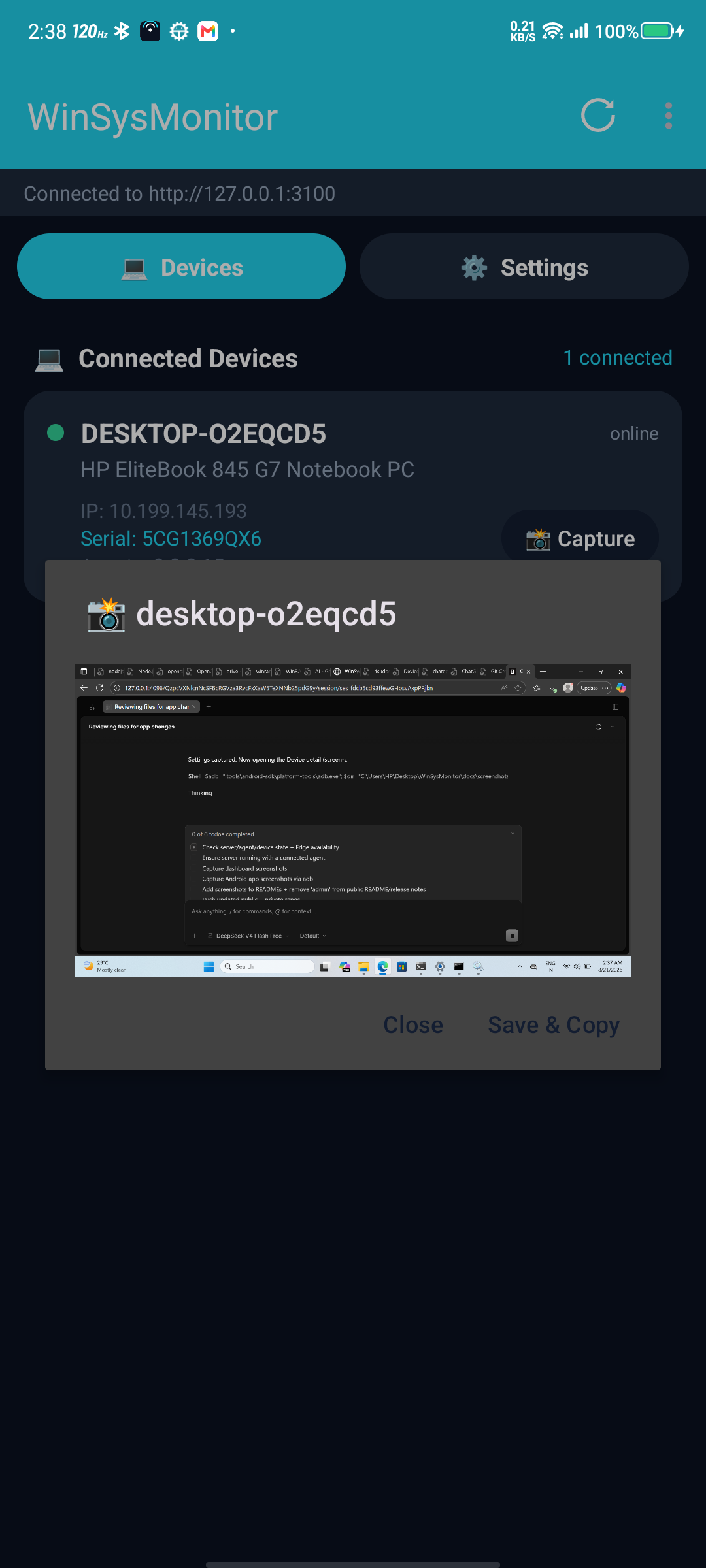
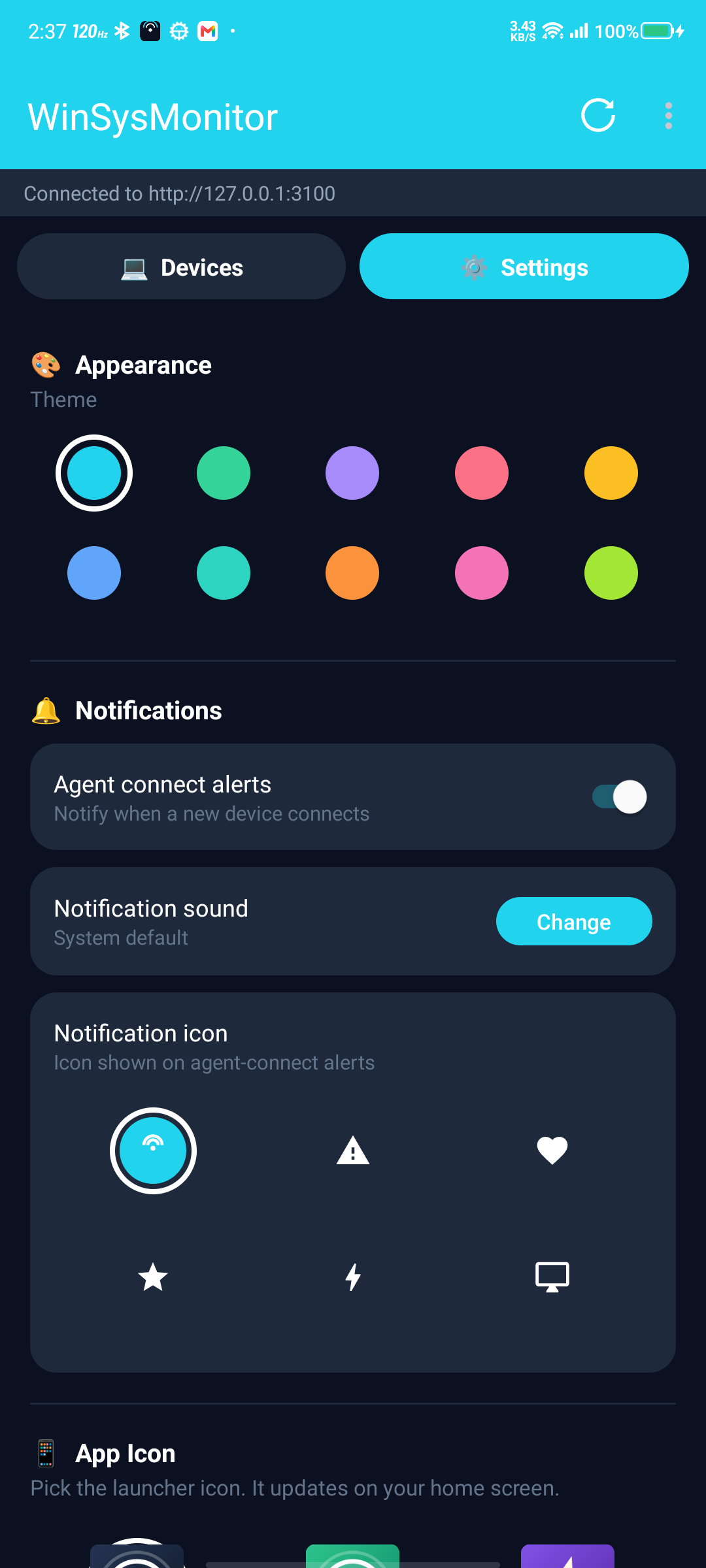
📱 Android App — Native Kotlin + Material 3

🚀 Launcher 📱 Devices 🔍 Device Detail ⚙️ Settings

🎨 Theme Gallery — 10 Beautiful Themes

Theme Colors Preview
🌊 Midnight Ocean #0f172a #06b6d4 Midnight Ocean
🌅 Aurora #0c1a2b #22d3ee Aurora
☀️ Solar Flare #2c1a00 #fbbf24 Solar Flare
🌆 Cyberpunk #0a0a1a #a855f7 Cyberpunk
👑 Royal Purple #1a0a2e #c084fc Royal Purple
🌲 Forest Calm #0a1a0a #22c55e Forest Calm
⚫ Slate Pro #18181b #71717a Slate Pro
📄 Paper Light #fafafa #3b82f6 Paper Light
🌿 Mint Fresh #f0fdf4 #10b981 Mint Fresh
🌸 Rose Blush #fdf2f8 #ec4899 Rose Blush

🎨 All themes match between Android app and Web Dashboard — persist in localStorage


✨ Features Overview

📱 Android App 🖥️ Windows Agent 🌐 Server & Dashboard 🔐 Security
Native Kotlin + Material 3 24×7 Windows Service Real-time SSE Updates Token-based Agent Auth
Embedded Node.js Runtime Silent Installer + ACL 10 Beautiful Themes 3-Strike Device Block
10 Themes + 6 Icons Config Auto-Reload Admin Cookie Sessions Brute-Force Protection
Live Screenshots Secure GDI Capture REST Admin API TLS/WSS Support

📱 Android App — Native Experience

Feature Description Emoji
Mandatory Update Gate Checks GitHub releases on startup, blocks UI until verified 🚀
Native Material 3 UI Kotlin + Jetpack Compose — no WebView for main flow 🎨
Live Device List Real-time SSE updates, search/filter by hostname, IP, serial, model 📡
Screenshot Capture One-tap full-screen capture, zoom/pan, save/copy/share 📸
Auto-Refresh Configurable 3s / 5s / 10s per device ⏱️
Connect Alerts Native notification + custom sound/icon when agent connects 🔔
10 Themes Midnight Ocean, Aurora, Solar Flare, Cyberpunk, Royal Purple, Forest Calm, Slate Pro, Paper Light, Mint Fresh, Rose Blush 🌈
6 Launcher Icons Default, Emerald, Violet, Rose, Amber, Ocean (adaptive) 🎯
Custom Notifications Pick tone (system/chime/alert/ding/soft/custom) + icon 🔊
Host or Connect Run server on phone (127.0.0.1 or 0.0.0.0) or connect to external 🏠

🖥️ Windows Agent — Enterprise Grade

Feature Description Emoji
24×7 Windows Service Runs as LocalSystem, auto-restart on crash (sc failure) ⚙️
Silent Install /VERYSILENT /SERVERIP=x /SERVERPORT=y /SERVERTOKEN=z 🤫
Config Auto-Reload Edit agent.config.json → agent reconnects instantly 🔄
Config ACL Lock icacls → only SYSTEM + Admins can modify 🔒
Secure Screenshots Scheduled task in user session (no Service Desktop access) 📷
Dual Capture Direct GDI first, fallback to PowerShell interactive 🎯

🌐 Server & Dashboard — Real-time Control

Feature Description Emoji
Real-time SSE Live agent connect/disconnect, device list updates ⚡
10 Dashboard Themes Matches Android themes, persists in localStorage 🎨
Admin Auth Cookie sessions (7-day) + X-Admin-Password header 🔐
Brute-Force Protection 3 failed logins → server locks until restart 🛡️
Device Blocking 3-strike strict block (passwords ignored while blocked) 🚫
Screenshot API POST /api/monitor/:machine/screenshot → base64 PNG 📸
Config API /api/config for server info, /api/agents for device list ⚙️
CORS/Origin Control Locked to configured origins 🌐
Payload Limits 200MB max for screenshots 📦

🔐 Security — Defense in Depth

Layer Implementation Emoji
Agent → Server Shared token (WebSocket query param) 🔑
Admin → Dashboard Password (cookie) or X-Admin-Password header 🍪
Agent Config ACL-locked to SYSTEM + Administrators 📁
Transport WSS on 443 (TLS), WS on LAN 🔒
Update Security Fixed keystore, mandatory signature verification ✅
Dashboard Lock 3 failed logins → server lock until restart 🔐
Device Block 3 wrong passwords → strict block (dashboard unlock only) 🚫

🚀 Deployment Options

Option 1: Render.com (Free TLS, Auto-sleep) ⭐ Recommended

Deploy to Render

This repo contains release artifacts and deployment config. Source code is private.

WHILE USING RENDER (OR 443 PORT) MAKE SURE IT'S WSS:// IN AGENT CONFIG

"ServerUrl": "wss://

🐳 Deploy via Docker (recommended):

# 1️⃣ Build & push Docker image
docker build -t yourusername/winsysmonitor:latest .
docker push yourusername/winsysmonitor:latest

# 2️⃣ In Render dashboard: New Web Service → Docker Image
#    Image: yourusername/winsysmonitor:latest

# 3️⃣ Set environment variables:
#    ADMIN_PASSWORD=your-strong-password
#    PORT=10000

🚀 One-click deploy (uses render.yaml): Click button above → Connect this repo → Render builds from Dockerfile

  • ✅ Free tier — 750 hrs/month
  • ✅ Auto HTTPS — TLS on .onrender.com
  • ✅ Auto-sleep/wake — Instant wake on request
  • ✅ WSS Support — Agents connect: wss://your-app.onrender.com/ws/agent

Option 2: VPS / Cloud VM (Full Control) — Docker

# 🐧 Ubuntu/Debian
apt update && apt install -y docker.io

docker run -d --name winsysmonitor \
  -p 3001:3001 \
  -e ADMIN_PASSWORD="your-strong-password" \
  -e PORT=3001 \
  yourusername/winsysmonitor:latest

# 🌐 Dashboard: http://your-ip:3001
# 🔌 Agents: ws://your-ip:3001/ws/agent
Provider Est. Cost Notes Emoji
Hetzner CX22 ~€4/mo Best price/performance 🇩🇪
DigitalOcean ~$6/mo Simple setup ☁️
AWS Lightsail ~$5/mo Easy management 🟠
Oracle Cloud Free tier 4 ARM cores, 24GB RAM 🆓

Option 3: Local LAN (Phone or PC)

Platform Command Emoji
📱 Phone App → 🚀 Start Server (127.0.0.1) or 🌐 Run on 0.0.0.0 📱
💻 PC (Docker) docker run -d -p 3001:3001 -e ADMIN_PASSWORD=xxx yourusername/winsysmonitor:latest 💻
🖥️ Agents Connect to LAN IP: ws://192.168.x.x:3001/ws/agent 🖥️

💡 Pro tip: Run server on phone (0.0.0.0) + agents on LAN = fully portable monitoring!


📁 Repository Structure (Public)

WinSysMonitor/
├── 📄 render.yaml          # Render.com Blueprint (Node.js runtime)
├── 🐳 Dockerfile           # Server Docker image
├── 📁 Server/              # Node.js server + dashboard source
│   ├── 📄 server.js        # Express + WS + SSE + REST
│   ├── 📄 package.json     # Dependencies
│   └── 📁 dashboard/       # Web dashboard
│       ├── 📄 index.html   # Main dashboard (10 themes, SSE)
│       ├── 📄 login.html   # Admin login
│       ├── 📄 app.js       # Theme, devices, screenshots
│       └── 📄 style.css    # CSS variables for theming
├── 📁 docs/screenshots/    # App screenshots
├── 📄 README.md
└── 📄 LICENSE

Source code is private. Release artifacts (APK, EXE) available on Releases.


🔧 Configuration

🖥️ Agent (agent.config.json)

{
  "ServerUrl": "ws://192.168.1.50:3001/ws/agent",
  "Token": "SHARED_SECRET_TOKEN",
  "ReconnectDelaySec": 5,
  "KeepAliveSec": 20
}
Property Description
ServerUrl WebSocket endpoint (use wss:// for TLS)
Token Shared secret for agent authentication
ReconnectDelaySec Seconds between reconnection attempts
KeepAliveSec Heartbeat interval to detect disconnection
  • 🔄 Auto-reloads on file change (watched by service)
  • 🔒 ACL-locked: only SYSTEM + Administrators can edit

🌐 Server (Environment Variables)

Variable Default Description
ADMIN_PASSWORD Alok@1234 ⚠️ Change in production! Dashboard + API password
PORT 3001 HTTP + WebSocket port
HOST 0.0.0.0 Bind address (0.0.0.0 = all interfaces)

📱 Android App (SharedPreferences)

Setting Description
Server URL + Mode Host (0.0.0.0/127.0.0.1) or Connect to external
Admin Password For server authentication
Theme 10 beautiful themes
Notification Tone/Icon Custom sound + icon for alerts
Launcher Icon 6 adaptive icon variants
Device Block State Persists across app restarts

🔐 Security Deep Dive

🛡️ 3-Strike Device Block (Strict)

graph TD
    A[Agent Connects] --> B{Wrong Password?}
    B -->|Yes| C[Attempt 1/2]
    C --> D{Attempts < 3?}
    D -->|Yes| E[401: attemptsLeft 2, 1]
    D -->|No| F[403: deviceBlocked true]
    F --> G[Server: adds to blockedDevices Map]
    G --> H[Client: locks UI, shows Check Status]
    H --> I[Only Dashboard Unlock Clears It]
    B -->|No| J[Allow Connection]
    style F fill:#fee2e2,stroke:#ef4444
    style I fill:#fef3c7,stroke:#f59e0b
Loading

🔒 Admin Dashboard Brute-Force Protection

graph TD
    A[POST /api/login] --> B{Wrong Password?}
    B -->|Yes| C[Attempt 1/2]
    C --> D{Attempts < 3?}
    D -->|Yes| E[403: attemptsLeft 2, 1]
    D -->|No| F[423: locked - Restart server to unlock]
    F --> G[loginLocked = true until process restart]
    B -->|No| H[200 OK + Cookie Session]
    style F fill:#fee2e2,stroke:#ef4444
    style G fill:#fef3c7,stroke:#f59e0b
Loading

📁 Config ACL (Windows Installer)

icacls "C:\Program Files\WinSysMonitor\agent.config.json" ^
  /inheritance:r ^
  /grant:r "SYSTEM:(F)" "Administrators:(F)" "BUILTIN\Users:(R)"
Permission Principal Access
(F) SYSTEM Full Control
(F) Administrators Full Control
(R) BUILTIN\Users Read Only

🔐 Result: Standard users cannot modify agent configuration — only admins and the service itself.


📦 Releases

Platform Asset Version Notes
📱 Android WinSysMonitor-v1.1.33.apk 1.1.33 (code 33) Signed, mandatory update gate
🖥️ Windows WinSysMonitor-Setup-1.0.0.2.exe 1.0.0.2 Best working installer

Download Latest Release


🛣️ Roadmap

🔴 High Priority 🟡 Medium Priority 🟢 Low Priority
workflow_dispatch trigger Play Store deployment Signed agent releases via CI
setup-java@v5 migration Delta updates Auto version bump
GitHub token for UpdateChecker Beta/stable channels Slack notifications

🤝 Contributing

This is a public releases/deployment repo. Source code is private.


🙏 Credits & Contact

👨‍💻 Author 4sudo.su (@4sudosu)
📱 Telegram @verifiedharyanvi
📧 Email 4sudo.su@gmail.com
🎨 Android Icons Material Design Icons
🎭 Dashboard Themes Custom CSS variables
⚡ Node.js Runtime nodejs-mobile

Built with ❤️ for trusted LANs — no cloud, no subscription, no tracking.


Download Latest Release Star on GitHub Follow on Telegram


Made with care by 4sudo.su

About

WinSysMonitor V1 — vibe-coded with AI. Monitor Windows PCs from phone/browser over LAN. C# agent, Node.js dashboard, Kotlin Android app. No cloud, no subscription.

Topics

Resources

Stars

0 stars

Watchers

0 watching

Forks

Releases

Packages

Contributors

Languages