BLE API
低功秏藍芽裝置分為 Central 與 Peripheral 兩類型。一般手機、電腦為 Central 會搜尋週邊裝置,並且可與連線至 Peripheral 取得裝置上面的各種資料。像對的於心跳偵測器這種 Peripheral ,則會發出廣播 Advertisement ,可讓附近的 Central 知道心跳偵測器 存在。
在 Peripheral 上面所提供的資訊,統稱為 attributre 。為了提供這些屬性,Peripheral 裝置上會運行一個支援 GATT (Generic Attribute) Profile Server。也就是說,Peripheral 是GATT Server,而Central是GATT Client,由Central去連接Peripheral,就等同於一個GATT Client 連接GATT Server。
attribute可以在區分:Sevices 、characteristics 與 descriptors。簡單說GATT Server 提供多個服務。而每一個 Sevices 都有許多 characteristics 可供存取。而 descriptors 則 用於描述資料特性的額外資訊。
為了識別不同的 attributre ,所有 attributre 都會用 UUID (通用唯一識別碼)來識別。
Bluetooth官方有定義好一組 Sevices 的UUID。如體重計,電池狀態、時間, 可以參考 官方指定碼的列表。也可以自行自訂 Sevices
要使用的UUID,但是需要自己生成的UUID,並自行管理這些UUID

在LinkIt 7697 MicroPython提供LBLE程式提供類別供開發者使用
-
LBLE:用於初始化低功秏藍牙系統
-
LBLEPeripheral:類別提供了基本的 Peripheral 功能
- 設定周邊裝置發出的廣播內容
- 設定Peripheral的Sevices與characteristics
要在 LinkIt 7697 上面使用藍牙之前,必須先初始化藍牙子系統。
import bluetooth

LBLE = bluetooth.LBLE()
LBLE.begin()lble=bluetooth.LBLE()
宣告bluetooth的LBLE object
lbel.begin()
啟動藍牙子系統
lbel.get_dev_address()
取得MT7697 bluetooth MAC
藍牙beacon是最單純的一種低功秏藍牙的Peripheral device, 它只不間斷廣播信號,beacon不會提供其他服務
iBeacon就只一個以特定格式發送資料的低功耗藍牙裝置。它不能夠被主控裝置連線。 可透過 LBLEAdvertisement 輕易的生成並設定 iBeacon 廣播的內容,只需要呼叫 configAsIBeacon 這個函示來設定 iBeacon 的資訊。
import bluetooth

LBLE = bluetooth.LBLE()
LBLE.begin()

LBLEAdvertisementData = bluetooth.LBLEAdvertisementData()
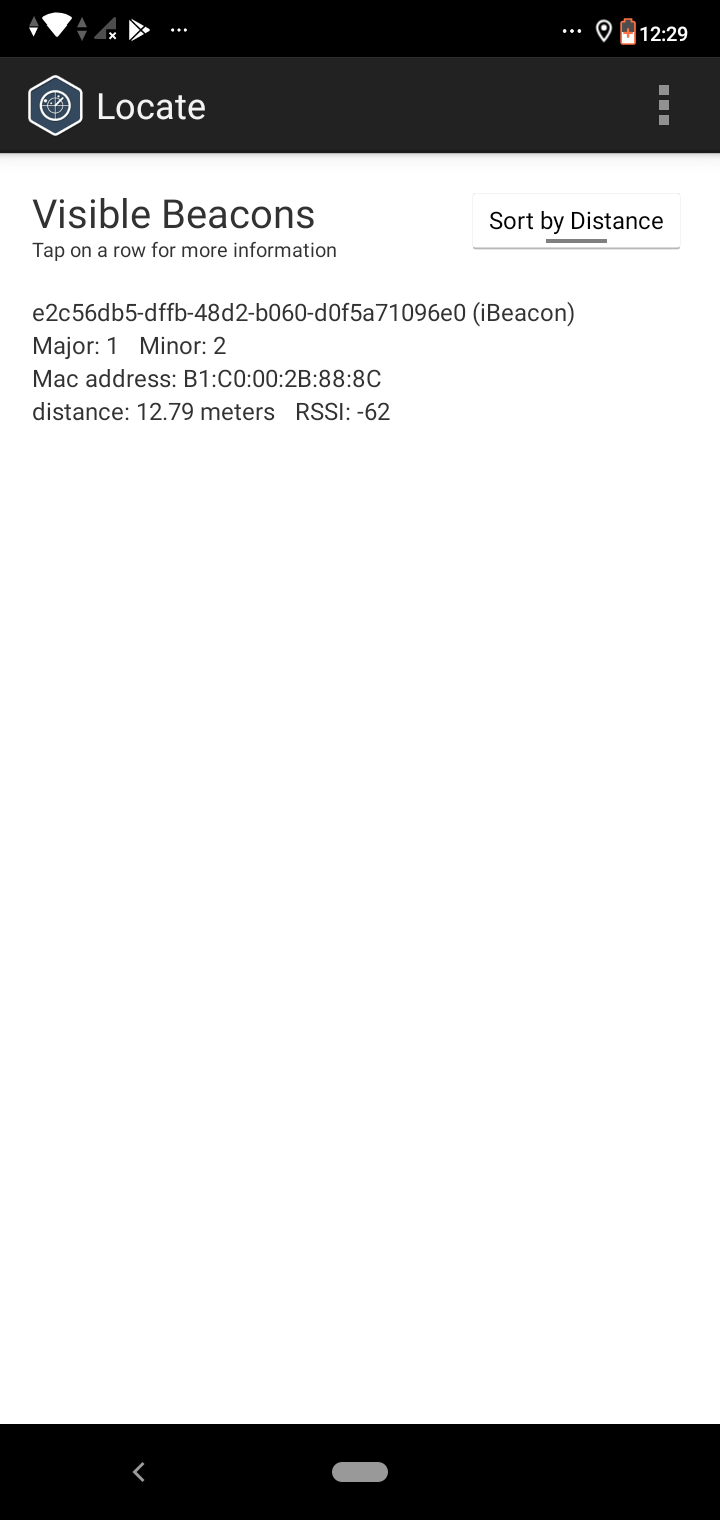
LBLEAdvertisementData.configAsIBeacon(uuid="E2C56DB5-DFFB-48D2-B060-D0F5A71096E0", major = 1, minor = 2, txPower = -40)

LBLEPeriphral = bluetooth.LBLEPeriphral()
LBLEPeriphral.begin(LBLE)
LBLEPeriphral.advertise(LBLEAdvertisementData)bluetooth.LBLEAdvertisementData()
宣告AdvertisementData
LBLEAdvertisementData.configAsIBeacon(uuid=, major=, minor=, txPower)
- E2C56DB5-DFFB-48D2-B060-D0F5A71096E0 是 iBeacon 的 UUID。這個 UUID 是應用程式要自己去生成的。在這個例子當中,我們使用了 E2C56DB5-DFFB-48D2-B060-D0F5A71096E0,這是一個在 iOS 開發套件當中的 AirLocate iBeacon 範例。有許多 iOS 的信標偵測工具,都會提供掃描這個 UUID 對應的信標的範例。
- 參數 01 跟 02 分別是所謂的 major ID 與 minor ID。這兩個 ID 的用途是讓開發者區分同一個信標應用當中的不同實體信標。比如說,使用者可能會想要在辦公室的每一間會議室當中,都放一個 LinkIt 7697 作為 iBeacon 信標,並且把 major ID 設定為樓層號碼,把 minor ID 設定為會議室編號。這樣一來,就可以透過偵測 major 與 minor ID,得知自己所在的會議室。
- 最後一個數值 -40,是代表「在距離此信標一公尺遠的範圍,測量此信標的信號強度所預期得到的dB值」,主要的目的是讓 iBeacon 掃描器的應用可以提供大概的距離估算。要注意的是,這個值只是單純的被保存在信標的廣播數據之中,它不會真的影響廣播信號的強度。開發者應該在實際環境與對應的 iBeacon 掃描器中,測量並且校正此數值應該有的大小。
LBLEPeriphral = bluetooth.LBLEPeriphral()
宣告Periphral object
LBLEPeriphral.begin(LBLE)
將設定好的LBLE ojbect帶入LBLEPeriphral
LBLEPeriphral.advertise(LBLEAdvertisementData)
定好Beacon廣播的內容之後,只需要呼叫 advertise 這個方法,就可以讓 LBLEPeripheral 類別開始廣播Beacon
即可以使用 Locate Beacon 這類的手機 iBeacon 掃描工具來掃描範例所提供的信標。下面是該手機工具的螢幕截圖:
低功耗藍牙的Perioheral裝置會提供各種服務與資料,讓Central裝置連接後進行存取。更進一步來說, 周邊裝置需要提供一個 GATT 伺服器,才能夠讓主控裝置連接。 所謂的 GATT 伺服器,是包含了一組由 服務(service)和資料特性(characteristics)共同形成的屬性(attributes)的集合。
import bluetooth
import utime

LBLE = bluetooth.LBLE()
LBLE.begin()

LBLEAdvertisementData = bluetooth.LBLEAdvertisementData()
LBLEAdvertisementData.configAsConnectableDevice(name="TwoLab Upy01")

LBLEPeriphral = bluetooth.LBLEPeriphral()
LBLEPeriphral.setName("TwoLab Upy02")

##Peripheral
ledService = bluetooth.LBLEService(uuid="19B10010-E8F2-537E-4F6C-D104768A1214")
LBLECharacteristicInt = bluetooth.LBLECharacteristicInt(uuid="19B10011-E8F2-537E-4F6C-D104768A1214", permission=(bluetooth.LBLE_READ | bluetooth.LBLE_WRITE))
switchCharacteristicStringTx = bluetooth.LBLECharacteristicString(uuid="19B10012-E8F2-537E-4F6C-D104768A1214", permission=(bluetooth.LBLE_READ | bluetooth.LBLE_WRITE))
switchCharacteristicStringRx = bluetooth.LBLECharacteristicString(uuid="19B10013-E8F2-537E-4F6C-D104768A1214", permission=bluetooth.LBLE_WRITE)
switchCharacteristicBufferTx = bluetooth.LBLECharacteristicBuffer(uuid="19B10014-E8F2-537E-4F6C-D104768A1214")

ledService.addAttribute(LBLECharacteristicInt)
ledService.addAttribute(switchCharacteristicStringTx)
ledService.addAttribute(switchCharacteristicBufferTx)
ledService.addAttribute(switchCharacteristicStringRx)

LBLEPeriphral.addService(ledService)
LBLEPeriphral.begin(LBLE)
LBLEPeriphral.advertise(LBLEAdvertisementData)

firstTimeBTWrite = True
preConnect = True
countTime = 0
import gc

while True:
    utime.sleep_ms(10)
    if preConnect != LBLEPeriphral.connected():
        preConnect = LBLEPeriphral.connected()
        print("conected=", preConnect)

    if LBLEPeriphral.connected() and firstTimeBTWrite:
        print("First write")
        firstTimeBTWrite = False
        switchCharacteristicStringTx.setValue("Hello World")
        utime.sleep(5)

    if LBLEPeriphral.connected():
        gc.collect()
        #print("men size {0}".format(gc.mem_free()))
        utime.sleep(0.5)
        countTime +=1
        #print("countTime{0}".format(countTime))
        sendWrite = "Hello World: " + str(countTime)
        print("countTime {0}".format(sendWrite))
        sendWrite += '\n'
        number = 15
        if LBLECharacteristicInt.setValue(number):
            print("Send Number")

        if switchCharacteristicStringTx.setValue(sendWrite):
            print("switchCharacteristicStringTx Event")
            LBLEPeriphral.notifyAll(switchCharacteristicStringTx)


        if switchCharacteristicStringRx.isWritten():
          wriitenText = switchCharacteristicStringRx.getValue()
          print(wriitenText)

        else:
breakLBLEAdvertisementData.configAsConnectableDevice(name="")
對於LBLE的AdvertisementData設定 name 可以在Central在搜尋附近Periphral設備時可提供辨別 名稱。
LBLEPeriphral.setName("")
提供LBLEPeriphral設定個別名稱。
bluetooth.LBLEService(uuid="19B10010-E8F2-537E-4F6C-D104768A1214")
設定Peripheral的Service UUID。這個 UUID 會被Central用於搜尋與確認服務的內容。
bluetooth.LBLECharacteristicInt(uuid="", permission=(bluetooth.LBLE_READ | bluetooth.LBLE_WRITE))
characteristics的 UUID,主控裝置可以依據此 UUID 來確認讀寫的資料內容。要注意的是,GATT 當中資料特性是沒有型別概念的,所以開發者需要自己根據服務與資料特性的定義,來解析要讀寫的資料內容。為了便於解析資料,LBLECharacteristicInt使用這個方法為整數資料傳送。
- permission:內部設定為(bluetooth.LBLE_READ | bluetooth.LBLE_WRITE)
- bluetooth.LBLE_READ:可以讀取
- bluetooth.LBLE_WRITE:可以被寫入
bluetooth.LBLECharacteristicString(uuid="", permission=(bluetooth.LBLE_READ | bluetooth.LBLE_WRITE))
LBLECharacteristicString使用這個方法為字串資料傳送
switchCharacteristicBufferTx = bluetooth.LBLECharacteristicBuffer(uuid=",permission=(bluetooth.LBLE_READ | bluetooth.LBLE_WRITE))
LBLECharacteristicString使用這個方法為bytes資料傳送
ledService.addAttribute(LBLECharacteristic)
當定義並且設定好 GATT 相關的屬性內容之後,需要建立起Service跟Characteristic之間的關聯
LBLEPeriphral.connected()
辨別是否被Central所連線上。
LBLECharacteristic.setValue()
LBLECharacteristic 這樣的資料特性類別,提供了對應的 setValue() 方法,可以直接使用這個方法來寫入資料。
LBLECharacteristic.getValue()
LBLECharacteristic 這樣的資料特性類別,提供了對應的 getValue() 方法,可以直接使用這個方法來取得Central所傳來的資料。
LBLEPeriphral.notifyAll(LBLECharacteristic)
LBLECharacteristic 這樣的資料特性類別可以直接使用這個方法來寫入資料,對於LBLECharacteristic所寫入資料完畢後,經由notifyAll擴播給Central資料已填入傳送事件。
LBLECharacteristic.isWritten():
LBLECharacteristic這樣的資料特性類別辨別是否有接到Central資料寫入。

- Pin (machine module)
- I2C (machine module)
- PWM (machine module)
- WDT (machine module)
- RTC (machine module)
- Timer (machine module)
- ADC (machine module)
- SPI (machine module)
- UART (machine module)
- BLE (Peripheral)
- LinkIt Remote
- cmath (Builtin functions)
- gc (Builtin functions)
- math (Builtin functions)
- sys (Builtin functions)
- uarray (Builtin functions)
- ubinascii (Builtin functions)
- ucollections (Builtin functions)
- uerrno (Builtin functions)
- uhashlib (Builtin functions)
- uheapq (Builtin functions)
- uio (Builtin functions)
- ujson (Builtin functions)
- uos (Builtin functions)
- ure (Builtin functions)
- uselect (Builtin functions)
- usocket (Builtin functions)
- ussl (Builtin functions)
- ustruct (Builtin functions)
- utime (Builtin functions)
- uzlib (Builtin functions)
- []