Description
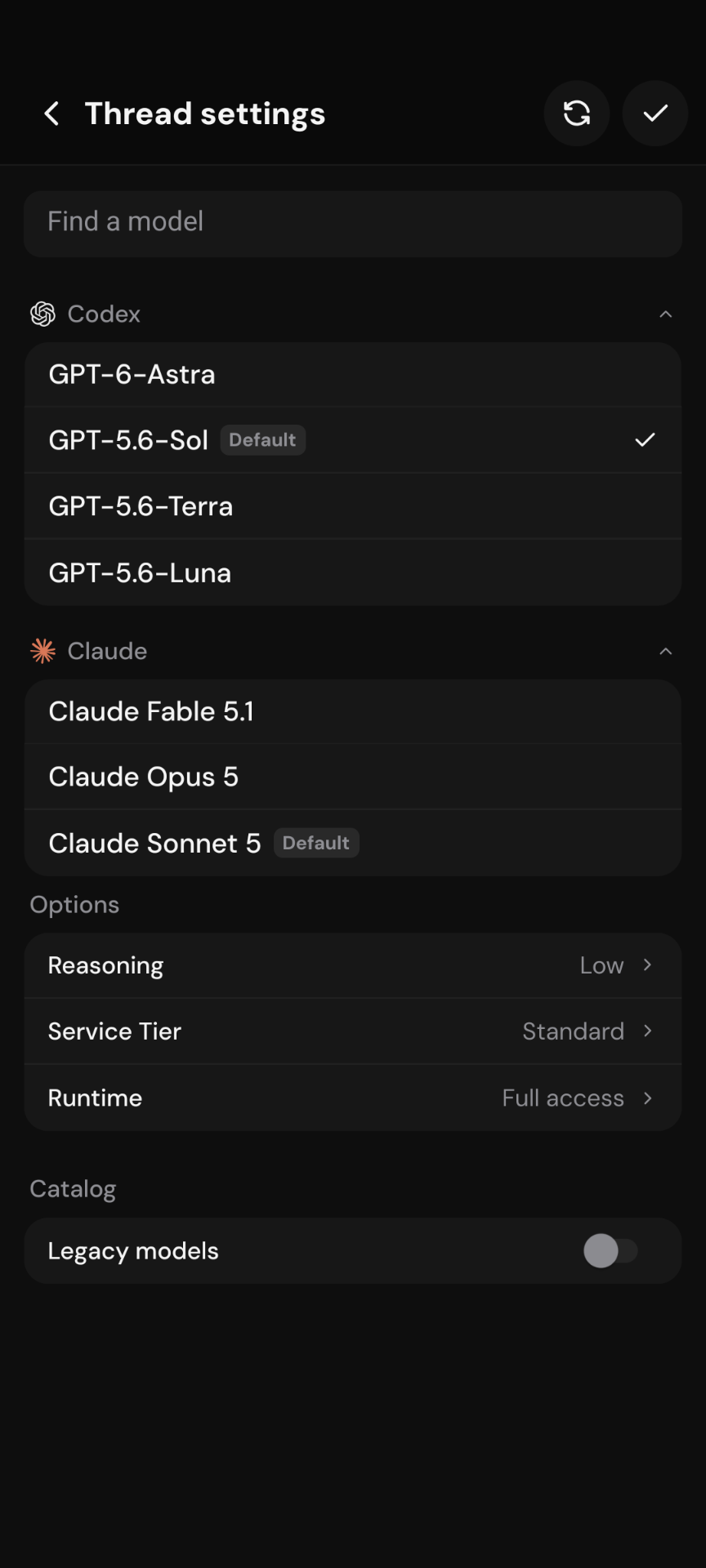
On Android, Thread settings shows models that have been hidden/disabled in T3 Desktop. Worse, one of the hidden models is selected and marked as the default.
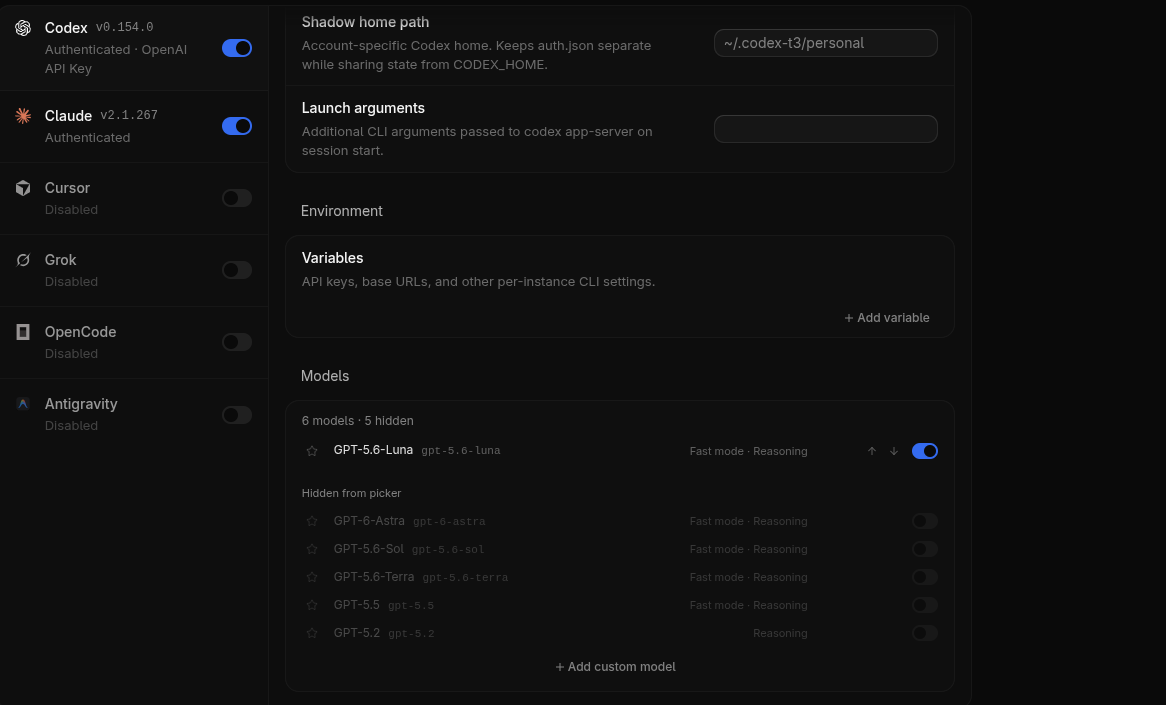
The reporter states that only GPT-6-Luna is enabled in the T3 Desktop model preferences. Android nevertheless shows the full provider catalog and can retain a model hidden on Desktop as the default.
Evidence
Android
Desktop
Steps to reproduce
- On T3 Desktop, hide/disable all but GPT-6-Luna in the Codex model preferences.
- Connect the Android app to the same T3 environment.
- Open an existing Codex thread.
- Open Thread settings.
- Expand the Codex model list.
- Observe the available models and the model marked Default.
These steps are based on the reporter's observation and supplied screenshots; they have not been independently reproduced in this report.
Actual behavior
Android shows Codex models hidden in T3 Desktop. A model hidden/disabled on Desktop is shown as the selected default on Android.
Expected behavior
- Connected clients should either share the same model visibility preferences, or mobile should provide its own model visibility controls.
- Hidden models should not appear as selectable models on Android or iOS.
- A hidden model should never be shown as the default. If the current default becomes hidden, the client should choose a valid visible fallback or require the user to select one.
Impact
Users can unknowingly configure or start threads with a model they intentionally hid/disabled on Desktop. The UI also communicates an incorrect default, which can lead to unexpected token spending when the unintended model has different usage costs.
Root cause context
T3 Desktop stores hidden models in the client-local providerModelPreferences. Mobile currently does not receive or apply that preference, so Android shows the full provider catalog. This is a T3 client-preference synchronization gap, not Codex account availability.
There are two viable product directions:
- Make model-visibility preferences environment/server-owned and synchronize them across web, desktop, Android, and iOS.
- Add model visibility configuration to mobile as well, so mobile users can manage its local picker independently.
The first option best matches users expecting Desktop and mobile connected to the same T3 environment to show the same model list.
Environment
- Client: Android app
- App version: 1.1.0
- Provider: Codex
- Desktop Codex version shown in evidence: 0.154.0
- Android version/device: Unknown
- Server/environment version: Unknown
- Reproduction frequency: Reported occurrence; frequency not yet measured
Related issues
- #9350 — closed report documenting the same Desktop/mobile hidden-model preference mismatch.
- #10902 — similar mobile Thread settings/model visibility report, but filed for iOS.
Description
On Android, Thread settings shows models that have been hidden/disabled in T3 Desktop. Worse, one of the hidden models is selected and marked as the default.
The reporter states that only GPT-6-Luna is enabled in the T3 Desktop model preferences. Android nevertheless shows the full provider catalog and can retain a model hidden on Desktop as the default.
Evidence
Android
Desktop
Steps to reproduce
These steps are based on the reporter's observation and supplied screenshots; they have not been independently reproduced in this report.
Actual behavior
Android shows Codex models hidden in T3 Desktop. A model hidden/disabled on Desktop is shown as the selected default on Android.
Expected behavior
Impact
Users can unknowingly configure or start threads with a model they intentionally hid/disabled on Desktop. The UI also communicates an incorrect default, which can lead to unexpected token spending when the unintended model has different usage costs.
Root cause context
T3 Desktop stores hidden models in the client-local
providerModelPreferences. Mobile currently does not receive or apply that preference, so Android shows the full provider catalog. This is a T3 client-preference synchronization gap, not Codex account availability.There are two viable product directions:
The first option best matches users expecting Desktop and mobile connected to the same T3 environment to show the same model list.
Environment
Related issues