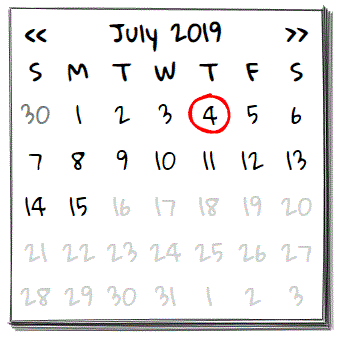
Calendar control with a hand-drawn, wireframe like, style.
For demo and view the complete set of wired-elements: wiredjs.com
Add wired-elements to your JavaScript project:
npm i wired-elements
Import module in your code:
import { WiredCalendar } from 'wired-elements/lib/wired-calendar.js';Or load directly into your HTML page:
<script type="module" src="https://unpkg.com/wired-elements/lib/wired-calendar.js?module"></script>Use it in your HTML:
<wired-calendar selected="Jul 4, 2019">
</wired-calendar>elevation - Numerical number between 1-5 (inclusive) - sets the elevation of the card. Default is 1.
selected - Optional string value that will be parsed as Date. Pre selects a date highlighted in the calendar.
firstdate - Optional string value that will be parsed as Date. Lower limit of valid dates.
lastdate - Optional string value that will be parsed as Date. Higher limit of valid dates.
locale - Optional string value to set locale used ONLY FOR RENDERING headers in calendar. Default to browser locale. Note: All internal and external dates handling are not affected by locale.
disabled - Boolean value that disables the calendar selector. Default value is false.
initials - Boolean value to use initials in weekdays names. Default value is false.
value - javascript object that contains the selected Date object and the corresponding formatted text.
format - gets/sets the javascript function to format a Date object into a formatted text.
--wired-calendar-bg Background color of the calendar. Default white.
--wired-calendar-color Calendar sketch line color. Default black.
--wired-calendar-selected-color Selected date sketch line color. Default red.
--wired-calendar-dimmed-color Font color days not belonging to calendar actual month. Default gray.
selected event fired when a date is selected by the user.
Eduardo Martinez