Credits: This project owes its existence to the foundational work of two developers. The beautiful ANSI art scripts were originally created and/or sourced by Derek Taylor (DistroTube) in his project shell-color-scripts. The collection was then ported to PowerShell by Scott McKendry as ps-color-scripts.
ColorScripts-Enhancedbuilds upon their efforts by introducing a high-performance caching system, PowerShell Cross-Platform support on Linux and Mac, an expanded command set, and a formal module structure.













A high-performance PowerShell module for displaying beautiful ANSI colorscripts in your terminal with intelligent caching for 6-19x faster load times.

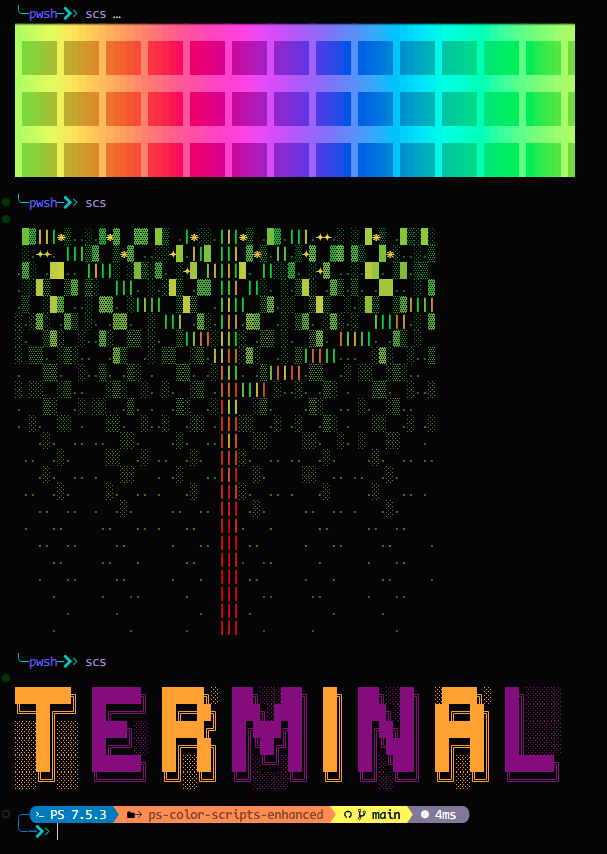
- 3156+ Colorscripts — Fractals, patterns, characters, nature scenes, and more
- 6-19x Faster — Intelligent caching drops load times to 5-20ms
- Cross-Platform — Works on Windows, macOS, and Linux
- 10 Languages — English, German, Spanish, French, Italian, Japanese, Dutch, Portuguese, Russian, Chinese
- Easy to Use — Simple commands with tab completion
# Install from PowerShell Gallery
Install-Module -Name ColorScripts-Enhanced -Scope CurrentUser

# Import and display a random colorscript
Import-Module ColorScripts-Enhanced
Show-ColorScript

# Add to your profile (optional - shows colorscript on every terminal open)
Add-ColorScriptProfile
Requires PowerShell 5.1+. PowerShell 7+ recommended for best performance.
# Show a random colorscript
Show-ColorScript
scs                          # shorthand alias

# Show a specific colorscript
Show-ColorScript -Name "mandelbrot-zoom"
scs pikachu

# List all available colorscripts
Show-ColorScript -List
Get-ColorScriptList

# Filter by category
Get-ColorScriptList -Category Patterns
Get-ColorScriptList -Tag Recommended

# Include Pokémon scripts (opt-in)
Show-ColorScript -IncludePokemon# Build cache for all scripts (recommended after install)
New-ColorScriptCache
# Rebuild cache if scripts seem stale
New-ColorScriptCache -Force
# Include Pokémon scripts when building the cache
New-ColorScriptCache -IncludePokemon
# Clear cache if needed
Clear-ColorScriptCache -AllAdd a colorscript to your terminal startup:
# Option 1: Use the built-in helper
Add-ColorScriptProfile

# Option 2: Manually edit your profile
notepad $PROFILE
# Add these lines:
Import-Module ColorScripts-Enhanced
Show-ColorScript

# Option 3: Always include Pokémon art
Add-ColorScriptProfile -IncludePokemon -SkipPokemonPrompt

# Pokémon are opt-in by default
- The module filters Pokémon colorscripts by default to keep startup lean.
- Opt in with `-IncludePokemon` on `Show-ColorScript`, `New-ColorScriptCache`, or `Add-ColorScriptProfile`.
- Direct Pokémon names always work (e.g., `Show-ColorScript -Name Pikachu`) even without `-IncludePokemon`.

# Tip: If Pokémon are filtered by default, specifying a Pokémon script by name still works (e.g., `Show-ColorScript -Name Pikachu`).
Create a custom alias:
Set-Alias -Name cs -Value Show-ColorScript| Command | Alias | Description |
|---|---|---|
Show-ColorScript |
scs |
Display a colorscript (random or by name) |
Get-ColorScriptList |
— | List available colorscripts |
New-ColorScriptCache |
— | Build cache for faster performance |
Clear-ColorScriptCache |
— | Remove cached files |
Add-ColorScriptProfile |
— | Add module to your PowerShell profile |
Get help for any command:
Get-Help Show-ColorScript -ExamplesSome colorscripts use special glyphs that require a Nerd Font. If you see boxes instead of icons:
- Download a Nerd Font (e.g., CascadiaCode, FiraCode, JetBrainsMono)
- Install the font and set it as your terminal font
- Test with:
Show-ColorScript -Name nerd-font-test
Colorscript not displaying correctly?
Show-ColorScript -Name "scriptname" -NoCacheCache seems stale?
New-ColorScriptCache -ForceModule not found?
Get-Module ColorScripts-Enhanced -ListAvailable- PowerShell: 5.1+ (7+ recommended)
- OS: Windows 10/11, macOS 10.13+, or Linux
- Terminal: Any ANSI-capable terminal (Windows Terminal, VS Code, iTerm2, etc.)
📖 User Documentation
🛠️ Developer Documentation
🤝 Contributing & Community

Built upon the work of:
- Derek Taylor (DistroTube) — Original shell-color-scripts
- Scott McKendry — PowerShell port
ANSI art sourced from 16colo.rs, ArtScene, and r/ANSIart.
Unlicense — Public domain. Do whatever you want with it.
Enjoy the colors! 🌈✨