Real-time Sub-Agent Monitoring · TUI Sidebar Visualization
Adaptive Theme Colors · Low-Saturation Design Language · EN/ZH Bilingual · Data Persistence
If you find this plugin useful, consider giving it a star ⭐ — thank you!



This project extends Hotakus/opencode-subagent-magazine with real sub-agent cancellation support.
Interested in token cache visualization? Check out opencode-visual-cache!


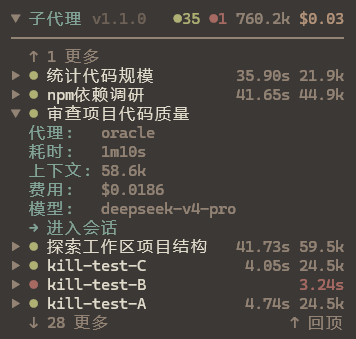
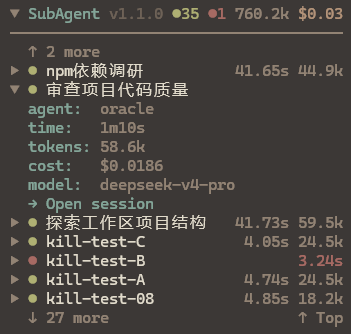
- Real-time Status: Running (breathing animation), done, error — color-coded dots at a glance
- Token & Cost Tracking: Per-sub-agent token consumption and cost summary, displayed globally in the title bar
- Expandable Details: Click to expand and view agent type, status, elapsed time, tokens, cost, model, and todo progress, with right-aligned values
- One-click Session Jump:
→ Open sessionlink in expanded view to navigate to the sub-agent's full conversation - One-click Session ID Copy: Expanded detail shows the sub-agent session ID; click
ses_xxx… ⎘to copy directly to the system clipboard (Windows/macOS/Linux) - Manual Dismiss:
- Dismiss displaybutton on the right side of expanded view to manually clear stuck/zombie entries (local UI only, does NOT cancel the real task);/subagent-clear-runningfor batch cleanup - Real Cancel: Running entries with a session ID show a red
Cancel taskbutton that calls OpenCode's real cancel API, unblocks the parent task, and showscancelledstatus - Status Field:
status: running/done/errorin expanded view, color-coded to match the status dot - Collapsible Panel: Click title bar to collapse/expand; state persists across restarts
- Scroll to Newest:
↑ Top/↓ Bottombutton jumps to the newest entries; direction adapts to sort order - Configurable Sort Order:
/subagent-ordersupports descending (newest first) and ascending (oldest first) ordering - Scroll Mode Toggle:
/subagent-scrollswitches between wheel scroll and click-to-scroll (click↑ more/↓ moreto page), resolving sidebar/global scroll conflicts - TTL Auto Cleanup: Configurable retention period (3/7/14/30 days or Never), auto-refreshed on access, expired data purged automatically
- Manual Entry Clear:
/subagent-clear-entriesremoves all records for the current session and prevents scan re-creation of historical entries - Language Support: Runtime language switch via
/subagent-lang(Chinese / English), preference persisted - Slash Commands:
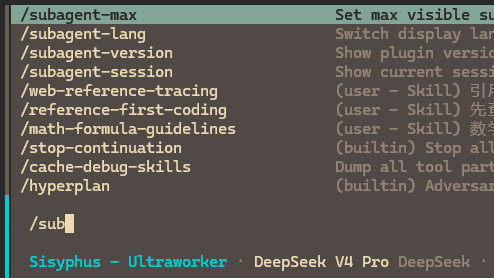
/subagent-lang,/subagent-max,/subagent-order,/subagent-scroll,/subagent-ttl,/subagent-clear-entries,/subagent-session,/subagent-version,/subagent-clear-runningfor dynamic configuration
Press Ctrl + P in OpenCode to open the command palette, search for install plugin, and enter:
opencode-subagent-control@latest
Press Enter to complete installation and configuration.
1. Install the plugin
npm install -g opencode-subagent-control@latest2. Configure the TUI plugin
# Option A: OpenCode CLI install (recommended; writes to local .opencode/)
opencode plugin opencode-subagent-control@latestNote: The
opencode plugin installcommand writes to.opencode/tui.jsonin the project directory (local scope), which takes precedence over the global~/.config/opencode/tui.jsonc.
Open any session — the SubAgent Magazine panel will appear in the sidebar.
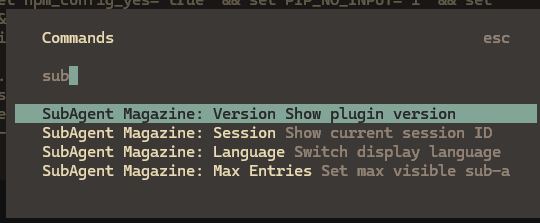
The plugin supports dynamic configuration via slash commands or the command palette (Ctrl + P). All settings take effect immediately and are persisted:
| Command | Function | Usage |
|---|---|---|
/subagent-lang |
Switch display language | Select Chinese or English from the list; takes effect instantly without restart |
/subagent-max |
Adjust max visible entries | Enter a number (default 10) to control how many sub-agent entries are shown |
/subagent-order |
Switch sort order | Choose descending (newest first) or ascending (oldest first); list re-sorts and jumps to newest |
/subagent-scroll |
Switch scroll mode | Choose wheel scroll or click-to-scroll (click ↑ more / ↓ more to page) |
/subagent-ttl |
Set data retention period | Choose 3 / 7 / 14 / 30 days or Never to control KV auto-cleanup interval |
/subagent-clear-entries |
Clear current session records | Confirms then deletes all sub-agent records, preventing scan re-creation of historical entries |
/subagent-session |
View current session ID | Displays the current OpenCode session ID |
/subagent-version |
View plugin version | Displays the current plugin version |
/subagent-clear-running |
Batch cleanup stuck entries | Marks all running entries as done in one click, cleaning up stale data |
| Action | Description |
|---|---|
| Click title bar | Collapse / Expand the panel |
| Click entry row | Expand / Collapse details |
Scroll / Click ↑ more ↓ more |
Page through entries (/subagent-scroll to toggle mode) |
Click ↑ Top / ↓ Bottom |
Jump to the newest entries (direction adapts to sort order) |
Click → Open session |
Navigate to the sub-agent's session |
Click ses_xxx… ⎘ |
One-click copy Session ID to system clipboard (Windows/macOS/Linux/SSH) |
Click - Dismiss display |
Clear the entry from the plugin display only, does NOT cancel the real task (only shown for running entries) |
Click Cancel task (red) |
Really cancel the sub-agent via session.abort, unblocks parent task (requires a session ID) |
| Color | Meaning |
|---|---|
| 🟢 Green | Done |
| 🟡 Yellow (breathing) | Running |
| 🔴 Red | Error |
| ⚪ Gray | Cancelled |
Due to OpenCode issue #6774, the plugin cache locks to the version at first install and won't auto-detect newer versions on npm.
Update steps:
1. Clear the OpenCode plugin cache
# Windows
Remove-Item -Recurse -Force "$env:USERPROFILE\.cache\opencode\packages\opencode-subagent-control@latest"# macOS / Linux
rm -rf ~/.cache/opencode/packages/opencode-subagent-control@latest2. Reinstall the plugin
In OpenCode, press Ctrl + P → install plugin → opencode-subagent-control@latest → Enter
3. Restart OpenCode
Type /subagent-lang in the TUI and select "中文" or "English" to switch instantly without restart. The preference is persisted and restored on next launch.
By default, the plugin auto-detects the system language. If it doesn't match your preference, switch once using /subagent-lang — the choice will be remembered.
The plugin is fully model-agnostic and works with all OpenCode-compatible AI models (DeepSeek / Claude / GPT, etc.). Token data and sub-agent information are obtained through the OpenCode SDK standard interfaces.
MIT
# Option B: Manually create or edit ~/.config/opencode/tui.jsonc (global config)
{
  "$schema": "https://opencode.ai/tui.json",
  "plugin": ["opencode-subagent-control@latest"]
}